# Listing all tagged fields in the tag panel
**URL:** https://community.mp3tag.de/t/listing-all-tagged-fields-in-the-tag-panel/71949
**Category:** Support
**Created:** [October 11, 2026, 5:26pm UTC](https://community.mp3tag.de/t/listing-all-tagged-fields-in-the-tag-panel/71949 "2026-10-11T17:26:58Z")
**Posts on this page:** 10
**Page:** 1
### Author:  [@7stones](https://community.mp3tag.de/u/7stones)
#### Post date: [October 11, 2026, 5:26pm UTC](https://community.mp3tag.de/t/listing-all-tagged-fields-in-the-tag-panel/71949/1 "2026-10-11T17:26:58Z")
I've often wanted a complete list of fields & values - similar to **Extended tags** - right at my editing space beside the file list & tag panel. To much delight, with the fresh v3.37-beta.2 you can now setup `_FORMAT` in the tag panel to create such list as an informational field. Thanks a lot for this new feature 👍 This is what I came up with:
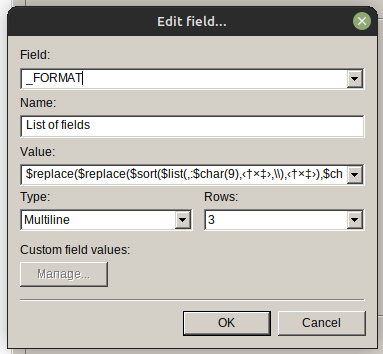
Value: `$replace($replace($sort($list(,:$char(9),‹†×‡›,\\),‹†×‡›),$char(13)$char(10),▒),‹†×‡›,$char(13)$char(10))`
I settled for 3 multiline rows for now, perhaps I'll extend that later despite the additional space it consumes.
It bugs me that I couldn't create two distinct columns of `Field` and `Value` because the length of the `Fields` varies. Tab $char(9) doesn't create a proper spacing between them. Anyone can come up with a neat trick to correct this?
---
### Author:  [@7stones](https://community.mp3tag.de/u/7stones)
#### Post date: [October 12, 2026, 11:41am UTC](https://community.mp3tag.de/t/listing-all-tagged-fields-in-the-tag-panel/71949/2 "2026-10-12T11:41:53Z")
And for those preferring a limited list of specific fields, this value could be a start:
`ALBUM:$char(9)$char(9)$meta_sep(album,\\)$char(13)$char(10)ARTIST:$char(9)$char(9)$meta_sep(artist,\\)$char(13)$char(10)COMPOSER:$char(9)$meta_sep(composer,\\)$char(13)$char(10)GENRE:$char(9)$char(9)$meta_sep(genre,\\)`
In this case there's no issue with tab spacing, since you can insert $char(9) once or twice depending on the length of the field name.
The string grows very quickly and probably works best for a smaller selection of fields.
---
### Author:  [@7stones](https://community.mp3tag.de/u/7stones)
#### Post date: [October 12, 2026, 9:26pm UTC](https://community.mp3tag.de/t/listing-all-tagged-fields-in-the-tag-panel/71949/3 "2026-10-12T21:26:30Z")
I added an extra tab after field names shorter than 7 characters by wrapping the string from my initial post in a $regexp. The new string:
`$regexp($replace($replace($sort($list(,:$char(9),‹†×‡›,\\),‹†×‡›),$char(13)$char(10),▒),‹†×‡›,$char(13)$char(10)),^(.{1,6}:$char(9)),$1$char(9))`
The columns are mostly uniform now. It's almost impossible to reach perfection since the font is proportional. Very long field names is also a "problem", but I can live with that since they are few.
So not perfect, but I'm satisfied. 🙂
---
### Author:  [@Casual\_Tea](https://community.mp3tag.de/u/Casual_Tea)
#### Post date: [October 13, 2026, 6:06pm UTC](https://community.mp3tag.de/t/listing-all-tagged-fields-in-the-tag-panel/71949/4 "2026-10-13T18:06:55Z")
This is a cool idea with a cryptic execution that made me lose quite a few hours and a bit of my sanity.
For anyone wondering:
`$char(9)` is tab,
`$char(13)` is carriage return,
`$char(10)` is linefeed
`‹†×‡›` is the delimiter
I'd personally change it up to also work with Linux style `\n` newlines and not only Windows style `\r\n` and replace `▒` with `↵` to symbolize each newline.
Like this:
`$regexp(,\r?\n,↵)`
## The monster
Here's what I've built using your solution as a starting point:
Field: `_FORMAT`
Name: `List of fields`
Value:
```auto
$regexp($regexp($regexp($regexp($regexp($sort($regexp($list(,:$repeat($char(9),4),🦖,\\),(?:(?<=^)|(?<=🦖))('['a-zA-Z_ ']'+:\t++(?='['^🦖']'{68})'['^🦖']'{67})'['^🦖']'*,$1…),🦖),(?:(?<=^)|(?<=🦖))('['a-zA-Z_ ']'+:),\U$1),\r?\n,↵),(?:(?<=^)|(?<=🦖))('['^:']'{1','31}:\t+'['^🦖']'{1','36})🦖,$1\r\n),('['^:\n']'+:)\t+('['^🦖\n']'+)🦖(?=\w),$1\r\n $2\r\n),(?|(^LYRICIST:\t{4})\t*|(^COMMENT:\t{3})\t*|(^'['A-Z_ ']'{31}:)\t*|(^'['A-Z_ ']'{24','30}:\t)\t*|(^'['A-Z_ ']'{16','23}:\t{2})\t*|(^'['A-Z_ ']'{8','16}:\t{3})\t*|(^'['A-Z_ ']'{1','7}:\t{4})\t*),$1)
```
Type: `Multiline`
Rows: `3`
I have spent entirely too much time on it and had 7 regex101 windows open at the same time at one point, but I am happy with the result.
Result (expanded to 9 rows to show more in the screenshot):
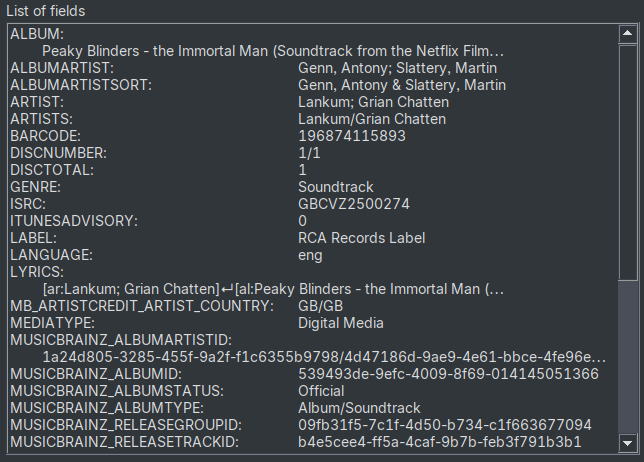
I have a fairly wide tag panel and tried to fit the tags I commonly encounter (for example the MB tags) whole. Overlong tag names or values lead to the value being inserted one line below the tag name with 8 spaces prepended (the default tabbing is too large for my taste).
The solution could be neater but sadly the Boost regex engine goes on strike when I try to use alternation in lookbehinds `(?<=^|🦖)` or lookbehinds with a range `(?<=[a-zA-Z_]{1,3})`.
If you want to use my solution but adjust it to a different width, I can point out the relevant things to change.
@Florian the `_FORMAT` field is a great addition, thank you for implementing it!
## Update:
I have tweaked the behavior further. After noticing that selecting tracks with large amounts of tag data (verbose `LYRICS` or multiple pages worth of `COMMENT`) got slowed down to lagging \>1s before the Tag Panel showed values, I decided to trim tag values early on.
Previously, `LYRICS`, `COMMENT` or any other tag with a large value were displayed in full, only replacing newlines with `↵`. Since I consider this field to be an overview, such tag values bloated the display and also tanked the performance since multiple nested regular expressions evaluated all that data repeatedly.
Now tag values are trimmed to max. 67 chars early on in the evaluation order, which has 3 effects:
1. Every tag-value pair displays in 1 or max. 2 lines, still replacing newlines with `↵`
2. Tag values exceeding the length limit are marked with an appended `…`
3. The field no longer slows the Tag Panel loading time down to a crawl
When adding this field to my father's installation, I noticed that for the newlines to be displayed on Windows, `\r\n` was needed. I incorporated a fix for that.
How well the formatting works also depends on the font that is used, results may vary depending on field name and font.
---
### Author:  [@7stones](https://community.mp3tag.de/u/7stones)
#### Post date: [October 14, 2026, 8:27pm UTC](https://community.mp3tag.de/t/listing-all-tagged-fields-in-the-tag-panel/71949/5 "2026-10-14T20:27:14Z")
Thanks for the ideas, that was an enormous effort 👍 I compared our versions side by side on my system, in two different tag panel sizes (yours is the CT one):
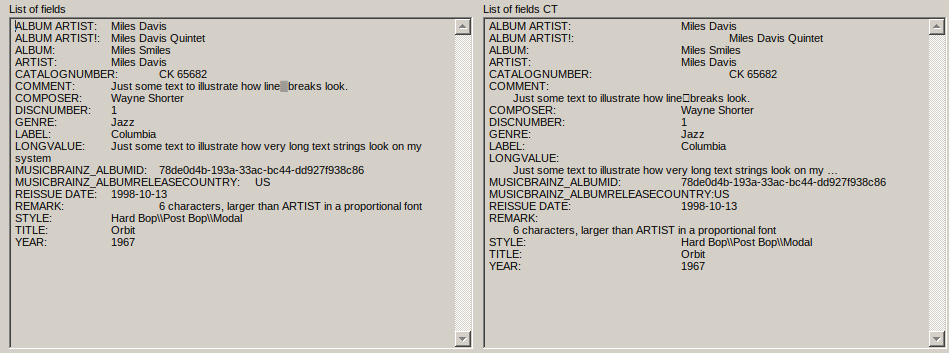
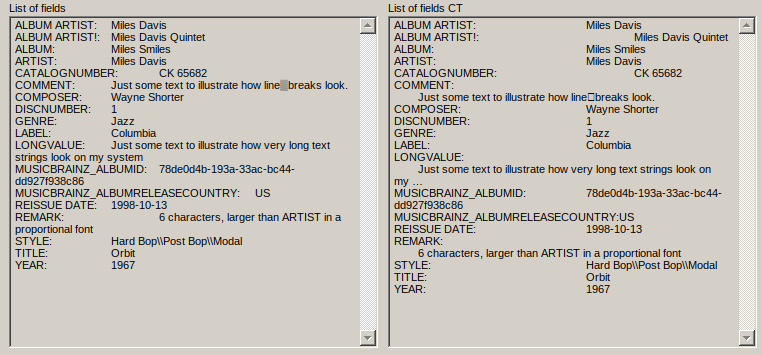
I've added some fields & remarks to illustrate the effects and some MUSICBRAINZ fields I don't normally use.
Some oddities: The ↵ character doesn't show on my Wine/Mp3tag installation (but I'm good with ▒). The 🦖 character doesn't show either, but your string works for me anyway.
Obviously there are many variables here. We have different installations, displays and tags, so end results differ.
So you got me thinking again... I like these ideas:
> [@Casual\_Tea](#):
>
> Overlong tag names or values lead to the value being inserted one line below the tag name with 8 spaces prepended
> [@Casual\_Tea](#):
>
> Now tag values are trimmed to max. 67 chars /.../
>
> 1. Every tag-value pair displays in 1 or max. 2 lines /.../
> 2. Tag values exceeding the length limit are marked with an appended `…`
Perhaps I'll incorporate these into my version. I would probably lower the 67 characters to avoid a second line altogether. Or maybe I'll try to do some edits on your version, although not sure how many hours I'd have to put into that - it's pretty darn complex 😉.
---
### Author:  [@Casual\_Tea](https://community.mp3tag.de/u/Casual_Tea)
#### Post date: [October 14, 2026, 9:21pm UTC](https://community.mp3tag.de/t/listing-all-tagged-fields-in-the-tag-panel/71949/6 "2026-10-14T21:21:58Z")
> [@7stones](#):
>
> The ↵ character doesn't show on my Wine/Mp3tag installation
You probably use a different font than I do. I use `Sarasa UI CL` to get most of the CJK symbols displayed. That also partially explains the different alignment since I suspect neither your font nor mine are monospace.
> [@7stones](#):
>
> The 🦖 character doesn't show either
The t-rex is not supposed to show up since I used it as the delimiter. It's less wordy and expensive to match against compared to `‹†×‡›` and as an added benefit, seeing it in there cheers me up every time. I also do not expect a t-rex emoji to be part of a legitimate tag.
> [@7stones](#):
>
> maybe I'll try to do some edits on your version, although not sure how many hours I'd have to put into that - it's pretty darn complex
I have broken it down into individual steps with test actions that each act on the result of the previous one to not go completely insane while changing/fixing it (and also to feed intermediary results into regex101 to test my ideas).
If you're interested, I can provide these test actions and outline what each of them is supposed to do, so you can adopt part of the behavior or have an easier time understanding the whole. I've stared at it so much in the last 2 days that I almost feel like I understand it in the one line form. Almost.
Also:
The padding for `ALBUM ARTIST!` is off in your screenshot because I don't expect (and thus match for) an `!` in the tag name, which is why it retains the default 4 tabs I used as the initial padding to then consume/reduce based on the length of the tag name.
## Breakdown
Field: `TEST1`
Format string:
```auto
$list(,:$repeat($char(9),4),🦖,\\)
```
Creates the initial tag-value list, separated by `:` and 4 tabs, tags delimited by 🦖.
Field: `TEST2`
Format string:
```auto
$sort($regexp(%test1%,(?:(?<=^)|(?<=🦖))('['a-zA-Z_ ']'+:\t++(?='['^🦖']'{68})'['^🦖']'{67})'['^🦖']'*,$1…),🦖)
```
Trims tag values that are longer than 67 chars, appends `…` when a value was trimmed and sorts the result alphabetically.
Field: `TEST3`
Format string:
```auto
$regexp(%test2%,(?:(?<=^)|(?<=🦖))('['a-zA-Z_ ']'+:),\U$1)
```
Changes the tag case to uppercase.
Field: `TEST4`
Format string:
```auto
$regexp(%test3%,\r?\n,↵)
```
Replaces both Windows and Linux style newlines in tag values with `↵`.
Field: `TEST5`
Format string:
```auto
$regexp(%test4%,(?:(?<=^)|(?<=🦖))('['^:']'{1','31}:\t+'['^🦖']'{1','36})🦖,$1\r\n)
```
Adds newlines after tag value pairs where neither the tag name exceeds 31 chars nor the tag content 36.
Field: `TEST6`
Format string:
```auto
$regexp(%test5%,('['^:\n']'+:)\t+('['^🦖\n']'+)🦖(?=\w),$1\r\n $2\r\n)
```
When tag value or name were too long, this moves the value to a new line and prepends 8 spaces.
Field: `TEST7`
Format string:
```auto
$regexp(%test6%,(?|(^LYRICIST:\t{4})\t*|(^COMMENT:\t{3})\t*|(^'['A-Z_ ']'{31}:)\t*|(^'['A-Z_ ']'{24','30}:\t)\t*|(^'['A-Z_ ']'{16','23}:\t{2})\t*|(^'['A-Z_ ']'{8','16}:\t{3})\t*|(^'['A-Z_ ']'{1','7}:\t{4})\t*),$1)
```
This handles the actual formatting/padding. Depending on the length of the tag name, the 4 initially added tab characters are partially removed to adjust the padding.
The numbers I use come from me creating test tags with `Z` (medium size uppercase) letters from 1 `Z` all the way to 31 `ZZZZZZZZZZZZZZZZZZZZZZZZZZZZZZZ`s and noting down how many tabs were required to align the tag values in Mp3tag.
This depends on the font used and can vary from tag name to tag name. `COMMENT` for example did not fit, which is why I added a specific match for it. As long as the specific case comes before the general case in the alternation, outliers can be fixed this way.
**UPDATE:**
To make it easier to maintain (and also because I noticed that `LYRICIST` also did not fit, I changed this part to use a branch reset, which makes the alternation easier to maintain as all capture groups capture to `$1`.
If you don't want to create those test actions by hand, here's my action group that contains them:
Revision:
2026-10-16 added branch reset and `LYRICIST`
[\_\_ALLFIELDS\_TESTS.mta](https://community.mp3tag.de/uploads/short-url/tK0p3m2QKIEj5e5gp9AjRYMXvDr.mta) (985 Bytes)
### Regex format string trick
Here's a trick if you want to test or change my regexes on regex101 for example:
Since `,`, `[` and `]` need to be escaped in format strings, I created these quick and dirty conversion regexes to escape/unescape regexes. I don't claim that they always work, but for the regexes I used in this case, they did as I did not use literal `[],'` in them.
[Escape for Mp3tag format string](https://regex101.com/substitution?regex=%28%5B%2C%5B%5C%5D%5D%29&testString=&flags=gm&flavor=pcre2&delimiter=%2F&substitution=%27%241%27)
[Unescape to test regex](https://regex101.com/substitution?regex=%28%3F%3C%3D%5B%2C%5B%5C%5D%5D%29%27%7C%27%28%3F%3D%5B%2C%5B%5C%5D%5D%29&testString=&flags=gm&flavor=pcre2&delimiter=%2F&substitution=)
Hopefully the breakdown as well as the reasoning for why each step was performed give others ideas what can be done with the new `_FORMAT` field.
---
### Author:  [@7stones](https://community.mp3tag.de/u/7stones)
#### Post date: [October 15, 2026, 2:46pm UTC](https://community.mp3tag.de/t/listing-all-tagged-fields-in-the-tag-panel/71949/7 "2026-10-15T14:46:30Z")
> [@Casual\_Tea](#):
>
> I use `Sarasa UI CL` to get most of the CJK symbols displayed.
> [@Casual\_Tea](#):
>
> The t-rex is not supposed to show up since I used it as the delimiter. It's less wordy and expensive to match against compared to `‹†×‡›`
The reason I don't use unicode in my scripts is that I don't like surprises when I use them on various computers. So my delimiters are always ANSI. I don't think the length of `‹†×‡›` has any impact on performance.
> [@Casual\_Tea](#):
>
> I don't expect (and thus match for) an `!` in the tag name
`ALBUM ARTIST!` is my custom field of course. I use it for the full artist name printed on the album cover, but only if it differs from my `ALBUM ARTIST` field. Think "Prince" vs "Prince & the New Power Generation". I don't use it in my server/players yet, but the data is there if I'd ever need it. Some players use `DISPLAY ALBUM ARTIST` for this purpose - hopefully that one will catch on.
> [@Casual\_Tea](#):
>
> Hopefully the breakdown as well as the reasoning for why each step was performed give others ideas what can be done with the new `_FORMAT` field.
It was very helpful for me. I can read your script and what it does now.
I'll try to find some time later this evening to put something together. I'm leaning towards simplicity - something that will be easy to adjust for various environments in the future. So will probably keep my version as the base and incorporate some of your ideas.
---
### Author:  [@7stones](https://community.mp3tag.de/u/7stones)
#### Post date: [October 16, 2026, 12:30am UTC](https://community.mp3tag.de/t/listing-all-tagged-fields-in-the-tag-panel/71949/8 "2026-10-16T00:30:26Z")
Here is my new version. I took your idea of truncating the values, but I also wanted to eliminate line breaks completely. Visually it's important to me with one field per row and straight columns, so I can focus with ease. Plus you save rows for more fields. The cleanest solution was to truncate right before the line break, but the number where this occurs depends on the font and type of text. Right now the magic string length is 48 in my current installation & tag panel size, but this number is also very easy to change in the script to fit other environments.
Also my field names are all upper case, so I don't need to correct that.
So I took my previous (slightly adjusted) version and wrapped it in an additional regex:
expression: `'(^|\n)([^\r\n]+?:\t+)([^\r\n]{48})[^\r\n]+'`
replace by: `$1$2$3…`
the whole string:
`$regexp($regexp($replace($replace($sort($list(,:$repeat($char(9),1),‹†×‡›,\\),‹†×‡›),$char(13)$char(10),▒),‹†×‡›,$char(13)$char(10)),^(.{1,6}:$char(9)),$1$char(9)),'(^|\n)([^\r\n]+?:\t+)([^\r\n]{48})[^\r\n]+',$1$2$3…)`
Then there was the problem with very long field names. I don't have many of those, and I wasn't keen on using another regex that wouldn't handle this perfectly anyway. So I opted to treat them separately by the use of abbreviations. Some may not like it, but it gives you perfect columns - and it's very easy to edit this last part of the script if/when new special cases arise.
So another wrap, this time in a simple $replace. Below is the string that I used to compare with my previous version. I added the MUSICBRAINZ fields/abbreviations only for comparison - they are not pretty, but I don't use them.
`$replace($regexp($regexp($replace($replace($sort($list(,:$repeat($char(9),1),‹†×‡›,\\),‹†×‡›),$char(13)$char(10),▒),‹†×‡›,$char(13)$char(10)),^(.{1,6}:$char(9)),$1$char(9)),'(^|\n)([^\r\n]+?:\t+)([^\r\n]{48})[^\r\n]+',$1$2$3…),CATALOGNUMBER:,CATALOGNUMB·,REMARK:,REMArK·,MUSICBRAINZ_ALBUMID:,MZ_ALBUMID·,MUSICBRAINZ_ALBUMRELEASECOUNTRY:,MZ_ALBUM R C·)`
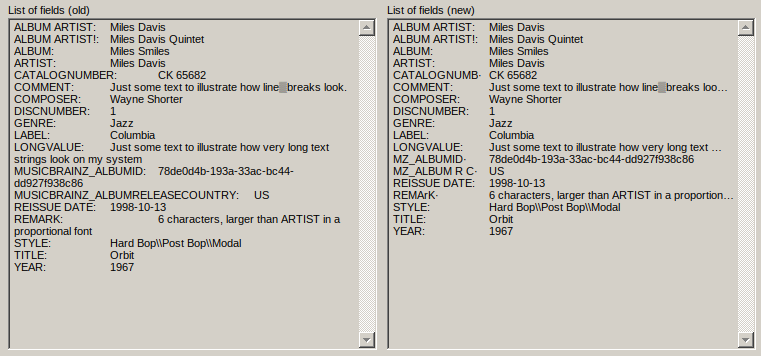
I'm fully satisfied with the handling of line breaks.
Of course I would prefer a regex that perfectly nails the handling of very long field names in all environments, but I'm also ok with the solution I have.
If anyone's interested:
- It's easy to make room for slightly longer field names. Just look for `$repeat($char(9),1)` in the script and increase tabs from 1 to 2. The downside is less space for the values.
- It's easy to adjust the truncation - just edit the {48} number to accept more or less characters. Higher numbers may lead to line breaks.
- Preferably adjust to make it fit perfectly for the smallest tag panel size you use. Then if you heighten your horizontal tag panel (to widen the fields/boxes) you won't get undesirable line breaks, only redundant space.
I'm happy with the result, but I also unticked "Solution" previously and think I'll refrain re-ticking, since some may prefer CasualTea's version.
---
### Author:  [@Casual\_Tea](https://community.mp3tag.de/u/Casual_Tea)
#### Post date: [October 16, 2026, 11:18pm UTC](https://community.mp3tag.de/t/listing-all-tagged-fields-in-the-tag-panel/71949/9 "2026-10-16T23:18:05Z")
### 1 Unicode vs. 5 ANSI
> [@7stones](#):
>
> I don't use unicode in my scripts is that I don't like surprises when I use them on various computers.
Agreed in general, but since this is an Mp3tag internal use case that works regardless of whether the user font is able to display the character/emoji, I do not see any risk here.
> [@7stones](#):
>
> I don't think the length of `‹†×‡›` has any impact on performance.
Real world impact? Probably not. But it's easier to create a negated character class `[^🦖]` to match anything but the delimiter than to do the same with `‹†×‡›` since `[^‹†×‡›]` does not match the delimiter whole and instead matches each symbol it consists of. So you have
a) 5 comparisons instead of one per character in the string and
b) 5 times the risk of the character actually being part of a legitimate tag.
Or if you use lookarounds it's more complex, verbose and often requires more comparisons as well.
### Uppercase tag names
> [@7stones](#):
>
> my field names are all upper case, so I don't need to correct that.
I thought so too, but Mp3tag automatically displays tag names as uppercase in the Extended Tags window. I was a bit surprised to see non-uppercase tag names when using `$list()`. My own rips done with dBpoweramp for example don't have uppercase tag names.
```hex
00000110 65 33 38 30 63 2d 31 25 00 00 00 54 69 74 6c 65 |e380c-1%...Title|
00000120 3d 44 61 72 6b 20 43 6c 6f 75 64 73 20 57 69 74 |=Dark Clouds Wit|
00000130 68 20 53 69 6c 76 65 72 20 4c 69 6e 69 6e 67 73 |h Silver Linings|
00000140 25 00 00 00 41 6c 62 75 6d 3d 44 61 72 6b 20 43 |%...Album=Dark C|
00000150 6c 6f 75 64 73 20 57 69 74 68 20 53 69 6c 76 65 |louds With Silve|
00000160 72 20 4c 69 6e 69 6e 67 73 09 00 00 00 44 61 74 |r Linings....Dat|
00000170 65 3d 31 39 39 35 0e 00 00 00 53 74 79 6c 65 3d |e=1995....Style=|
```
### Feedback
> [@7stones](#):
>
> Some may not like it, but it gives you perfect columns - and it's very easy to edit this last part of the script if/when new special cases arise.
The only one who has to like it is you. I also thought about using abbreviations but decided against it because I process files from many sources with a huge variety in tags (some are nightmare fuel).
I crafted my version specifically to have a one glance overview into what I'm dealing with without having to open and close the Extended Tags window each time. If exotic tags I'm about to delete aren't displayed properly, I don't care. With the alternation in my version I can align all tags that I deem useful/standard perfectly and the majority of exotic tags are displayed well enough.
> [@7stones](#):
>
> I'm fully satisfied with the handling of line breaks.
Your new version looks clean, good job!
### v2.0 and my continued descend into madness
After reviewing my [breakdown](https://community.mp3tag.de/t/listing-all-tagged-fields-in-the-tag-panel/71949/6#p-245761-breakdown-1) with a fresh head I noticed some superflous/redundant steps and also that my regexes highly depend on the result of the previous regex, making them less modular and harder to understand than I'd like.
Which _naturally_ lead to me overhauling my entire approach.
v2.0 (because of 🦕 and 🦖):
Field: `_FORMAT`
Name: `List of fields`
Value:
```auto
$replace($regexp($regexp($regexp($regexp($sort($regexp($list(🦕,:$repeat($char(9),4),🦖,\\),(?<=🦕)('['a-zA-Z_ #\d']'+:\t++(?='['^🦖']'{68})'['^🦖']'{67})'['^🦖']'*,$1…),🦖),\r?\n,↵),(?<=🦕)('['^:']'{1','31})(:\t+'['^🦖']'{1','36})(?=🦖),\U$1\E$2\r\n),(?|(?<=🦕)('['a-zA-Z_ #\d']'{32','}:)\t+('['^🦖']'+)(?=🦖)|(?<=🦕)('['a-zA-Z_ #\d']'+:)\t+('['^🦖\n']'{36','}))(?=🦖),\U$1\E\r\n $2\r\n),(?<=🦕)(?|(LYRICIST:\t{4})\t*|(COMMENT:\t{3})\t*|('['A-Z_ #\d']'{1','7}:\t{4})\t*|('['A-Z_ #\d']'{8','16}:\t{3})\t*|('['A-Z_ #\d']'{16','23}:\t{2})\t*|('['A-Z_ #\d']'{24','30}:\t)\t*|('['A-Z_ #\d']'{31}:)\t*),$1),🦕,,🦖,)
```
Type: `Multiline`
Rows: `3`
This yields 1:1 the same result as the first version I posted unless the tag name contains `0-9` or `#`, in which case this version ought to work better. I also do not notice a difference in display speed (although this version is even more verbose).
> **Breakdown v2.0**
>
> The main difference in this approach is that I didn't use a T-Rex as the sole delimiter, but instead wrapped each tag name-value pair into an opening Sauropod and a closing T-Rex, retaining this clear separation all the way to the last step, which makes reviewing intermediate results easier and also improves the flexibility of the steps. I also reordered the alternation from short to long since it technically requires fewer steps this way, but there's no way that would be noticeable. Another change is that tag names can now contain `a-zA-Z_ #\d` to allow for things like `ALBUMARTIST2` or `CATALOG #`. I might add more symbols if I encounter tags in the wild that contain them.
>
> Field: `TEST1`
> Format string:
>
> ```auto
> $list(🦕,:$repeat($char(9),4),🦖,\\)
>
> ```
>
> Creates the initial tag-value pairs, separated by `:` and 4 tabs, wrapped into 🦕 and 🦖.
>
> Field: `TEST2`
> Format string:
>
> ```auto
> $sort($regexp(%test1%,(?<=🦕)('['a-zA-Z_ #\d']'+:\t++(?='['^🦖']'{68})'['^🦖']'{67})'['^🦖']'*,$1…),🦖)
>
> ```
>
> Trims tag values that are longer than 67 chars, appends `…` when a value was trimmed and sorts the result alphabetically.
>
> Field: `TEST3`
> Format string:
>
> ```auto
> $regexp(%test2%,\r?\n,↵)
>
> ```
>
> Replaces both Windows and Linux style newlines in tag values with `↵`.
>
> Field: `TEST4`
> Format string:
>
> ```auto
> $regexp(%test3%,(?<=🦕)('['^:']'{1','31})(:\t+'['^🦖']'{1','36})(?=🦖),\U$1\E$2\r\n)
>
> ```
>
> Adds newlines after tag value pairs where neither the tag name exceeds 31 chars nor the tag content 36 and also converts the tag name case to uppercase.
>
> Field: `TEST5`
> Format string:
>
> ```auto
> $regexp(%test4%,(?|(?<=🦕)('['a-zA-Z_ #\d']'{32','}:)\t+('['^🦖']'+)(?=🦖)|(?<=🦕)('['a-zA-Z_ #\d']'+:)\t+('['^🦖\n']'{36','}))(?=🦖),\U$1\E\r\n $2\r\n)
>
> ```
>
> When tag value or name exceed the length limits, this moves the value to a new line, prepends 8 spaces and also converts the tag name case to uppercase.
>
> Field: `TEST6`
> Format string:
>
> ```auto
> $regexp(%test5%,(?<=🦕)(?|(LYRICIST:\t{4})\t*|(COMMENT:\t{3})\t*|('['A-Z_ #\d']'{1','7}:\t{4})\t*|('['A-Z_ #\d']'{8','16}:\t{3})\t*|('['A-Z_ #\d']'{16','23}:\t{2})\t*|('['A-Z_ #\d']'{24','30}:\t)\t*|('['A-Z_ #\d']'{31}:)\t*),$1)
>
> ```
>
> This handles the actual formatting/padding. Depending on the length of the tag name, the 4 initially added tab characters are partially removed to adjust the padding.
>
> The numbers I use come from me creating test tags with `Z` (medium size uppercase) letters from 1 `Z` all the way to 31 `ZZZZZZZZZZZZZZZZZZZZZZZZZZZZZZZ`s and noting down how many tabs were required to align the tag values in Mp3tag.
> This depends on the font used and can vary from tag name to tag name. `COMMENT` for example did not fit, which is why I added a specific match for it. As long as the specific case comes before the general case in the alternation, outliers can be fixed this way.
>
> Field: `TEST7`
> Format string:
>
> ```auto
> $replace(%test6%,🦕,,🦖,)
>
> ```
>
> This removes the opening Sauropod and the closing T-Rex at last.
>
> Test actions for v2.0. Rename it if you want to keep/compare both version.
> [\_\_ALLFIELDS\_TESTS.mta](https://community.mp3tag.de/uploads/short-url/zYA4AyKp2Dyg02HgLzEN6tuYxU5.mta) (1.1 KB)
### Additional idea while writing this
Instead of showing all tags, yet another regex could be used to filter out tag-value pairs that are already present as normal fields in the tag panel (title, artist, album, year etc.). That way instead of showing all tags, it could only display "invisible" (without opening the Extended Tags window) tags.
Perhaps I'll try that another day. Sadly I'm out of dinosaur emojis for a v3.0.
---
### Author:  [@Casual\_Tea](https://community.mp3tag.de/u/Casual_Tea)
#### Post date: [October 18, 2026, 12:05pm UTC](https://community.mp3tag.de/t/listing-all-tagged-fields-in-the-tag-panel/71949/10 "2026-10-18T12:05:42Z")
# Listing only hidden fields in the tag panel
Perhaps this is also a solution for [this thread](https://community.mp3tag.de/t/remaining-metadata-in-tag-panel/71908/14).
Field: `_FORMAT`
Name: `List of hidden fields`
Value:
```x
$replace($regexp($regexp($regexp($regexp($sort($regexp($regexp($list(🦕,:$repeat($char(9),4),🦖,\\),🦕(?:album(?:artistsort|artists?|sort)?|artist(?:sort|s)?|barcode|catalognumber|co(?:mment|mposer|pyright)|description|dis(?:ambiguation|cnumber|csubtitle|ctotal)|genre|isrc|label|lyricist|mediatype|mb_artistcredit_artist_country|musicbrainz_(?:(?:album(?:artistid|id|releasecountry|status|type))|artistid|release(?:groupid|trackid)|trackid)|originalyear|publisher|setsubtitle|title|track(?:total)?|version|year):\t'['^🦖']'+🦖,,1),(?<=🦕)('['a-zA-Z_ #\d']'+:\t++(?='['^🦖']'{68})'['^🦖']'{67})'['^🦖']'*,$1…),🦖),\r?\n,↵),(?<=🦕)('['^:']'{1','31})(:\t+'['^🦖']'{1','36})(?=🦖),\U$1\E$2\r\n),(?|(?<=🦕)('['a-zA-Z_ #\d']'{32','}:)\t+('['^🦖']'+)(?=🦖)|(?<=🦕)('['a-zA-Z_ #\d']'+:)\t+('['^🦖\n']'{36','}))(?=🦖),\U$1\E\r\n $2\r\n),(?<=🦕)(?|('['A-Z_ #\d']'{1','7}:\t{4})\t*|('['A-Z_ #\d']'{8','16}:\t{3})\t*|('['A-Z_ #\d']'{16','23}:\t{2})\t*|('['A-Z_ #\d']'{24','30}:\t)\t*|('['A-Z_ #\d']'{31}:)\t*),$1),🦕,,🦖,)
```
Type: `Multiline`
Rows: `4`
## Breakdown
Field: `TEST1`
Format string:
```x
$list(🦕,:$repeat($char(9),4),🦖,\\)
```
Creates the initial tag-value pairs, separated by `:` and 4 tabs, wrapped into `🦕` and `🦖`.
Field: `TEST2`
Format string:
```x
$regexp(%test1%,🦕(?:album(?:artistsort|artists?|sort)?|artist(?:sort|s)?|barcode|catalognumber|co(?:mment|mposer|pyright)|description|dis(?:ambiguation|cnumber|csubtitle|ctotal)|genre|isrc|label|lyricist|mediatype|mb_artistcredit_artist_country|musicbrainz_(?:(?:album(?:artistid|id|releasecountry|status|type))|artistid|release(?:groupid|trackid)|trackid)|originalyear|publisher|setsubtitle|title|track(?:total)?|version|year):\t'['^🦖']'+🦖,,1)
```
This is the filter and the main difference to [v2.0](https://community.mp3tag.de/t/listing-all-tagged-fields-in-the-tag-panel/71949/9#p-245814-v20-and-my-continued-descend-into-madness-4). You need to add all tag names that you have as fields in your tag panel in the alternation so they get removed from the `_FORMAT` field.
Example:
When you only have `TITLE`, `ALBUM`, `ARTIST` and `YEAR` in your tag panel,
```x
$regexp(%test1%,🦕(?:title|album|artist|year):\t'['^🦖']'+🦖,,1)
```
would be correct. This regex is case insensitive so it doesn't matter if you use `ALBUM` or `Album` or `album`.
You can also use this filter to hide tags you don't need/want to see. An example would be ReplayGain tags if your workflow includes a step that ensures they are always populated.
Field: `TEST3`
Format string:
```x
$sort($regexp(%test2%,(?<=🦕)('['a-zA-Z_ #\d']'+:\t++(?='['^🦖']'{68})'['^🦖']'{67})'['^🦖']'*,$1…),🦖)
```
Trims tag values that are longer than 67 chars, appends `…` when a value was trimmed and sorts the result alphabetically.
Field: `TEST4`
Format string:
```x
$regexp(%test3%,\r?\n,↵)
```
Replaces both Windows and Linux style newlines in tag values with `↵`.
Field: `TEST5`
Format string:
```x
$regexp(%test4%,(?<=🦕)('['^:']'{1','31})(:\t+'['^🦖']'{1','36})(?=🦖),\U$1\E$2\r\n)
```
Adds newlines after tag value pairs where neither the tag name exceeds 31 chars nor the tag content 36 and also converts the tag name case to uppercase.
Field: `TEST6`
Format string:
```x
$regexp(%test5%,(?|(?<=🦕)('['a-zA-Z_ #\d']'{32','}:)\t+('['^🦖']'+)(?=🦖)|(?<=🦕)('['a-zA-Z_ #\d']'+:)\t+('['^🦖\n']'{36','}))(?=🦖),\U$1\E\r\n $2\r\n)
```
When tag value or name exceed the length limits, this moves the value to a new line, prepends 8 spaces and also converts the tag name case to uppercase.
Field: `TEST7`
Format string:
```x
$regexp(%test6%,(?<=🦕)(?|('['A-Z_ #\d']'{1','7}:\t{4})\t*|('['A-Z_ #\d']'{8','16}:\t{3})\t*|('['A-Z_ #\d']'{16','23}:\t{2})\t*|('['A-Z_ #\d']'{24','30}:\t)\t*|('['A-Z_ #\d']'{31}:)\t*),$1)
```
This handles the actual formatting/padding. Depending on the length of the tag name, the 4 initially added tab characters are partially removed to adjust the padding.
The numbers I use come from me creating test tags with `Z` (medium size uppercase) letters from 1 `Z` all the way to 31 `ZZZZZZZZZZZZZZZZZZZZZZZZZZZZZZZ`s and noting down how many tabs were required to align the tag values in Mp3tag.
This depends on the font used and can vary from tag name to tag name. You can add specific cases before the general cases in the alternation to handle outliers.
Field: `TEST7`
Format string:
```x
$replace(%test6%,🦕,,🦖,)
```
This removes the opening Sauropod and the closing T-Rex at last.
Test actions for the hidden fields only version:
[\_\_HIDDEN\_FIELDS\_TESTS.mta](https://community.mp3tag.de/uploads/short-url/3eKsjMvb2USSvfLZIESKpEjeMst.mta) (1.6 KB)
And for people who are only interested in this version, here's a repeat of the regex formatting tricks:
### Regex format string trick
Here's a trick if you want to test or change my regexes on regex101 for example:
Since `,`, `[` and `]` need to be escaped in format strings, I created these quick and dirty conversion regexes to escape/unescape regexes. I don't claim that they always work, but for the regexes I used in this case, they did as I did not use literal `[],'` in them.
[Escape for Mp3tag format string](https://regex101.com/substitution?regex=%28%5B%2C%5B%5C%5D%5D%29&testString=&flags=gm&flavor=pcre2&delimiter=%2F&substitution=%27%241%27)
[Unescape to test regex](https://regex101.com/substitution?regex=%28%3F%3C%3D%5B%2C%5B%5C%5D%5D%29%27%7C%27%28%3F%3D%5B%2C%5B%5C%5D%5D%29&testString=&flags=gm&flavor=pcre2&delimiter=%2F&substitution=)