# Missing Savebutton in the program for Imac
**URL:** https://community.mp3tag.de/t/missing-savebutton-in-the-program-for-imac/71899
**Category:** Mac
**Created:** [October 1, 2026, 9:06am UTC](https://community.mp3tag.de/t/missing-savebutton-in-the-program-for-imac/71899 "2026-10-01T09:06:45Z")
**Posts on this page:** 3
**Page:** 1
### Author:  [@Rob47](https://community.mp3tag.de/u/Rob47)
#### Post date: [October 1, 2026, 9:06am UTC](https://community.mp3tag.de/t/missing-savebutton-in-the-program-for-imac/71899/1 "2026-10-01T09:06:45Z")
I don't see a button to save in the program
---
### Author:  [@ohrenkino](https://community.mp3tag.de/u/ohrenkino)
#### Post date: [October 1, 2026, 9:20am UTC](https://community.mp3tag.de/t/missing-savebutton-in-the-program-for-imac/71899/2 "2026-10-01T09:20:44Z")
See e.g. here:
> [@How to you save changes in MP3 Tag](https://community.mp3tag.de/t/how-to-you-save-changes-in-mp3-tag/58453):
>
> Hi, I bought the MP3Tag app yesterday via the App Store (version 1.6.1) I can't seem to save any changes that I am making to my music files and was wondering if you can tell me how to do this. The downward arrow "save" tab in the tab bar (just above the word "Filename") is greyed out and so it won't let me save any changes that I have made to the music files. Are you able to please help on this? Thanks Will
---
### Author:  [@Florian](https://community.mp3tag.de/u/Florian)
#### Post date: [October 1, 2026, 7:14pm UTC](https://community.mp3tag.de/t/missing-savebutton-in-the-program-for-imac/71899/3 "2026-10-01T19:14:30Z")
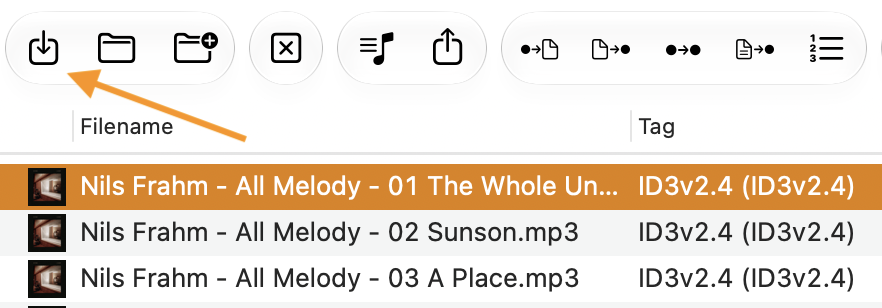
It's the leftmost button on the toolbar: