# Moving text inside \[ \]
**URL:** https://community.mp3tag.de/t/moving-text-inside/11524
**Category:** Support
**Created:** [January 31, 2011, 6:26pm UTC](https://community.mp3tag.de/t/moving-text-inside/11524 "2011-01-31T18:26:17Z")
**Posts on this page:** 12
**Page:** 1
### Author:  [@djphatic](https://community.mp3tag.de/u/djphatic)
#### Post date: [January 31, 2011, 6:26pm UTC](https://community.mp3tag.de/t/moving-text-inside/11524/1 "2011-01-31T18:26:17Z")
I cannot appear to get this to work, ive tried adapting the other regex expressions I have found on here and a very similar one which uses () but I cannot get it to work with [].
Heres what I am trying to achieve:
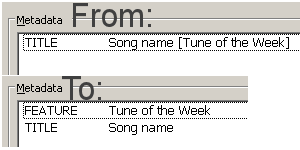
TITLE - Song name [Tune of the Week]
I would like to move the text in the [] out of the TITLE tag and move to a new tag called FEATURE. The [] and the text in the TITLE would then be removed.
I have tried using a very similar Guess Values action which I use to remove (Disc #) from MusicBrainz album tags and populate the DISCNUMBER tag but this doesnt work:
Source format: %feature%$regexp(%title%,(._) [(._)],$2+++$1)
Guessing pattern: %feature%+++%title%
---
### Author:  [@DetlevD](https://community.mp3tag.de/u/DetlevD)
#### Post date: [January 31, 2011, 6:34pm UTC](https://community.mp3tag.de/t/moving-text-inside/11524/2 "2011-01-31T18:34:25Z")
> [@djphatic](#):
>
> ...
> TITLE - Song name [Tune of the Week]
> I would like to move the text in the out of the TITLE tag and move to a new tag called FEATURE. The and the text in the TITLE would then be removed....
Begin Action Group **Test 2011#20110131.djphatic.Guess**
Action #1
_Actiontype 7:_ **Import tag fields (guess values)**
_Source format:_ **%TITLE%**
_Guessing pattern:_ **%TITLE%÷[%FEATURE%]**
_Note: Replace each special ÷ character with one space character._
End Action Group **Test 2011#20110131.djphatic.Guess** (1 Action)
DD.20110131.2034.CET
> [@djphatic](#):
>
> ... the text in the TITLE would then be removed....
???
Action #2
_Actiontype 9:_ **Remove fields**
_Fields to remove (semicolon separated):_ **TITLE**
DD.20110131.2046.CET
---
### Author:  [@djphatic](https://community.mp3tag.de/u/djphatic)
#### Post date: [February 1, 2011, 7:05am UTC](https://community.mp3tag.de/t/moving-text-inside/11524/3 "2011-02-01T07:05:48Z")
> [@DetlevD](#):
>
> Begin Action Group **Test 2011#20110131.djphatic.Guess**
>
> Action #1
> _Actiontype 7:_ **Import tag fields (guess values)**
> _Source format:_ **%TITLE%**
> _Guessing pattern:_ **%TITLE%÷[%FEATURE%]**
>
>
>
> _Note: Replace each special ÷ character with one space character._
> End Action Group **Test 2011#20110131.djphatic.Guess** (1 Action)
>
>
>
> DD.20110131.2034.CET
>
>
>
> ???
>
>
>
> Action #2
> _Actiontype 9:_ **Remove fields**
> _Fields to remove (semicolon separated):_ **TITLE**
>
>
>
> DD.20110131.2046.CET
Hi
This doesnt work for me.
With regards to removing the text from the TITLE tag I mean:
TITLE - Song name [Tune of the Week]
to
TITLE - Song name
FEATURE - Tune of the Week
---
### Author:  [@ohrenkino](https://community.mp3tag.de/u/ohrenkino)
#### Post date: [February 1, 2011, 8:57am UTC](https://community.mp3tag.de/t/moving-text-inside/11524/4 "2011-02-01T08:57:15Z")
> [@djphatic](#):
>
> TITLE - Song name
After you have "guessed" the value and title still has the square brackets you could add an action that (with just an ordinary "replace") replaces the square brackets with nothing.
If you are sure that always the same remainder can be found you may do this with one action like
Replace
Search string "[]" (leave out the quotation marks)
Replace string "" (leave out the quotation marks = nothing)
Or replace one bracket after the other and then also add an action for title to trim the trailing spaces:
Format tag field Title
String: $trim(%title%)
---
### Author:  [@DetlevD](https://community.mp3tag.de/u/DetlevD)
#### Post date: [February 1, 2011, 9:43am UTC](https://community.mp3tag.de/t/moving-text-inside/11524/5 "2011-02-01T09:43:40Z")
> [@djphatic](#):
>
> Hi This doesnt work for me.
> With regards to removing the text from the TITLE tag I mean:
> TITLE - Song name [Tune of the Week]
> to
> TITLE - Song name
> FEATURE - Tune of the Week
Should work, it is one of the simplest things you can do in Mp3tag, see FAQ area and thousands of user requests in the forum of nearly the same problem.
Try again Action #1 as described!
DD.20110201.1144.CET

---
### Author:  [@djphatic](https://community.mp3tag.de/u/djphatic)
#### Post date: [February 1, 2011, 6:16pm UTC](https://community.mp3tag.de/t/moving-text-inside/11524/6 "2011-02-01T18:16:24Z")
> [@DetlevD](#):
>
> Should work, it is one of the simplest things you can do in Mp3tag, see FAQ area and thousands of user requests in the forum of nearly the same problem.
> Try again Action #1 as described!
> 
>
> DD.20110201.1144.CET
Managed to get it to work, the problem was I had used TITLE in the Source format rather than %title%.
---
### Author:  [@DetlevD](https://community.mp3tag.de/u/DetlevD)
#### Post date: [February 1, 2011, 7:10pm UTC](https://community.mp3tag.de/t/moving-text-inside/11524/7 "2011-02-01T19:10:31Z")
> [@djphatic](#):
>
> Managed to get it to work, the problem was I had used TITLE in the Source format rather than %title%.
Yes, there is a learning curve how to differentiate between the tag-field name and the tag-field content.
If you want to use the content of a tag-field, then you have to enclose the tag-field name by a pair of percent signs, which work as "content operators".
DD.20110201.2110.CET
---
### Author:  [@thelordsmurf](https://community.mp3tag.de/u/thelordsmurf)
#### Post date: [February 13, 2011, 5:23am UTC](https://community.mp3tag.de/t/moving-text-inside/11524/8 "2011-02-13T05:23:41Z")
A quick variation of this that I couldn't figure out. I have tracks with the title field being:
Song Title [Feat. Second Artist]
After Mp3Tag made a big deal about ALBUMARTIST vs. ARTIST and all that jazz, and keeping the TITLE clean, I figure I want to move the [Feat. Second Artist] part to the end of the ARTIST, so I want to start with:
ARTIST = First Artist
TITLE = Song Title [Feat. Second Artist]
and go to:
ALBUMARTIST = First Artist
ARTIST = First Artist [Feat. Second Artist]
TITLE = Song Title
Thoughts on how to make that happen in one step?
Thanks!
---
### Author:  [@DetlevD](https://community.mp3tag.de/u/DetlevD)
#### Post date: [February 13, 2011, 6:38am UTC](https://community.mp3tag.de/t/moving-text-inside/11524/9 "2011-02-13T06:38:06Z")
> [@thelordsmurf](#):
>
> ...
> A quick variation of this that I couldn't figure out. I have tracks with the title field being:
> Song Title [Feat. Second Artist] ... I want to start with:
> ARTIST = First Artist
> TITLE = Song Title [Feat. Second Artist]
> and go to:
> ALBUMARTIST = First Artist
> ARTIST = First Artist [Feat. Second Artist]
> TITLE = Song Title
> Thoughts on how to make that happen in one step?Thanks!
What is more important for you?
- "... to make that happen in one step"?
- "... to make that happen?
Be aware, that a complicated looking task can mostly be solved by single steps.
Mp3tag supports this strategy by so called action modules, so that nobody needs to solve their tasks in a one step go.
You can find answers and examples for your problem in this thread and in the FAQ area of the forum.
DD.20110213.0840.CET
---
### Author:  [@thelordsmurf](https://community.mp3tag.de/u/thelordsmurf)
#### Post date: [February 13, 2011, 7:34am UTC](https://community.mp3tag.de/t/moving-text-inside/11524/10 "2011-02-13T07:34:33Z")
> [@DetlevD](#):
>
> What is more important for you?
>
> - "... to make that happen in one step"?
> - "... to make that happen?
>
> Be aware, that a complicated looking task can mostly be solved by single steps.
> Mp3tag supports this strategy by so called action modules, so that nobody needs to solve their tasks in a one step go.
>
> You can find answers and examples for your problem in this thread and in the FAQ area of the forum.
>
> DD.20110213.0840.CET
It would be nice if I could run a single action (even if it had nested subactions in there) so that I could process a whole bunch of files at once.
Any hints on the single steps? I'm not an expert at regexp and my Mp3Tag actions so far have been pretty simple.
---
### Author:  [@DetlevD](https://community.mp3tag.de/u/DetlevD)
#### Post date: [February 13, 2011, 7:58am UTC](https://community.mp3tag.de/t/moving-text-inside/11524/11 "2011-02-13T07:58:58Z")
> [@thelordsmurf](#):
>
> It would be nice if I could run a single action (even if it had nested subactions in there) so that I could process a whole bunch of files at once. Any hints on the single steps? I'm not an expert at regexp and my Mp3Tag actions so far have been pretty simple.
As I said ... you can find simple answers and simple strategies in the FAQ area for such basic questions and overall in the forum threads too.
At last you can build an actiongroup which would look like this ...
Begin Action Group **Test 2011#20110213.thelordsmurf.guess**
Action #1
_Actiontype 5:_ **Format value**
_Field:_ **ALBUMARTIST**
_Formatstring:_ **%ARTIST%**
Action #2
_Actiontype 7:_ **Import tag fields (guess values)**
_Source format:_ **%TITLE%**
_Guessing pattern:_ **%DUMMY%÷[%TITLE2%]**
Action #3
_Actiontype 7:_ **Import tag fields (guess values)**
_Source format:_ **%TITLE%**
_Guessing pattern:_ **%TITLE%÷[%DUMMY%]**
Action #4
_Actiontype 5:_ **Format value**
_Field:_ **ARTIST**
_Formatstring:_ **%ARTIST%÷'['%TITLE2%']'**
Action #5
_Actiontype 9:_ **Remove fields**
_Fields to remove (semicolon separated):_ **TITLE2**
_Note: Replace each special ÷ character with one space character._
End Action Group **Test 2011#20110213.thelordsmurf.guess** (5 Actions)
DD.20110213.1000.CET
---
### Author:  [@system](https://community.mp3tag.de/u/system)
#### Post date: [February 9, 2026, 12:22pm UTC](https://community.mp3tag.de/t/moving-text-inside/11524/12 "2026-02-09T12:22:52Z")