# Mp3Tag & Album Art Downloader Tut
**URL:** https://community.mp3tag.de/t/mp3tag-album-art-downloader-tut/11489
**Category:** General Discussion
**Created:** [January 23, 2011, 3:20pm UTC](https://community.mp3tag.de/t/mp3tag-album-art-downloader-tut/11489 "2011-01-23T15:20:05Z")
**Posts on this page:** 20
**Page:** 1
### Author:  [@g.p.m](https://community.mp3tag.de/u/g.p.m)
#### Post date: [January 23, 2011, 3:20pm UTC](https://community.mp3tag.de/t/mp3tag-album-art-downloader-tut/11489/1 "2011-01-23T15:20:05Z")
After working hours to find my almost perfect solution to pick up album art and include it into my mp3 files I decided to make up a little tutorial how I did it. (Deutsche Version [hier](https://community.mp3tag.de/t/11829/1))
Because I'm really noob this maybe can be refined by others with more knowledge than me.
What you need:
Mp3Tag - latest version can be found [here](https://www.mp3tag.de/en/download.html).
Album Art Downloader - latest version can be found [here](https://sourceforge.net/projects/album-art/).
Install both progs. For Album Art Downloader it may be required also to install the MS .NET Framework 3.5 SP1 (except for Windows 7). During install choose your appropriate scripts for searching album art. Never mind to install all, you can choose later which of them you want to use.
Run AAD, leave all settings as is.
Open "File" -\> "New" -\> "Search Window..." click on Options.
😃
---
### Author:  [@pone](https://community.mp3tag.de/u/pone)
#### Post date: [January 23, 2011, 8:42pm UTC](https://community.mp3tag.de/t/mp3tag-album-art-downloader-tut/11489/2 "2011-01-23T20:42:10Z")
See also dano's new tool Mp3tag Cover Preview.
[/t/11341/1](https://community.mp3tag.de/t/11341/1)
Can also be started as a tool in Mp3tag, with different parameters which start the different web sources in Mp3tag with a preview in the tool. Works great.
A simple web source without preview:
[/t/11166/1](https://community.mp3tag.de/t/11166/1)
A trick to import cover art which is already stored at your folders but with different names:
1. Step:
Go to: File \> Options \> Tags. In the field "Restrict incoming files to:" add _.jpg_ _(or/and_ _.gif , \*.bmp_ , whatever you need). When you now load a directory into Mp3tag, jpg files are also listed.
2. Step:
Use the Filter (F3) with
_%\_extension% IS jpg_
or
_%\_extension% MATCHES (jpg|jpeg|png|gif|bmp)_
3. Step:
Use the Tag - Filename Converter with:
_%\_directory%_
or
_folder
cover
whatever_
4. Step:
Now you can import all you all your images with the standard Import Cover From File action. Use:
_%\_directory%.jpg_
or
_folder.jpg
cover.jpg
whatever.jpg_
---
### Author:  [@g.p.m](https://community.mp3tag.de/u/g.p.m)
#### Post date: [January 23, 2011, 11:07pm UTC](https://community.mp3tag.de/t/mp3tag-album-art-downloader-tut/11489/3 "2011-01-23T23:07:23Z")
> [@pone](#):
>
> See also dano's new tool Mp3tag Cover Preview.
> [/t/11341/1](https://community.mp3tag.de/t/11341/1)
> Can also be started as a tool in Mp3tag, with different parameters which start the different web sources in Mp3tag with a preview in the tool. Works great.
I'm sorry, but this didn't work for me. ☹ So I'd to find my own solution.
I would appreciate the Mp3Tag Cover Preview rather than using extern progs but I can't get it to run properly. It ever only shows me an empty window.
Also bothering is that the (empty) window is always in foreground which is really annoying.
---
### Author:  [@icon123](https://community.mp3tag.de/u/icon123)
#### Post date: [January 27, 2011, 7:49pm UTC](https://community.mp3tag.de/t/mp3tag-album-art-downloader-tut/11489/4 "2011-01-27T19:49:32Z")
I just register to tell you THANKS!!!
This is exactly what I was looking for. Thanks again for sharing!
---
### Author:  [@wisko](https://community.mp3tag.de/u/wisko)
#### Post date: [July 23, 2011, 3:03pm UTC](https://community.mp3tag.de/t/mp3tag-album-art-downloader-tut/11489/5 "2011-07-23T15:03:48Z")
hi g.p.m.
i did the complete process as you were told here. but the problem is i dont get any search results from AAD other than what it found from the local folder.
what could it be the cause for this..
need your help...

---
### Author:  [@rungumprun](https://community.mp3tag.de/u/rungumprun)
#### Post date: [July 28, 2011, 7:31pm UTC](https://community.mp3tag.de/t/mp3tag-album-art-downloader-tut/11489/6 "2011-07-28T19:31:22Z")
I just installed AAD as a tool and it works just fine. If AAD launched then it's not an issue within Mp3tag. I suggest you look at your AAD settings, and confirm you have a good internet connection - those two things are what typically causes my AAD results to return nothing.
---
### Author:  [@yng\_mastr](https://community.mp3tag.de/u/yng_mastr)
#### Post date: [October 21, 2011, 5:50pm UTC](https://community.mp3tag.de/t/mp3tag-album-art-downloader-tut/11489/7 "2011-10-21T17:50:08Z")
> [@pone](#):
>
> A trick to import cover art which is already stored at your folders but with different names:
>
> 1. Step:
> Go to: File \> Options \> Tags. In the field "Restrict incoming files to:" add _.jpg_ _(or/and_ _.gif , \*.bmp_ , whatever you need). When you now load a directory into Mp3tag, jpg files are also listed.
>
> 2. Step:
> Use the Filter (F3) with
> _%\_extension% IS jpg_
> or
> _%\_extension% MATCHES (jpg|jpeg|png|gif|bmp)_
>
> 3. Step:
> Use the Tag - Filename Converter with:
> _%\_directory%_
> or
> _folder
> cover
> whatever_
>
> 4. Step:
> Now you can import all you all your images with the standard Import Cover From File action. Use:
> _%\_directory%.jpg_
> or
> _folder.jpg
> cover.jpg
> whatever.jpg_
I registered Just to Thank you!!!!!!!!!!!
That helped me a lot!! CHEERS !!!!!!!!!!!! 😃
---
### Author:  [@pone](https://community.mp3tag.de/u/pone)
#### Post date: [October 22, 2011, 7:01am UTC](https://community.mp3tag.de/t/mp3tag-album-art-downloader-tut/11489/8 "2011-10-22T07:01:12Z")
> [@yng\_mastr](#):
>
> I registered Just to Thank you!!!!!!!!!!!
>
> That helped me a lot!! CHEERS !!!!!!!!!!!! 😃
you are welcome!
---
### Author:  [@coocooworld](https://community.mp3tag.de/u/coocooworld)
#### Post date: [January 25, 2012, 9:30pm UTC](https://community.mp3tag.de/t/mp3tag-album-art-downloader-tut/11489/9 "2012-01-25T21:30:32Z")
Awesome Tutorial! Very thorough and help me out a lot! Loved the step by step graphic attachment. THANK YOU!
I use the tag to store the pictures and don't organize my mp3 into albums, so I created one single folder with one single name and overwrite each time. Here are the parameter if anyone is interested.
**For the tools:**
**Path:** K:\Portable Programs\AlbumArtDownloader\AlbumArt.exe
I stored my AAD and mp3tag on the external drive because I use multiple computers, this way I don't have to install the programs on every computer.
**Parameters for each tool:**
AAD Album: /ar "%artist%" /al "%album%" /p "K:/Music/AlbumArt/AlbumArt.jpg"
AAD Artist: /ar "%artist%" /p "K:/Music/AlbumArt/AlbumArt.jpg"
AAD Title: /ar "%artist%" /al "%title%" /p "K:/Music/AlbumArt/AlbumArt.jpg"
I have one **Action** to import the picture.
Type: Import Cover from File
Parameter: _K:\Music\AlbumArt\AlbumArt.jpg_
Note that _"K:\Music\AlbumArt\AlbumArt.jpg"_ is where I store it. K is the drive letter and the rest is the path and filename, you can change it to where-ever.
I also use the [Windows Image Resizer](http://imageresizer.codeplex.com/) to shrink the picture down to below 50kb before inserting into tag. I just wished this program uses parameters like AAD so I can do it faster, but it does a decent job with two or three mouse click.
Again, Thank You GPM!
---
### Author:  [@TGK](https://community.mp3tag.de/u/TGK)
#### Post date: [January 27, 2012, 4:16pm UTC](https://community.mp3tag.de/t/mp3tag-album-art-downloader-tut/11489/10 "2012-01-27T16:16:00Z")
**g.p.m.**
1). What are the sources is preferable to choose to load the skins on the Album Art Downloader (scan disk, etc.)?
By the way - the script for Album Art Downloader for download [www.discogs.com](http://www.discogs.com) does not work. You do the same?
2). How to make the title cover (scan disk, etc.) are stored in the folder where the cover (scans disks, etc.), it was here in this format? :
Type (cover) - Artist - Albom.jpg
I ordered a set "Save Images To" so
C:\ Images \% type% -% artist% -% album%. jpg
where Images - folder to store images
[](http://keep4u.ru/full/5c84773a8774f156f6f0996de41a7246.html)
closed the window of Album Art Downloader ie this option should be preserved.
Then ran mp3tag, chose the "actions" and then choose to load an image for the album, Launch the
Album Art Downloader, but to set "Save Images To" is written this way:
C:\Music\Collection Ravermeister 1998-2001 [[rutracker.org](http://rutracker.org)]\01.Ravermeister Vol.1 1995\01.CD 1\ 1.Muzyka\% album%. Jpg
[](http://keep4u.ru/full/490c94ae6e94dd30c06ede2fb54f2c49.html)
ie, this setting turns folded ...
3). How to make so that you can simultaneously save the selected file to the tag number of covers (different types) and / or scan the disk, and save several types of covers are stored in the folder where the images?
4). For some reason, the cover does not want to get registered in the tag file (...
Here are the settings:
[http://img259.imageshack.us/img259/1120/22754855.png](http://img259.imageshack.us/img259/1120/22754855.png)
[http://img708.imageshack.us/img708/2210/39421943.png](http://img708.imageshack.us/img708/2210/39421943.png)
[http://img194.imageshack.us/img194/3101/64408984.png](http://img194.imageshack.us/img194/3101/64408984.png)
[http://img694.imageshack.us/img694/2568/62755261.png](http://img694.imageshack.us/img694/2568/62755261.png)
[http://img715.imageshack.us/img715/6349/25122759.png](http://img715.imageshack.us/img715/6349/25122759.png)
[http://img534.imageshack.us/img534/7264/65462531.png](http://img534.imageshack.us/img534/7264/65462531.png)
[http://img829.imageshack.us/img829/4716/30206996.png](http://img829.imageshack.us/img829/4716/30206996.png)
I press the button "save"
[](http://keep4u.ru/full/91621bc0558bcc901ad8108e3787e747.html)
then a window appears:
[](http://keep4u.ru/full/4fce0074305e996ec60c83c38bf348ba.html)
I press on "Overwrite the existing file with the new one", but nothing happens - cover to a file is not overwritten (although the image file and appears in the folder with the music ...
Important:
Covers are in one folder with the file (s) in which to save the skin and not in different folders.
---
### Author:  [@g.p.m](https://community.mp3tag.de/u/g.p.m)
#### Post date: [January 27, 2012, 11:25pm UTC](https://community.mp3tag.de/t/mp3tag-album-art-downloader-tut/11489/11 "2012-01-27T23:25:01Z")
@coocooworld
Your welcome!
I think your method comes in very handy for those who use more than one computer. You may even run the programs from an usb stick, I think.
Great idea!
@TGK
Not shure if I understand all what you've written. Also, I'm no specialist at AAD, I'm almost a noob but I'll do my best.
@1: The source scripts which I prefere are: [Amazon.com](http://Amazon.com), Coveralia, GoogleImage; which i've set to "search first" and limited to 5 results. I've checkmarked a few others too which will be asked by clicking "Expand Search" - when the first run gives no sufficient results.
I don't use discogs and have not tested it yet. In the AAD forum is a fixed version: [click](http://album-art.sourceforge.net/scripts/discogs.boo)
@2: As I said in the tut
> [@](#):
>
> Leave the "Save images to:" field untouched, this will be filled in later automatically.
I guess that your settings are not proper and therefor you get a file with this name "% album.jpg".
I'd suggest you start from the beginning of the tut and follow exactly the single steps. I wrote this tut about one year ago. This setup works for me since then and I never had to change anything, so today I'm no longer into the matter and not shure what the placeholders mean and how they have to be used exactly. This is a bit complex.
@3: Not shure what you mean at this. The tut gives you three choices (=Tools) resulting in three different .jpg files. You can have more when you set up more tools in the way the tut subscribes.
@4: As far as I can see you missed the quotation mark at the end of the line:
> [@](#):
>
> At "Parameter:" put exactly the following line:
> /ar "%artist%" /al "%album%" /p "$replace(%\_path%,%\_filename\_ext%,)%%album%%.jpg **"**
Try to put one there or copy and paste the complete line.
The name of the "Action Group" is up to you, name it as you like it. The format string for the action is fine.
Not shure if I got your last statement right. When you setup AAD like in the tut the images are saved in the same directory/folder as the mp3 files. No need to set a path in the options of AAD - as I said above. You may move the images later in another folder or, when they have been stored in the mp3s, you may delete them. (You can always extract the images out of the mp3s later, if you need them.)
My first impression after reading your post was that it seems to me that you've mixed things up.
The "Tools" you set up by the tut are starting the AAD and doing the search.
The "Actions" grab the images which have been saved and store them into the mp3s.
Another idea would be to take a look in the [AAD forums](http://www.hydrogenaudio.org/forums/index.php?showtopic=57392) or the [AAD Wiki](http://sourceforge.net/apps/mediawiki/album-art/index.php?title=Main_Page)
Good luck!
---
### Author:  [@TGK](https://community.mp3tag.de/u/TGK)
#### Post date: [January 28, 2012, 9:40am UTC](https://community.mp3tag.de/t/mp3tag-album-art-downloader-tut/11489/12 "2012-01-28T09:40:08Z")
Hi !
**g.p.m**
> [@](#):
>
> I don't use discogs and have not tested it yet. In the AAD forum is a fixed version: click
downloaded the revised script is still not working 
> [@](#):
>
> @4: As far as I can see you missed the quotation mark at the end of the line:
> ZITAT
> At "Parameter:" put exactly the following line:
> /ar "%artist%" /al "%album%" /p "$replace(%\_path%,%\_filename\_ext%,)%%album%%.jpg"
>
> Try to put one there or copy and paste the complete line.
> The name of the "Action Group" is up to you, name it as you like it. The format string for the action is fine.
put quotation marks in a line search works
but found the image still is not stored in the tag file 
the picture is not inserted into the file ...
have any ideas? 😳 - Settings seem to be all right, maybe something else is needed to set up mp3tag? - Some more options?
you have found himself keeps a picture in a tag file?
and why in the "actions" you should "import" a picture from a file? - It turns out - to extract a picture from a file ie save the image to disk, and do not burn image to a file? ie - "export" ie save the picture **in** the file.
---
### Author:  [@g.p.m](https://community.mp3tag.de/u/g.p.m)
#### Post date: [January 28, 2012, 2:33pm UTC](https://community.mp3tag.de/t/mp3tag-album-art-downloader-tut/11489/13 "2012-01-28T14:33:58Z")
@TGK
Let me try to sort things out:
A "tag" in an mp3 file is a portion inside the file (=data field) which does not contain music data but other data like artist, album, year, genre etc.
There are several data fields defined and one data field is for an image like a cover.
So you have the file name of the mp3 and _inside the mp3_ some more information (which of course can be completely different).
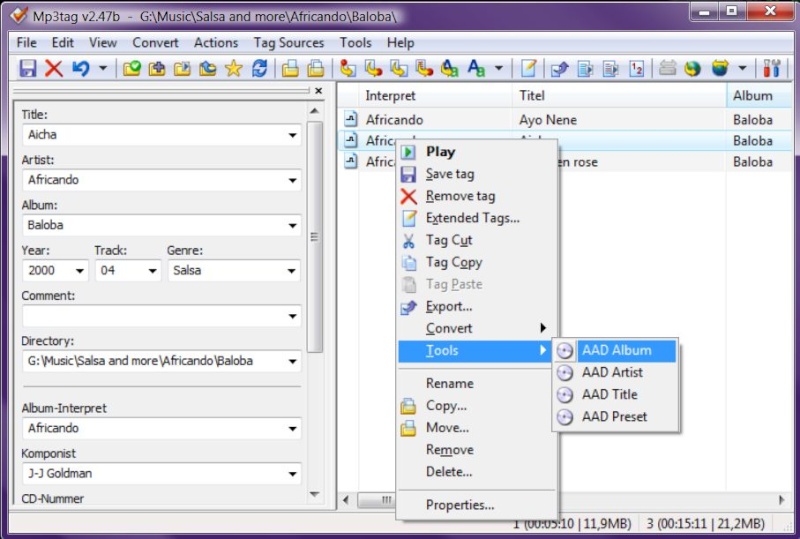
- 1. The "Tools" you set up in mp3tag do take the information from the tags _ **inside the mp3** _, i.e. in the first one the "artist" and the "album" name, call the AAD and put this information into the search field and search your chosen sources for images. (This means in consequence that a mp3 without proper tags won't work! You would have to go back and tag them first correctly.) The information _ **where to save the image** _ is in the _ **parameters** _ of the "Tools". So you select one file in mp3tag and call the "Tool" and get an AAD window with the proper search results.
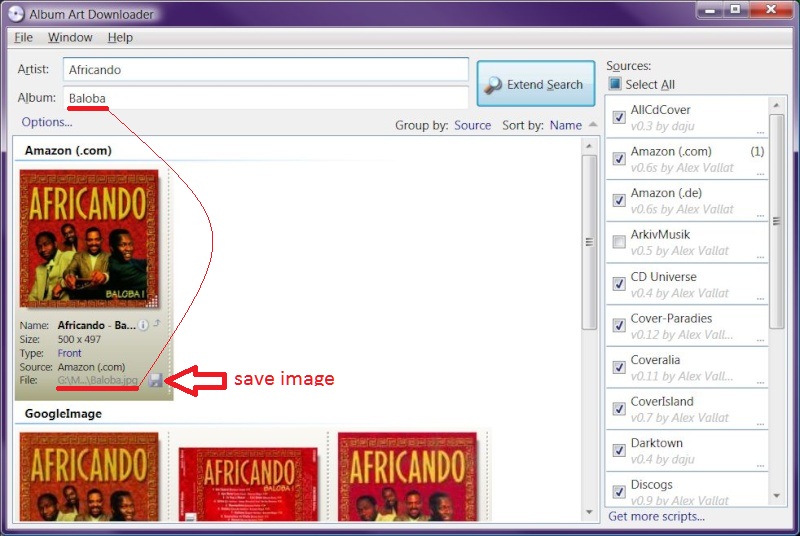
- 2. **Then** you have to choose one image and _ **save it to disk** _ by clicking the "diskette icon" at this image.
- 3. To store the now saved-on-disk-image _ **into the mp3 file** _ you select one or more mp3s in mp3tag and call the appropriate "Action" which will do exactly that: Store the image _ **into the mp3 file** _! (Of course it is an import from a file. You saved it in step 2. as an image file!)
**To do only step 1. and 2. above isn't sufficient, it's a three step procedure!**
I'd suggest again you start from scratch and repeat exactly all the steps of the tut. It will work! And RTFM, by the way.
---
### Author:  [@TGK](https://community.mp3tag.de/u/TGK)
#### Post date: [January 28, 2012, 3:32pm UTC](https://community.mp3tag.de/t/mp3tag-album-art-downloader-tut/11489/14 "2012-01-28T15:32:53Z")
Thanks
I did not understand very well in English, you cannot do the steps that you wrote to accompany the picture ?
---
### Author:  [@g.p.m](https://community.mp3tag.de/u/g.p.m)
#### Post date: [January 28, 2012, 4:29pm UTC](https://community.mp3tag.de/t/mp3tag-album-art-downloader-tut/11489/15 "2012-01-28T16:29:18Z")

@TGK
- 1. The "Tools" you set up in mp3tag do take the information from the tags inside the mp3, i.e. in the first one the "artist" and the "album" name, call the AAD and put this information into the search field and search your chosen sources for images. (This means in consequence that a mp3 without proper tags won't work! You would have to go back and tag them first correctly.) The information where to save the image is in the parameters of the "Tools". **So you select one file in mp3tag and call the "Tool" and get an AAD window with the proper search results:**
- **2. Then you have to choose one image and save it to disk by clicking the "diskette icon" at this image:**
- **3. To store the now saved-on-disk-image into the mp3 file you select one or more mp3s in mp3tag and call the appropriate "Action" which will do exactly that:Store the image into the mp3 file!** (Of course it is an import from a file. You saved it in step 2. as an image file!)

---
### Author:  [@TGK](https://community.mp3tag.de/u/TGK)
#### Post date: [January 28, 2012, 5:38pm UTC](https://community.mp3tag.de/t/mp3tag-album-art-downloader-tut/11489/16 "2012-01-28T17:38:14Z")
**g.p.m.**
Everything is now figured out, I thought that just keeps floppy disks icon artwork to the tag file - no step 3
it would be nice if the step 2, you can combine with step 3, ie, to not have to always use the "action" and choose, and click the floppy icon in step 2 and the cover will be maintained once the tag mp3 file
---
### Author:  [@Kubaton](https://community.mp3tag.de/u/Kubaton)
#### Post date: [February 24, 2012, 9:34pm UTC](https://community.mp3tag.de/t/mp3tag-album-art-downloader-tut/11489/17 "2012-02-24T21:34:25Z")
Thanks for the great tutorial, g.p.m.! I found one minor caveat to your parameter in the album string. I had to do a bit of trial and error to get it modified the way I needed. I use the Last.fm Cover script as my main source in AAD, of which many of the files are in PNG format. Using the hardcoded JPG extension always names the file folder.jpg (my choice of cover art filenames), regardless of the true filetype. I came up with the following parameter string, which names the file correctly regardless of its type. I've only done some minimal testing so I hope this is correct. So far it's worked perfectly for me.
/ar "%artist%" /al "%album%" /p "$replace(%\_path%,%\_filename\_ext%,)folder.%%extension%%"
I've only tested the album parameter because all of my music is full albums so far.
Hope this helps someone having the same issue.
Regards,
Kubaton
---
### Author:  [@kaokulk](https://community.mp3tag.de/u/kaokulk)
#### Post date: [March 16, 2012, 2:27pm UTC](https://community.mp3tag.de/t/mp3tag-album-art-downloader-tut/11489/18 "2012-03-16T14:27:12Z")
The script works great!
One minor issue: If the Album Title contains a colon ("Star Trek II: The Wrath of Khan"), the script in Actions will bomb. I've been copying the album art in Album Art Downloader when the title has a colon and pasting manually.
---
### Author:  [@imDhaval](https://community.mp3tag.de/u/imDhaval)
#### Post date: [May 26, 2012, 4:35am UTC](https://community.mp3tag.de/t/mp3tag-album-art-downloader-tut/11489/19 "2012-05-26T04:35:22Z")
thnx        😆 😆 😆 😆         
---
### Author:  [@onix](https://community.mp3tag.de/u/onix)
#### Post date: [August 13, 2012, 5:54pm UTC](https://community.mp3tag.de/t/mp3tag-album-art-downloader-tut/11489/20 "2012-08-13T17:54:48Z")
> [@wisko](#):
>
> hi g.p.m.
>
> i did the complete process as you were told here. but the problem is i dont get any search results from AAD other than what it found from the local folder.
>
> what could it be the cause for this..
> need your help...
> 
Ditto... same for me 😳
[Next page](https://community.mp3tag.de/t/mp3tag-album-art-downloader-tut/11489.md?page=2)