# Mp3tag inserts an extra space character in custom tag field names starting with COMMENT or WWW
**URL:** https://community.mp3tag.de/t/mp3tag-inserts-an-extra-space-character-in-custom-tag-field-names-starting-with-comment-or-www/71434
**Category:** Support
**Created:** [June 12, 2026, 8:19am UTC](https://community.mp3tag.de/t/mp3tag-inserts-an-extra-space-character-in-custom-tag-field-names-starting-with-comment-or-www/71434 "2026-06-12T08:19:05Z")
**Posts on this page:** 4
**Page:** 1
### Author:  [@yorickausyps](https://community.mp3tag.de/u/yorickausyps)
#### Post date: [June 12, 2026, 8:19am UTC](https://community.mp3tag.de/t/mp3tag-inserts-an-extra-space-character-in-custom-tag-field-names-starting-with-comment-or-www/71434/1 "2026-06-12T08:19:05Z")
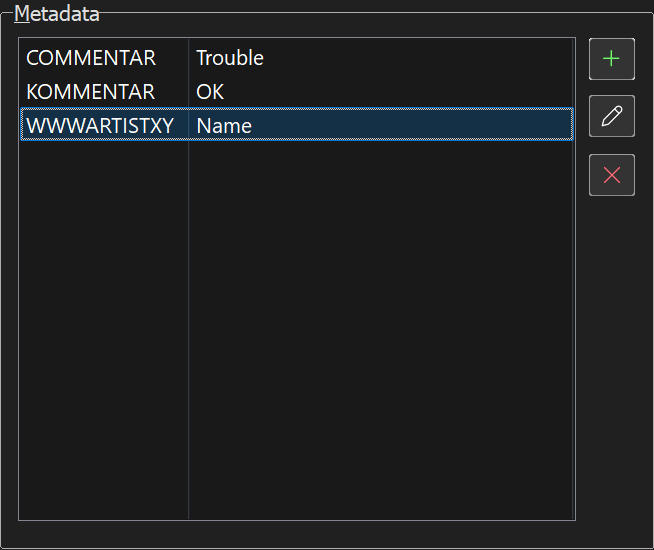
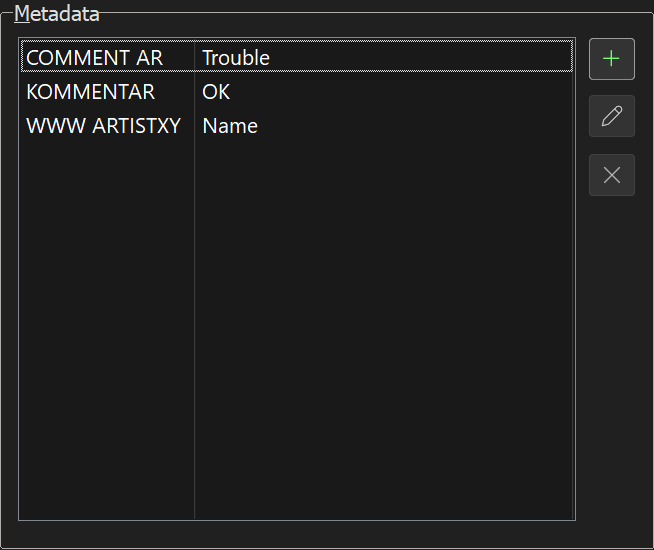
To reproduce this issue add a new custom tag in the Extended Tag View (Alt+T) dialog, with a tag name that has` COMMENT` at the beginning and one or more arbitrary characters following, e.g. `COMMENTAR`, and then write something into the Value field and save it in the file. Now open the Extended Tag View (Alt+T) again and the new tag field got the name `COMMENT AR`, i.e. a space character has been inserted behind the COMMENT-part.
A similar effect can be observed with standad tags that start with `WWW`. In this case the space always appears behind `WWW`, e.g. `WWWARTISTXY` becomes `WWW ARTISTXY`. All other standard tags act normal, that means that there does't turn up no extra space character, if their name is used together with some more characters at the end.
Before storing the tags in the file:
After storing and rereading the tags:
Same effect also appears in web source scripts.
---
### Author:  [@Florian](https://community.mp3tag.de/u/Florian)
#### Post date: [June 12, 2026, 8:35am UTC](https://community.mp3tag.de/t/mp3tag-inserts-an-extra-space-character-in-custom-tag-field-names-starting-with-comment-or-www/71434/2 "2026-06-12T08:35:16Z")
This is expected behaviour for these two fields and the part after `COMMENT` or `WWW` is treated as the description part of the respective ID3v2 frame.
---
### Author:  [@yorickausyps](https://community.mp3tag.de/u/yorickausyps)
#### Post date: [June 13, 2026, 8:53am UTC](https://community.mp3tag.de/t/mp3tag-inserts-an-extra-space-character-in-custom-tag-field-names-starting-with-comment-or-www/71434/3 "2026-06-13T08:53:58Z")
Thank you @Florian for this explanation, I didn't know that. It seems to me to be best practice to always in the first place insert a space between `COMMENT` or `WWW` and succeding chracters or words.
This is necessary in web source scripts, because e.g. using `COMMENTX` in a script will always create a new tag field `COMMENT X` and never overwrite an already existing one with every run of the script. This is contrary to the usual behaviour of replacing existent tag fields if at the `Adjust tag information` screen the OK is given.
---
### Author:  [@system](https://community.mp3tag.de/u/system)
#### Post date: [June 20, 2026, 8:54am UTC](https://community.mp3tag.de/t/mp3tag-inserts-an-extra-space-character-in-custom-tag-field-names-starting-with-comment-or-www/71434/4 "2026-06-20T08:54:51Z")
This topic was automatically closed 7 days after the last reply. New replies are no longer allowed.