# Mp3tag reads different MP4/M4A tags than Windows Explorer and MusicBee
**URL:** https://community.mp3tag.de/t/mp3tag-reads-different-mp4-m4a-tags-than-windows-explorer-and-musicbee/71540
**Category:** Support
**Created:** [June 30, 2026, 4:20pm UTC](https://community.mp3tag.de/t/mp3tag-reads-different-mp4-m4a-tags-than-windows-explorer-and-musicbee/71540 "2026-06-30T16:20:43Z")
**Posts on this page:** 6
**Page:** 1
### Author:  [@yurishalk](https://community.mp3tag.de/u/yurishalk)
#### Post date: [June 30, 2026, 4:20pm UTC](https://community.mp3tag.de/t/mp3tag-reads-different-mp4-m4a-tags-than-windows-explorer-and-musicbee/71540/1 "2026-06-30T16:20:43Z")
Hi everyone,
I'm experiencing a strange issue with some `.m4a` (MP4) files.
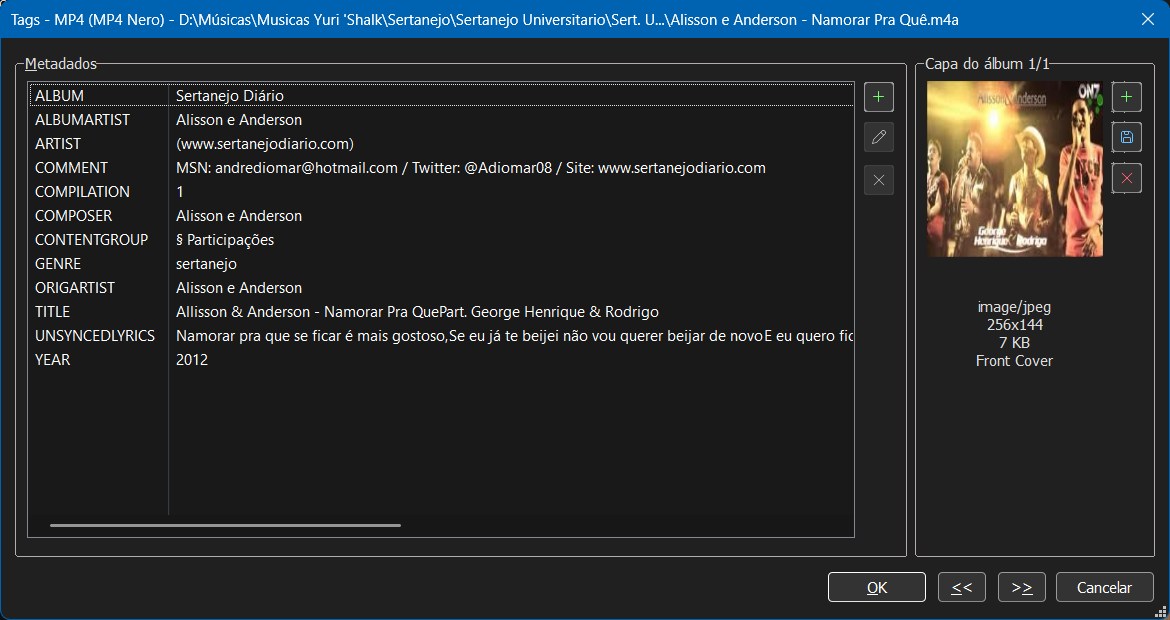
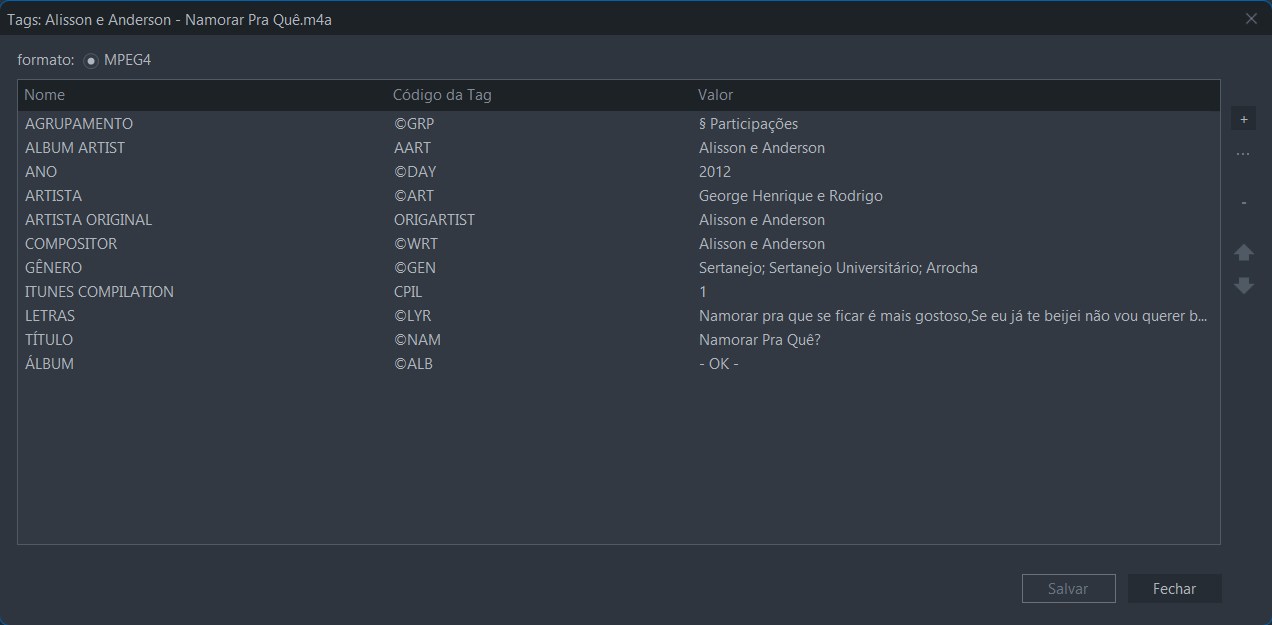
Windows Explorer and MusicBee display the same metadata, but Mp3tag shows completely different values for fields like **Album** , **Artist** , and **Title**.
For example:
- **Windows Explorer / MusicBee**
- **Mp3tag**
The files are **.m4a (MP4 Nero)**.
I checked the extended tags in Mp3tag and there are no obvious duplicate fields. Windows Explorer and MusicBee are consistent with each other, but Mp3tag seems to be reading a different set of metadata.
Is this expected behavior for M4A files?
Has anyone experienced this before or knows how to make Mp3tag read the same metadata as Windows Explorer and MusicBee?
---
### Author:  [@ohrenkino](https://community.mp3tag.de/u/ohrenkino)
#### Post date: [June 30, 2026, 4:26pm UTC](https://community.mp3tag.de/t/mp3tag-reads-different-mp4-m4a-tags-than-windows-explorer-and-musicbee/71540/2 "2026-06-30T16:26:20Z")
Perhaps this thread sheds some light on the observation:
> [@MP4/M4A/M4B: iTunes/QuickTime and Nero metadata](https://community.mp3tag.de/t/mp4-m4a-m4b-itunes-quicktime-and-nero-metadata/69341):
>
> Mp3tag supports two tag formats for MP4/M4A/M4B: iTunes/QuickTime and Nero metadata. When writing metadata, Mp3tag tries to only use iTunes/QuickTime metadata if possible, but writes Nero metadata in the following circumstances: The file already contains Nero metadata. Mp3tag then updates both metadata formats with the updated contents. The file contains QuickTime chapters. Mp3tag can't edit QuickTime chapters at the moment — only reading and removing QuickTime chapters is supported. On w…
---
### Author:  [@yurishalk](https://community.mp3tag.de/u/yurishalk)
#### Post date: [July 1, 2026, 12:55am UTC](https://community.mp3tag.de/t/mp3tag-reads-different-mp4-m4a-tags-than-windows-explorer-and-musicbee/71540/3 "2026-07-01T00:55:43Z")
Hi, thanks for information. I tried remove with the AtomicParsley, but my file doesn't contain `moov.udta.tags`. Instead it contains legacy Nero atoms (`titl`, `albm`, `perf`, `gnre`, `yrrc`) directly under `moov.udta`.
`--manualAtomRemove moov.udta.tags` returns "No changes".
Is there a supported way to remove these legacy Nero atoms?
Maybe edits each song in mp3Tag is a option, re writing the tags, but my collection is huge.
---
### Author:  [@ohrenkino](https://community.mp3tag.de/u/ohrenkino)
#### Post date: [July 1, 2026, 4:48am UTC](https://community.mp3tag.de/t/mp3tag-reads-different-mp4-m4a-tags-than-windows-explorer-and-musicbee/71540/4 "2026-07-01T04:48:09Z")
You could filter for
`%_tag% HAS Nero`
to see only the files with Nero tags.
---
### Author:  [@yurishalk](https://community.mp3tag.de/u/yurishalk)
#### Post date: [July 1, 2026, 11:56am UTC](https://community.mp3tag.de/t/mp3tag-reads-different-mp4-m4a-tags-than-windows-explorer-and-musicbee/71540/5 "2026-07-01T11:56:18Z")
Thanks, it helps a lot.
---
### Author:  [@system](https://community.mp3tag.de/u/system)
#### Post date: [July 8, 2026, 11:56am UTC](https://community.mp3tag.de/t/mp3tag-reads-different-mp4-m4a-tags-than-windows-explorer-and-musicbee/71540/6 "2026-07-08T11:56:50Z")
This topic was automatically closed 7 days after the last reply. New replies are no longer allowed.