# Mp3tag (v2.39) not reading existing tags
**URL:** https://community.mp3tag.de/t/mp3tag-v2-39-not-reading-existing-tags/5300
**Category:** Support
**Created:** [August 14, 2007, 4:58am UTC](https://community.mp3tag.de/t/mp3tag-v2-39-not-reading-existing-tags/5300 "2007-08-14T04:58:24Z")
**Posts on this page:** 12
**Page:** 1
### Author:  [@CAaronL](https://community.mp3tag.de/u/CAaronL)
#### Post date: [August 14, 2007, 4:58am UTC](https://community.mp3tag.de/t/mp3tag-v2-39-not-reading-existing-tags/5300/1 "2007-08-14T04:58:24Z")
I'm sooooo frustrated. This problem seems to have occurred after running my whole MP3 library (approximately 400GB worth of files) through MP3Gain's track gain function....
My files are tagged. I can tell because the "Details" pane in Windows (Vista Ultimate) shows all the pertinent information. Artist, Album, Track Number, Title, Year, etc. Everything is there. In fact, no other programs seem to have trouble reading the tags that are there. Winamp, WMP, ENCSpot, iTunes -- every application I try that reads ID3 tags reads them perfectly.
Mp3tag will NOT read the existing tags on any of these files, however. It seems to know that the tags are THERE, but I can't figure out how to get it to read them. In the "Tag" column, it displays this:
APEv2 (ID3v1 ID3v2.3 APEv2)
Any idea what's going on here?
In Tools --\> Options --\> Tags --\> Mpeg, I have all the "Read" boxes checked.
Thanks in advance to anyone who can help with this!
---
### Author:  [@LyricsLover](https://community.mp3tag.de/u/LyricsLover)
#### Post date: [August 14, 2007, 8:16am UTC](https://community.mp3tag.de/t/mp3tag-v2-39-not-reading-existing-tags/5300/2 "2007-08-14T08:16:26Z")
You could try to uncheck the APE-Box on "read" and "write".
---
### Author:  [@CAaronL](https://community.mp3tag.de/u/CAaronL)
#### Post date: [August 14, 2007, 8:46am UTC](https://community.mp3tag.de/t/mp3tag-v2-39-not-reading-existing-tags/5300/3 "2007-08-14T08:46:01Z")
If I uncheck APE-read, it has no noticeable effect.
If I uncheck APE-write, then edit a tag and try to save it, nothing is saved to the file.
☹
---
### Author:  [@LyricsLover](https://community.mp3tag.de/u/LyricsLover)
#### Post date: [August 14, 2007, 8:57am UTC](https://community.mp3tag.de/t/mp3tag-v2-39-not-reading-existing-tags/5300/4 "2007-08-14T08:57:28Z")
Strange. Mabye someone should have a look inside such a file. Or you could paste the first 300 bytes and the last 200 bytes of such a non-working mp3-file.
---
### Author:  [@CAaronL](https://community.mp3tag.de/u/CAaronL)
#### Post date: [August 14, 2007, 9:34am UTC](https://community.mp3tag.de/t/mp3tag-v2-39-not-reading-existing-tags/5300/5 "2007-08-14T09:34:34Z")
Here is the beginning of the file:

And then the part where the audio data begins:

And the end of the audio data:

And finally the end of the file:

I have nearly 500GB of files like this. It's frustrating, because I normally use Mp3tag to manage my collection, but it can't read any of the tags. I would really like to find some kind of automated script or something I could run on the drive with my mp3 files that would make them readable my Mp3tag again.


---
### Author:  [@LyricsLover](https://community.mp3tag.de/u/LyricsLover)
#### Post date: [August 14, 2007, 12:55pm UTC](https://community.mp3tag.de/t/mp3tag-v2-39-not-reading-existing-tags/5300/6 "2007-08-14T12:55:35Z")
At first sight, I can't find any error. Maybe you should ask Florian himself, if he could have a look at it.
---
### Author:  [@nickless](https://community.mp3tag.de/u/nickless)
#### Post date: [August 14, 2007, 7:06pm UTC](https://community.mp3tag.de/t/mp3tag-v2-39-not-reading-existing-tags/5300/7 "2007-08-14T19:06:03Z")
It looks like you have analyzed your files with Mp3Gain. This program stores the information in APE-Tags which is the preferred tag type for Mp3Tag.
If you look at the first screenshot, you will see the ID3v1 tags in the file and in the last screenshot there is the mp3 gain information in the APE tag and ID3v2 tag just after it (I think).
Try to check ID3v1 and ID3v2 for read/write under Options-\>Tags-\>MPEG and uncheck all APE boxes.
Regards
nickless
---
### Author:  [@CAaronL](https://community.mp3tag.de/u/CAaronL)
#### Post date: [August 14, 2007, 7:54pm UTC](https://community.mp3tag.de/t/mp3tag-v2-39-not-reading-existing-tags/5300/8 "2007-08-14T19:54:48Z")
As I mentioned in the top post, yes, this problem started when I ran my entire music library through MP3Gain.
Unchecking APE boxes does not make the file readable, and, as I mentioned before, it makes Mp3tag simple not save any changes to the file at all. I don't want to remove the MP3Gain tags -- I just want to come up with a way for Mp3tag to be able to read the tags that are there, so I don't have to re-write them.
Even though these files ARE tagged, and every application OTHER than Mp3tag can read them fine, if I want to do any tag management through Mp3tag, I have to make entirely new tags, then save them to the file as APE. This does not damage the MP3Gain tags that are there -- they are retained. But if I want to make any changes to the tags in one of these files, I have to completely recreate the tags from scratch. There seems to be no way to make Mp3tag read these tags, although it does detect that they are there.
Here is a sample, file intact. Every other application I've tried reads the tags fine. Try to read the file with Mp3tag and you'll see what I'm talking about.
[Sample.mp3](https://community.mp3tag.de/uploads/default/original/2X/2/27857b77c86064d8a77727a4f8853ec515e4b7a3.mp3) (90.7 KB)
Actually, I wanted to clarify... If I go to "Extended Tags," I do see the MP3Gain tags. So those tags are the ONLY ones that Mp3tag will read. The rest of the tags are present, but not being read. Incidentally, I can edit the tags by right-clicking the file in Windows Explorer, or by changing the file properties via my WinAmp playlist. But even so, when I save the file after editing the tags, Mp3tag still can't see them.
[Sample.mp3](https://community.mp3tag.de/uploads/default/original/2X/2/27857b77c86064d8a77727a4f8853ec515e4b7a3.mp3) (90.7 KB)
---
### Author:  [@nickless](https://community.mp3tag.de/u/nickless)
#### Post date: [August 14, 2007, 8:07pm UTC](https://community.mp3tag.de/t/mp3tag-v2-39-not-reading-existing-tags/5300/9 "2007-08-14T20:07:38Z")
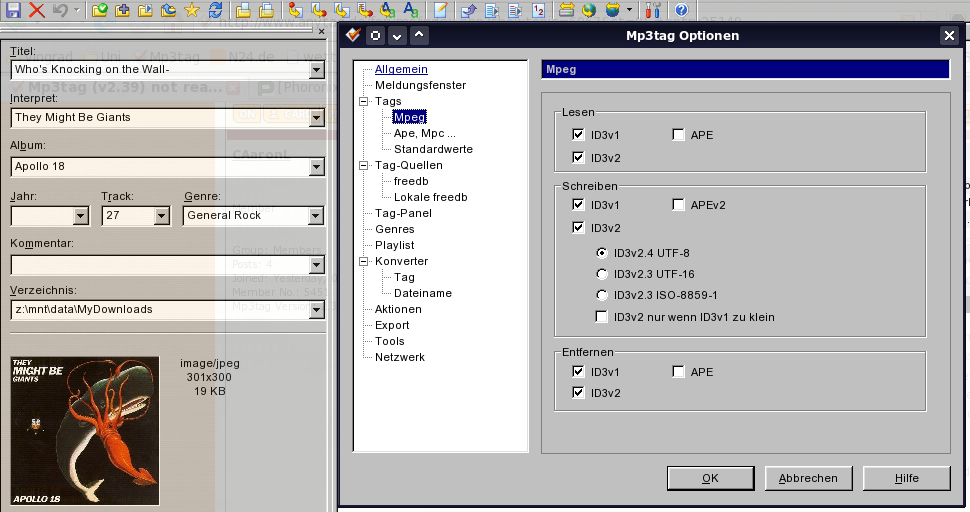
I use Mp3Gain too, and it works perfectly, see the screenshot.
Do you have the same settings as I do (see the options dialog in screenshot)?
---
### Author:  [@CAaronL](https://community.mp3tag.de/u/CAaronL)
#### Post date: [August 14, 2007, 8:32pm UTC](https://community.mp3tag.de/t/mp3tag-v2-39-not-reading-existing-tags/5300/10 "2007-08-14T20:32:23Z")
> [@nickless](#):
>
> I use Mp3Gain too, and it works perfectly, see the screenshot.
> Do you have the same settings as I do (see the options dialog in screenshot)?
I mirrored your settings and it seems to have fixed my problem! I'm not sure what was the setting that did it. I will have to do some more experimentation. So if you edit files using these settings, it doesn't affect the MP3Gain APE tags at all? That sounds like a good solution.
---
### Author:  [@nickless](https://community.mp3tag.de/u/nickless)
#### Post date: [August 14, 2007, 8:40pm UTC](https://community.mp3tag.de/t/mp3tag-v2-39-not-reading-existing-tags/5300/11 "2007-08-14T20:40:23Z")
> [@CAaronL](#):
>
> So if you edit files using these settings, it doesn't affect the MP3Gain APE tags at all?
Yes
---
### Author:  [@system](https://community.mp3tag.de/u/system)
#### Post date: [February 9, 2026, 12:20pm UTC](https://community.mp3tag.de/t/mp3tag-v2-39-not-reading-existing-tags/5300/12 "2026-02-09T12:20:27Z")