# MP4 file Tag editing not working
**URL:** https://community.mp3tag.de/t/mp4-file-tag-editing-not-working/71700
**Category:** Support
**Created:** [August 5, 2026, 2:00pm UTC](https://community.mp3tag.de/t/mp4-file-tag-editing-not-working/71700 "2026-08-05T14:00:57Z")
**Posts on this page:** 15
**Page:** 1
### Author:  [@specops](https://community.mp3tag.de/u/specops)
#### Post date: [August 5, 2026, 2:00pm UTC](https://community.mp3tag.de/t/mp4-file-tag-editing-not-working/71700/1 "2026-08-05T14:00:57Z")
Hi
I am a new user of Mp3tag and I am trying to clean up the tag data on my digital music collection as they are not showing correctly on my Sonos app, especially compilation ablum with various artists.
I have tried to correct the “Album Artist” to Various Artists in the field but I get an error message saying it can not be changed. The files are in a MP4 format.
---
### Author:  [@ohrenkino](https://community.mp3tag.de/u/ohrenkino)
#### Post date: [August 5, 2026, 2:08pm UTC](https://community.mp3tag.de/t/mp4-file-tag-editing-not-working/71700/2 "2026-08-05T14:08:06Z")
> [@specops](#):
>
> The files are in a MP4 format
Check if the files are real mp4 files, see e.g. about problems with MP4 files here:
> [@Can't change details on Twitter videos](https://community.mp3tag.de/t/cant-change-details-on-twitter-videos/65315):
>
> 1 Download an .mp4 video from Twitter 2 In Windows Explorer (windows 8.1), right-click on the filename of the file I just downloaded and examine the Properties | Details tag. 3.None of the fields are modifiable. 4 Open that directory in Mp3Tag, select that file, and enter a Comment. 5 It shows in the Comment field in Mp3Tag. 6. Save and close mp3.Tag, 7. Examine the Details in Windows Explorer, the comment isn't there. 8. Open mp3tag, the Comment is still there. In all other instances, t…
A check of the file's consistency would also help:
> [@How to check files for errors?](https://community.mp3tag.de/t/how-to-check-files-for-errors/44633):
>
> It’s required and often helps to reduce support cycles to check files for errors before filing a bug report. Symptoms of erroneous files are often missing or wrong bitrate or length audible blips or skips tags seem to be sticky and cannot be removed There are some really good tools to check the files for errors, namely MP3 Diags — identifies many different issues in MP3 files Website: [http://mp3diags.sourceforge.net](http://mp3diags.sourceforge.net) Download: [MP3 Diags - Getting MP3 Diags](http://mp3diags.sourceforge.net/010_getting_the_program.html#binWindows) If the font size in MP3 Diags is …
---
### Author:  [@LyricsLover](https://community.mp3tag.de/u/LyricsLover)
#### Post date: [August 5, 2026, 2:51pm UTC](https://community.mp3tag.de/t/mp4-file-tag-editing-not-working/71700/3 "2026-08-05T14:51:44Z")
In addition to @ohrenkino's advice:
You can confirm that you are using a genuine MP4 file and not a file with the wrong file extension (such as MP3, WMA or FLAC) by using a tool like [MediaInfo](https://mediaarea.net/en/MediaInfo), which can easily identify such files.
THEN:
Where do you try to change your MP4 file? Locally on your Windows PC?
On a external USB disc? On a remote NAS? Somewhere in the cloud?
---
### Author:  [@specops](https://community.mp3tag.de/u/specops)
#### Post date: [August 5, 2026, 3:05pm UTC](https://community.mp3tag.de/t/mp4-file-tag-editing-not-working/71700/4 "2026-08-05T15:05:35Z")
I have tried on a USB drive and on a Qnap nas
---
### Author:  [@ohrenkino](https://community.mp3tag.de/u/ohrenkino)
#### Post date: [August 5, 2026, 3:11pm UTC](https://community.mp3tag.de/t/mp4-file-tag-editing-not-working/71700/5 "2026-08-05T15:11:59Z")
What happens if the file is on a local/internal storage?
What did Mediainfo tell?
What was the result of the consistency check?
---
### Author:  [@specops](https://community.mp3tag.de/u/specops)
#### Post date: [August 5, 2026, 3:13pm UTC](https://community.mp3tag.de/t/mp4-file-tag-editing-not-working/71700/6 "2026-08-05T15:13:32Z")
I don’t have the music stored internally on my windows laptop
---
### Author:  [@ohrenkino](https://community.mp3tag.de/u/ohrenkino)
#### Post date: [August 5, 2026, 3:15pm UTC](https://community.mp3tag.de/t/mp4-file-tag-editing-not-working/71700/7 "2026-08-05T15:15:07Z")
The idea would be to copy it to the local storage and see what the result is - to rule out that any access rights might interfere.
---
### Author:  [@specops](https://community.mp3tag.de/u/specops)
#### Post date: [August 5, 2026, 3:24pm UTC](https://community.mp3tag.de/t/mp4-file-tag-editing-not-working/71700/8 "2026-08-05T15:24:43Z")
ok I will copy an album that is not working and try to correct it locally, I have looked a bit deeper the codec field in the Mp3tag and currently it is MPEG-4 AAC (itunes 12.2.1.16) if that makes any sense.
---
### Author:  [@Florian](https://community.mp3tag.de/u/Florian)
#### Post date: [August 6, 2026, 11:05am UTC](https://community.mp3tag.de/t/mp4-file-tag-editing-not-working/71700/9 "2026-08-06T11:05:54Z")
I'd be interested if editing the file locally worked, and if not, which version of Mp3tag you're using on which system (your profile lists both Windows and macOS).
---
### Author:  [@specops](https://community.mp3tag.de/u/specops)
#### Post date: [August 6, 2026, 4:02pm UTC](https://community.mp3tag.de/t/mp4-file-tag-editing-not-working/71700/10 "2026-08-06T16:02:48Z")
Hi Florian, I saved a copy of the album to my windows laptop and tried to edit the tags but when I tried to save the changes the processing return a message saying “Cannot write file” so I either have to skip the file or abort the operation.
---
### Author:  [@Florian](https://community.mp3tag.de/u/Florian)
#### Post date: [August 6, 2026, 4:06pm UTC](https://community.mp3tag.de/t/mp4-file-tag-editing-not-working/71700/11 "2026-08-06T16:06:52Z")
I just sent you a private upload link via personal message. It would be most helpful if I could have a look at the file and analyze the issue.
---
### Author:  [@Florian](https://community.mp3tag.de/u/Florian)
#### Post date: [August 6, 2026, 4:30pm UTC](https://community.mp3tag.de/t/mp4-file-tag-editing-not-working/71700/12 "2026-08-06T16:30:15Z")
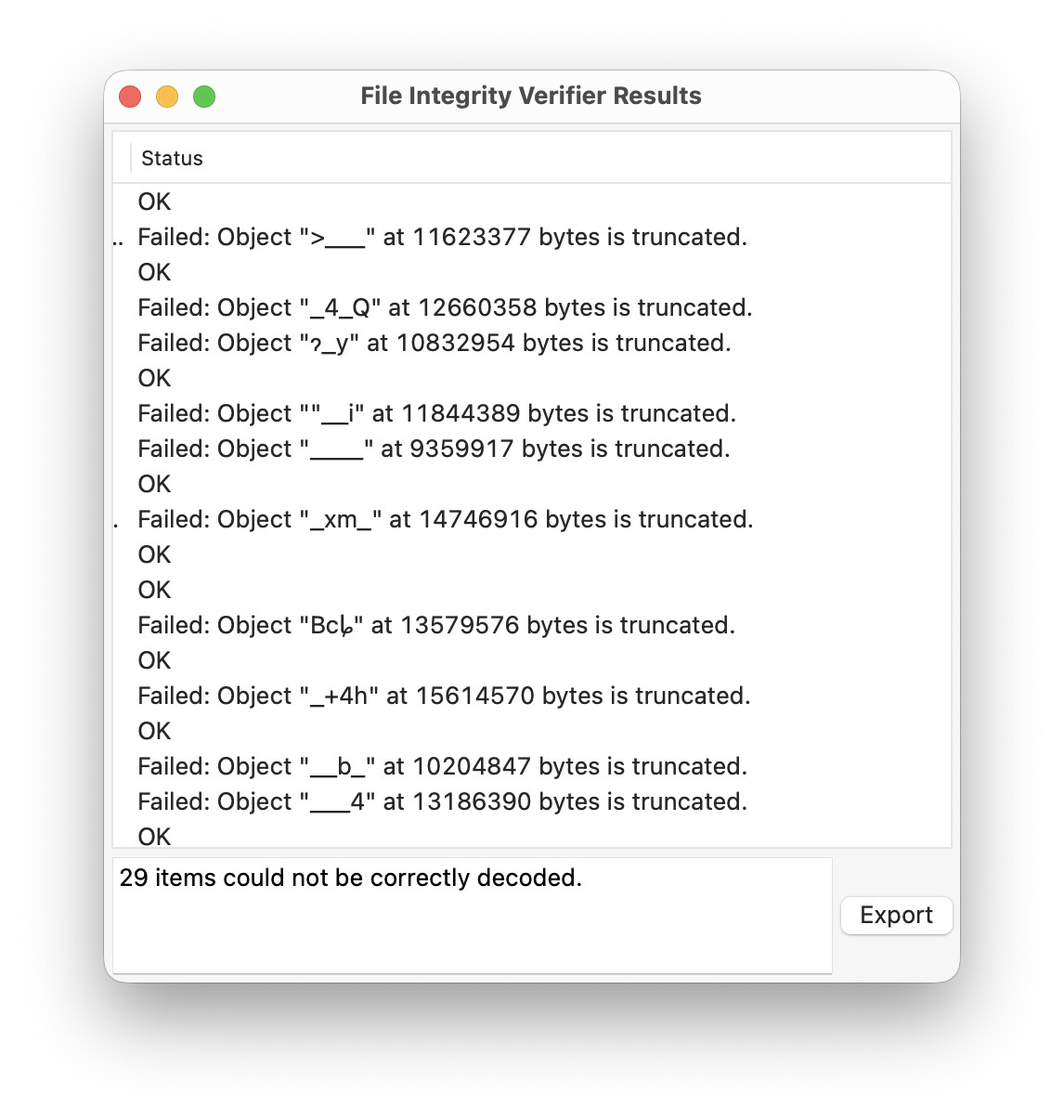
Thank you for the example files. I've analyzed them using foobar2000's Verify Integrity feature and, unfortunately, many of them are truncated and can, thus, not safely be tagged using Mp3tag.
---
### Author:  [@specops](https://community.mp3tag.de/u/specops)
#### Post date: [August 6, 2026, 4:57pm UTC](https://community.mp3tag.de/t/mp4-file-tag-editing-not-working/71700/13 "2026-08-06T16:57:37Z")
Thank you for checking this issue out for me. I still have many of these albums in hardcopy CD so will proberly just copy them to my Qnap Nas so they are available on my sonos speakers. What format would you recommend I copy the albums into?
thanks again
---
### Author:  [@Florian](https://community.mp3tag.de/u/Florian)
#### Post date: [August 7, 2026, 8:32am UTC](https://community.mp3tag.de/t/mp4-file-tag-editing-not-working/71700/14 "2026-08-07T08:32:55Z")
> [@specops](#):
>
> What format would you recommend I copy the albums into?
It depends on the players you're using. I still recommend MP3, which is supported everywhere and has good metadata support.
If you want lossless, FLAC is my first recommendation. If need compatibility with Apple Music and their devices, ALAC is the recommended format (although there are good FLAC players for macOS/iOS as well).
---
### Author:  [@system](https://community.mp3tag.de/u/system)
#### Post date: [August 9, 2026, 8:33am UTC](https://community.mp3tag.de/t/mp4-file-tag-editing-not-working/71700/15 "2026-08-09T08:33:21Z")
This topic was automatically closed 2 days after the last reply. New replies are no longer allowed.