# Multiple Language Song Title
**URL:** https://community.mp3tag.de/t/multiple-language-song-title/64547
**Category:** Support
**Created:** [April 28, 2024, 5:21pm UTC](https://community.mp3tag.de/t/multiple-language-song-title/64547 "2024-04-28T17:21:00Z")
**Posts on this page:** 6
**Page:** 1
### Author:  [@Jonjo](https://community.mp3tag.de/u/Jonjo)
#### Post date: [April 28, 2024, 5:21pm UTC](https://community.mp3tag.de/t/multiple-language-song-title/64547/1 "2024-04-28T17:21:00Z")
Hi
I have song that are in other languages i want the title to to be in both with Cyrillic letter and English transliteration e.g “Cyrillic Title / English Transliteration Title”. I can convert the title field but then end up loving the original version. Is there any way I can convert the Title field and have Transliteration added next to the original field using some scripts rather than doing it manually. I had a look at the scripts and not sure if there is any that will work.
Thanks
---
### Author:  [@ohrenkino](https://community.mp3tag.de/u/ohrenkino)
#### Post date: [April 28, 2024, 5:33pm UTC](https://community.mp3tag.de/t/multiple-language-song-title/64547/2 "2024-04-28T17:33:36Z")
Try an action of the type "Guess value"
Source string: %title%
Guessing pattern: %title% / %english\_title%
This creates a user-defined field called ENGLISH\_TITLE which you can add to the tag panel and/or the file list.
If you are looking for some kind of automatic transcription, then I doubt that this available ready-made.
---
### Author:  [@rboss](https://community.mp3tag.de/u/rboss)
#### Post date: [April 28, 2024, 9:01pm UTC](https://community.mp3tag.de/t/multiple-language-song-title/64547/3 "2024-04-28T21:01:43Z")
There may be a way - it depends on how you have / want to have your music collection organized regarding tags.
I also like to have dual titles for foreign music (original / transliterated), and my process is not fully automatic, but can be used in bulk.
1- First, tag your music in English data;
2- then, use a "Format value" action to write the English title to another tag, for example

3- next, tag your music in the original data.
Now, if you want to keep both titles:
4- use another "Format value" action to write the original title to another tag, like
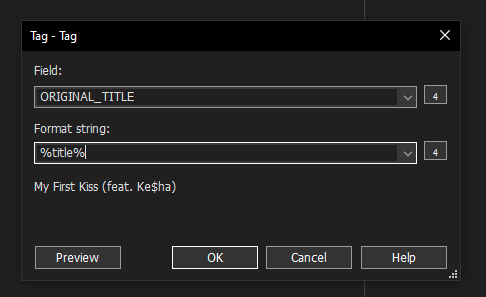
5- Finally, use another "Format value" action to change the %title% field:

Your music will have these tags:
TITLE: "Cyrillic Title / English Transliteration Title"
ORIGINAL\_TITLE: "Cyrillic Title"
ENGLISH\_TITLE: "English Transliteration Title"
If you don't want the original titles, and just keep the dual language title, end with
6- delete both ORIGINAL\_TITLE and ENGLISH\_TITLE.
--
Another way (if you don't want to keep the original titles) is:
- do steps 1, 2 and 3. You will have on your files:
TITLE: "Cyrillic Title"
ENGLISH\_TITLE: "English Transliteration Title"
4a- use another "Format value" action to change the %title% field, as
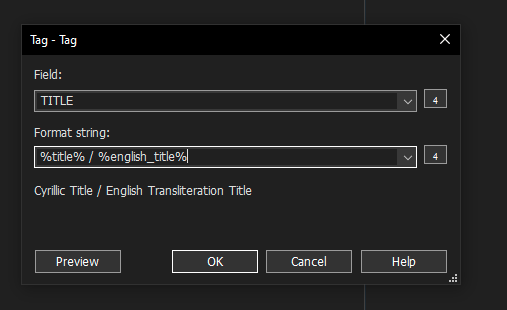
and you will get
TITLE: "Cyrillic Title / English Transliteration Title"
ENGLISH\_TITLE: "English Transliteration Title"
And finally
5- delete ENGLISH\_TITLE.
You can combine these actions into action groups, making step 2 into "Action group A" and steps 4-5-6 into "Action group B" for the first method and 4a-5 into "Action group B" for the second method.
If your tag source returns both English title and original title simultaneously, then after step 1 you will already have some form of
TITLE: "one of the titles"
ALTERNATIVE\_TITLE: "the other language of title"
and can skip to step 3 in the first method / 4a in the 2nd method.
Like I said, this process is not automatic, but with it (if you use action groups) you can process an entire album in a few clicks.
Hope this helps.
---
### Author:  [@esumsea](https://community.mp3tag.de/u/esumsea)
#### Post date: [April 29, 2024, 5:49pm UTC](https://community.mp3tag.de/t/multiple-language-song-title/64547/4 "2024-04-29T17:49:14Z")
Like others have suggested, I have a custom field I created called Accented Song Title (actually have fields for accented everything: artist, album artist, conductor, composer etc.). I then place any title with diacritics there and use an action I got from this site and modified to remove all diacritics from the regular fields (artist, title, composer, etc) AFTER I have transferred the originals to the custom fields. That way if I want to change back to a library using diacritics I can very easily.
---
### Author:  [@MotleyG](https://community.mp3tag.de/u/MotleyG)
#### Post date: [April 29, 2024, 6:57pm UTC](https://community.mp3tag.de/t/multiple-language-song-title/64547/5 "2024-04-29T18:57:57Z")
I use a slightly alternative approach. I keep TITLE as-is including any accents or other diacritic characters. But using the TITLESORT field I create the same without the accented characters. For any PC software that uses the TITLESORT feature like MusicBee, iTunes, or even the Android app GoneMAD, this works perfectly and keeps the songs sorted as expected.
---
### Author:  [@system](https://community.mp3tag.de/u/system)
#### Post date: [February 9, 2026, 12:30pm UTC](https://community.mp3tag.de/t/multiple-language-song-title/64547/6 "2026-02-09T12:30:17Z")