# NEW: added management of custom field values independent from Tag Panel fields
**URL:** https://community.mp3tag.de/t/new-added-management-of-custom-field-values-independent-from-tag-panel-fields/71737
**Category:** Support
**Created:** [August 18, 2026, 8:07pm UTC](https://community.mp3tag.de/t/new-added-management-of-custom-field-values-independent-from-tag-panel-fields/71737 "2026-08-18T20:07:55Z")
**Posts on this page:** 20
**Page:** 1
### Author:  [@Sergius](https://community.mp3tag.de/u/Sergius)
#### Post date: [August 18, 2026, 8:07pm UTC](https://community.mp3tag.de/t/new-added-management-of-custom-field-values-independent-from-tag-panel-fields/71737/1 "2026-08-18T20:07:56Z")
Hello everyone.
This looks very interesting: Mp3tag v3.36-beta.5: Added management of custom field values independent from Tag Panel fields.
I don't quite understand how to use this new feature. I imagine I'm not the only one. Could I have an example, please...
---
### Author:  [@ohrenkino](https://community.mp3tag.de/u/ohrenkino)
#### Post date: [August 18, 2026, 8:16pm UTC](https://community.mp3tag.de/t/new-added-management-of-custom-field-values-independent-from-tag-panel-fields/71737/2 "2026-08-18T20:16:57Z")
You find the management here:
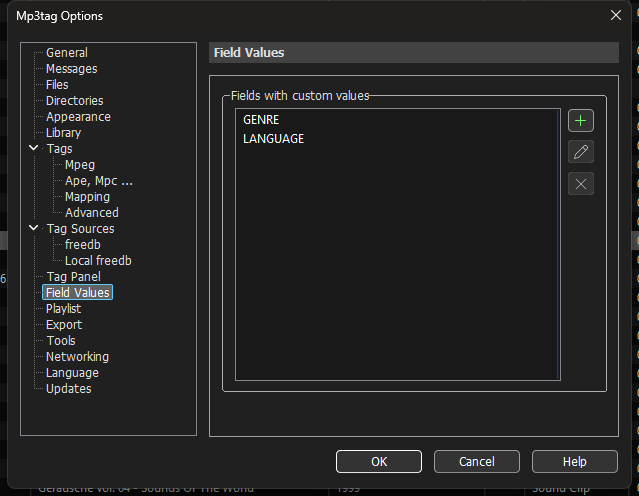
Not all fields are featured in the tag panel but may be only shown in the file list. So far it was not possible to define a custom value for such field but you had to add it to the tag panel to define a value.
As the selection of custom values is also possible in the file list, such a management is a logical evolution.
---
### Author:  [@Florian](https://community.mp3tag.de/u/Florian)
#### Post date: [August 18, 2026, 8:27pm UTC](https://community.mp3tag.de/t/new-added-management-of-custom-field-values-independent-from-tag-panel-fields/71737/3 "2026-08-18T20:27:29Z")
In addition to what @ohrenkino mentioned, removing a field from the Tag Panel now doesn't delete the custom values that were previously tied to that entry.
---
### Author:  [@Sergius](https://community.mp3tag.de/u/Sergius)
#### Post date: [August 25, 2026, 1:14pm UTC](https://community.mp3tag.de/t/new-added-management-of-custom-field-values-independent-from-tag-panel-fields/71737/4 "2026-08-25T13:14:07Z")
Sorry for my late reply...
Thank you so much @ohrenkino and @Florian for your help. I've done some testing and it works perfectly.
ohrenkino, could you provide me with a method or formula to transfer information from one or more fields in Field Values to the tag panel?
---
### Author:  [@ohrenkino](https://community.mp3tag.de/u/ohrenkino)
#### Post date: [August 25, 2026, 1:23pm UTC](https://community.mp3tag.de/t/new-added-management-of-custom-field-values-independent-from-tag-panel-fields/71737/5 "2026-08-25T13:23:10Z")
> [@Sergius](#):
>
> to transfer information from one or more fields in Field Values to the tag panel
I am not sure that I understand - the tag panel shows the same values as the columns in the file list so there is no transfer needed.
If you want to add a certain value quickly as you just stumbled across one, press Shift-Enter. The string is then added to the list for that field.
If you edit the list for a field via Options\>Tags\>Field\>Values\>Fieldname\>Edit then you can add a list of values from an external text file.
---
### Author:  [@Sergius](https://community.mp3tag.de/u/Sergius)
#### Post date: [August 25, 2026, 2:47pm UTC](https://community.mp3tag.de/t/new-added-management-of-custom-field-values-independent-from-tag-panel-fields/71737/6 "2026-08-25T14:47:09Z")
Hello @ohrenkino,
Let me be more specific in my request…
In “Field Values,” we can create one or more fields and add custom data to each field, which doesn't appear in the Tag panel…
“What is the procedure in Mp3tag to configure the tag panel to integrate and display existing metadata (Field Values)?”
---
### Author:  [@ohrenkino](https://community.mp3tag.de/u/ohrenkino)
#### Post date: [August 25, 2026, 2:49pm UTC](https://community.mp3tag.de/t/new-added-management-of-custom-field-values-independent-from-tag-panel-fields/71737/7 "2026-08-25T14:49:29Z")
> [@Sergius](#):
>
> What is the procedure in Mp3tag to configure the tag panel to integrate and display existing metadata (Field Values)?”
Please see the documentation about custom list values:
> **[Editing Fields - Tag Panel – Mp3tag Documentation](https://docs.mp3tag.de/customization/tag-panel/#editing-fields)**
>
> The Tag Panel is the sidebar on the left of the File List that shows the fields to enter metadata. Besides the standard fields, you can add user-defined tag fields to the Tag Panel via Options → Tag Panel. | Customization options for the Tag Panel,...
---
### Author:  [@LyricsLover](https://community.mp3tag.de/u/LyricsLover)
#### Post date: [August 25, 2026, 2:58pm UTC](https://community.mp3tag.de/t/new-added-management-of-custom-field-values-independent-from-tag-panel-fields/71737/8 "2026-08-25T14:58:51Z")
This is how I understand the new feature so far:
You can create a non-standard field however you like.
In this example I choose **EyeColor** as new fieldname.
Then I enter the text
`Green`
and press Shift + Enter.
This saves `Green` in the drop-down list with possible values.
Then I enter
`Blue`
and press again Shift + Enter.
This saves `Blue` additonally in the drop-down list of possible values.
And so on.
Ultimately, all of the eye colours I have previously entered are saved in the list.
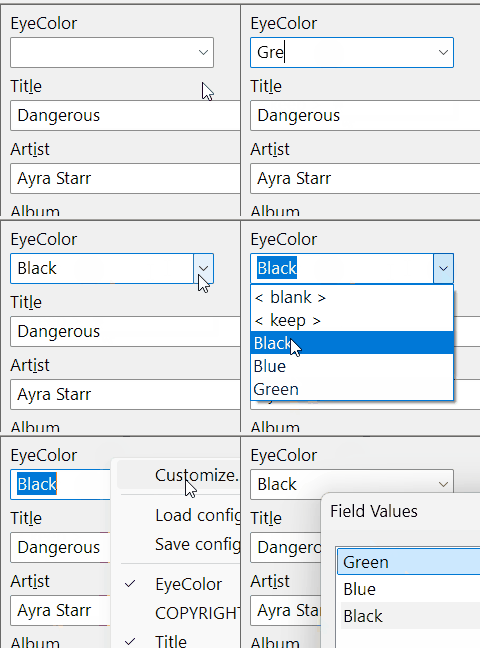
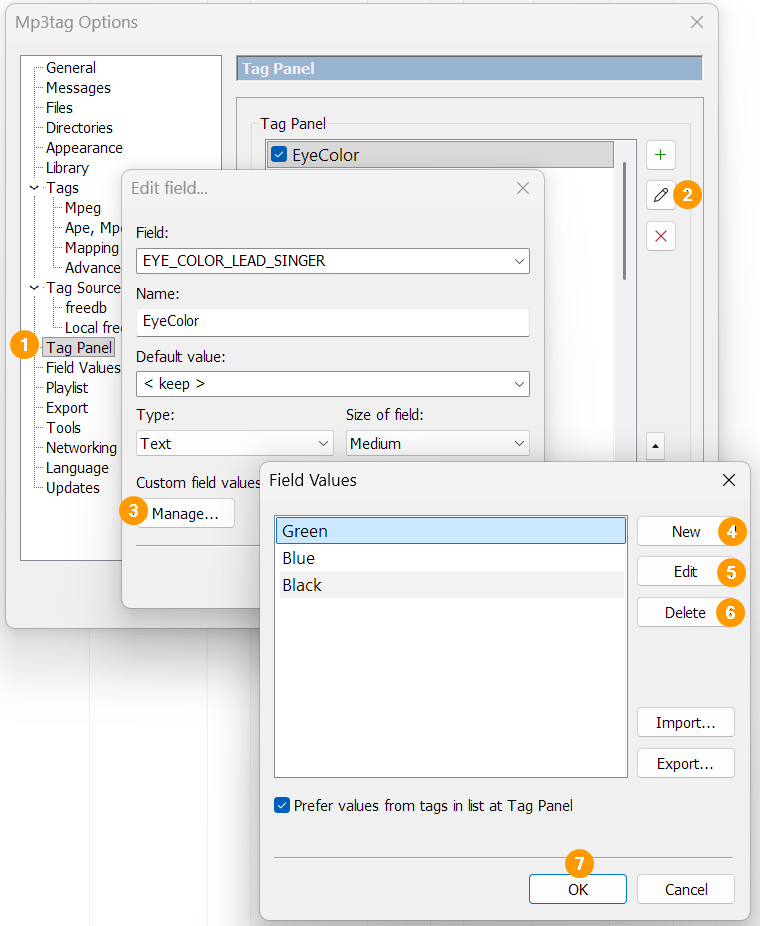
This list can be managed using
**File** -\> **Options** -\> **Tag Panel** -\> **EyeColor** -\> **Edit field...** -\> **Manage...**
As I learned from @ohrenkino:
The same list is also availabe with
**File** -\> **Options** -\> **Field Values** -\> **EYE\_COLOR\_LEAD\_SINGER** -\> **Edit field...**
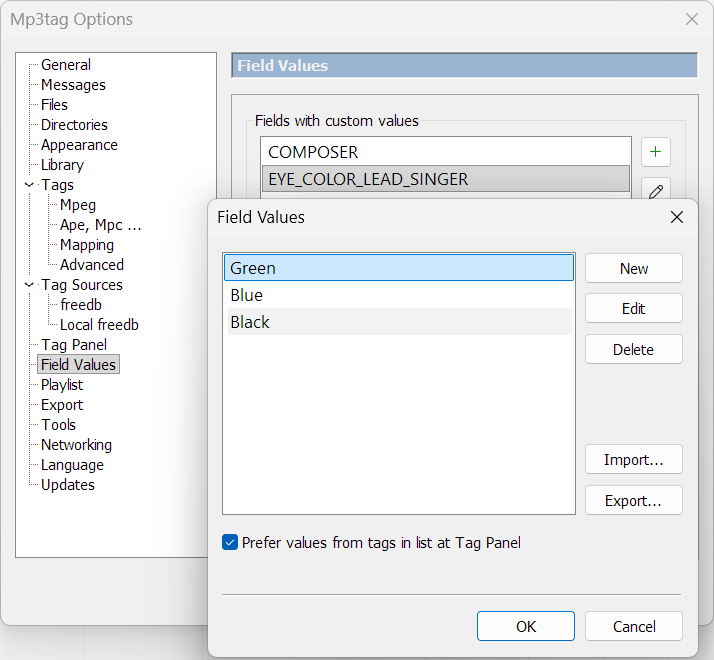
**EYE\_COLOR\_LEAD\_SINGER** is the technical field name where the values are saved.
**EyeColor** is the visible name in the Tag Panel.
---
### Author:  [@Sergius](https://community.mp3tag.de/u/Sergius)
#### Post date: [August 25, 2026, 4:02pm UTC](https://community.mp3tag.de/t/new-added-management-of-custom-field-values-independent-from-tag-panel-fields/71737/9 "2026-08-25T16:02:37Z")
Thanks for the image and video examples, @LyricsLover, and thanks to @ohrenkino for the explanation you gave to LyricsLover. Your explanation helps us better understand the new "Field Values" feature, which I find very interesting.
I tested this using LyricsLover's examples from the tag panel. I added a non-standard tag, and this tag only appears in "Field Values" if I add one or more data points using the "Custom field values" and "Manages" commands. It works perfectly.
If I delete the non-standard tag from the tag panel, it remains in memory in "Field Values," which I think is great.
I might be wrong, but from what I understand, I don't see a command to transfer data from "Field Values" to "Tag Panel" that would allow us to do this at the moment. I think that means we have to reprogram this non-standard tag again in the tag panel.
The non-standard tag is still in memory in "Field Values." LyricsLover, ohrenkino and @Florian, it seems to me that it would be good to have an added command to transfer one or more tags from "Field Values" to "the Tag panel" if that tag(s) do not exist in that section…
---
### Author:  [@LyricsLover](https://community.mp3tag.de/u/LyricsLover)
#### Post date: [August 25, 2026, 4:07pm UTC](https://community.mp3tag.de/t/new-added-management-of-custom-field-values-independent-from-tag-panel-fields/71737/10 "2026-08-25T16:07:24Z")
What exactly do you mean by "Transfer"?
Could you show us an example of when this would be useful?
---
### Author:  [@Sergius](https://community.mp3tag.de/u/Sergius)
#### Post date: [August 25, 2026, 4:13pm UTC](https://community.mp3tag.de/t/new-added-management-of-custom-field-values-independent-from-tag-panel-fields/71737/11 "2026-08-25T16:13:20Z")
Hello @LyricsLover,
This involves taking the existing field(s) from the "Field Values" section and sending this data, if it doesn't already exist, to the "Tag Panel" section.
---
### Author:  [@ohrenkino](https://community.mp3tag.de/u/ohrenkino)
#### Post date: [August 25, 2026, 4:42pm UTC](https://community.mp3tag.de/t/new-added-management-of-custom-field-values-independent-from-tag-panel-fields/71737/12 "2026-08-25T16:42:51Z")
> [@Sergius](#):
>
> I think that means we have to reprogram this non-standard tag again in the tag panel.
You have to (re-)create a field of the same name as listed in the custom value list so that this field can reference the list.
I do not really see where the problem lies.
---
### Author:  [@Sergius](https://community.mp3tag.de/u/Sergius)
#### Post date: [August 25, 2026, 5:03pm UTC](https://community.mp3tag.de/t/new-added-management-of-custom-field-values-independent-from-tag-panel-fields/71737/13 "2026-08-25T17:03:33Z")
Hello @LyricsLover,
I think that if the tag(s) already exist in the "Field Values" section along with several Custom Field Values, why rewrite these tags in the "Tag Panel"?
It would be simpler and faster to copy these same tags from the "Field Values" section to the "Tag Panel," which would make sense.
Is there a formula, using an Actions command, to transfer one or more tag data items from "Field Values" to "Tag Panel"?
---
### Author:  [@ohrenkino](https://community.mp3tag.de/u/ohrenkino)
#### Post date: [August 25, 2026, 5:07pm UTC](https://community.mp3tag.de/t/new-added-management-of-custom-field-values-independent-from-tag-panel-fields/71737/14 "2026-08-25T17:07:25Z")
> [@Sergius](#):
>
> Is there a formula
No, there isn't.
Just like before: even if there is a column for a user-defined or standard field, you still would have to (re-)create it for the tag panel (or vice versa) if you want to see it in both, the tag panel and the file list.
---
### Author:  [@LyricsLover](https://community.mp3tag.de/u/LyricsLover)
#### Post date: [August 25, 2026, 5:51pm UTC](https://community.mp3tag.de/t/new-added-management-of-custom-field-values-independent-from-tag-panel-fields/71737/15 "2026-08-25T17:51:17Z")
> [@Sergius](#):
>
> It would be simpler and faster to copy these same tags from the "Field Values" section to the "Tag Panel," which would make sense.
I'm not sure if you're mixing something up here.
Yes, you see two different menu entries:
1. **File** -\> **Options** -\> **Tag Panel**
2. **File** -\> **Options** -\> **Field Values**
The Field Values look exactly the same.
As far as I understand the feature, Florian could simply delete one of the menu entries.
Or have I misunderstood how this works?
---
### Author:  [@ohrenkino](https://community.mp3tag.de/u/ohrenkino)
#### Post date: [August 25, 2026, 6:05pm UTC](https://community.mp3tag.de/t/new-added-management-of-custom-field-values-independent-from-tag-panel-fields/71737/16 "2026-08-25T18:05:40Z")
> [@LyricsLover](#):
>
> As far as I understand the feature, Florian could simply delete one of the menu entries
The purpose of the feature is that the list of custom values does not depend on the presence of a corresponding field in the tag panel.
Which means: there is one option to define the tag panel and one option to define the list of custom field values - and that should stay like that IMHO.
---
### Author:  [@Sergius](https://community.mp3tag.de/u/Sergius)
#### Post date: [August 25, 2026, 6:18pm UTC](https://community.mp3tag.de/t/new-added-management-of-custom-field-values-independent-from-tag-panel-fields/71737/17 "2026-08-25T18:18:50Z")
Thank you @ohrenkino and @LyricsLover for your informative contributions…
LyricsLover
Let me express my thoughts more clearly:
This is my opinion, and I believe it's a matter of logic, as I've already written:
Why rewrite tag data that has already been deleted from the "Tag Panel" section when this tag data still exists in the "Field Values" section? It would be simpler and faster to send this data, which still exists in the "Field Values" section, to the "Tag Panel" section rather than rewriting it again.
I believe @Florian has read our exchanges; my request is before him. I truly believe it would be beneficial to have a command to transfer field data from the "Field Values" section to the "Tag Panel." I repeat: If the data doesn't exist in this section (Tag Panel), or to have a command added to the Actions menu to perform this data transfer…
---
### Author:  [@Florian](https://community.mp3tag.de/u/Florian)
#### Post date: [August 25, 2026, 6:26pm UTC](https://community.mp3tag.de/t/new-added-management-of-custom-field-values-independent-from-tag-panel-fields/71737/18 "2026-08-25T18:26:04Z")
> [@LyricsLover](#):
>
> As far as I understand the feature, Florian could simply delete one of the menu entries.
I think it's explained really good by @ohrenkino's reply in [post #2](https://community.mp3tag.de/t/new-added-management-of-custom-field-values-independent-from-tag-panel-fields/71737/2) and my addendum in the following post.
Picking up your example from above,
**Options → Tag Panel → EyeColor → Edit field... → Manage...**
and
**Options → Field Values → EYE\_COLOR\_LEAD\_SINGER → Edit field...**
are working on the same underlying data.
However, with this change, deleting field **EyeColor** doesn't also delete the custom field values anymore. This is an important improvement, because it also makes it possible to work with different Tag Panel configurations without needing to maintain custom field values in all the different configurations.
Furthermore, it allows for maintaining custom field values for fields that are edited via Extended Tags or the File List, without the need for the field to be also present on the Tag Panel.
> [@Sergius](#):
>
> it would be beneficial to have a command to transfer field data from the "Field Values" section to the "Tag Panel."
I have difficulties with understanding the suggestion. Let me rephrase how I interpret it: if a field is listed at **Options → Field Values** , e.g., `EYE_COLOR_LEAD_SINGER`, but currently not available at **Options → Tag Panel** , you'd like to have a button that adds a new field with an empty name to the Tag Panel, having the field `EYE_COLOR_LEAD_SINGER` preconfigured as field.
---
### Author:  [@ohrenkino](https://community.mp3tag.de/u/ohrenkino)
#### Post date: [August 25, 2026, 6:29pm UTC](https://community.mp3tag.de/t/new-added-management-of-custom-field-values-independent-from-tag-panel-fields/71737/19 "2026-08-25T18:29:32Z")
> [@Sergius](#):
>
> a command to transfer field data from the "Field Values" section to the "Tag Panel
The best way to see the custom field values is untick the option
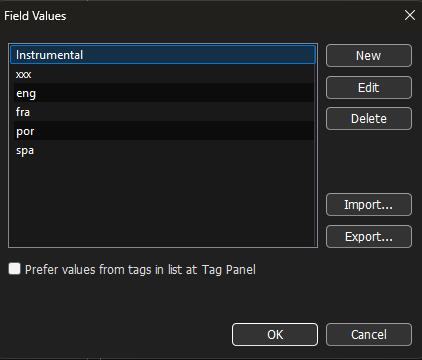
Prefer values from tags in list at Tag Panel
---
### Author:  [@Sergius](https://community.mp3tag.de/u/Sergius)
#### Post date: [August 25, 2026, 6:56pm UTC](https://community.mp3tag.de/t/new-added-management-of-custom-field-values-independent-from-tag-panel-fields/71737/20 "2026-08-25T18:56:31Z")
Yes @Florian, that's exactly it...
> [@Florian](#):
>
> I have difficulties with understanding the suggestion. Let me rephrase how I interpret it: if a field is listed at **Options → Field Values** , e.g., `EYE_COLOR_LEAD_SINGER`, but currently not available at **Options → Tag Panel** , you'd like to have a button that adds a new field with an empty name to the Tag Panel, having the field `EYE_COLOR_LEAD_SINGER` preconfigured as field.
If I understand the principle of the new "Field Values" feature correctly,
Example: The field EYE\_COLOR\_LEAD\_SINGER is only written to the "Field Values" section. I can't use it to write to my audio file. This field, it seems to me, must be located only in the "Tag Panel" for the data to be written to my audio file.
Yes, a kind of button that adds the new field EYE\_COLOR\_LEAD\_SINGER from the "Field Values" section. Along with the "Custom Field Values" data (Green, Blue, Black), it would then that adds to the "Tag Panel" if that data no longer exists in the section.
[Next page](https://community.mp3tag.de/t/new-added-management-of-custom-field-values-independent-from-tag-panel-fields/71737.md?page=2)