# Phantom duplicate tracks
**URL:** https://community.mp3tag.de/t/phantom-duplicate-tracks/13641
**Category:** Support
**Created:** [July 15, 2012, 7:40am UTC](https://community.mp3tag.de/t/phantom-duplicate-tracks/13641 "2012-07-15T07:40:24Z")
**Posts on this page:** 5
**Page:** 1
### Author:  [@susandavies](https://community.mp3tag.de/u/susandavies)
#### Post date: [July 15, 2012, 7:40am UTC](https://community.mp3tag.de/t/phantom-duplicate-tracks/13641/1 "2012-07-15T07:40:24Z")
Hi
(And sorry if this is posted elsewhere already, I have searched.)
I have a folder on my NAS which contains about 4000 mp3 files. I am finding that in the the MP3tag file listing, some of the files appear more than once, with the exact same filename but with old metadata. It is like it is reading some indexed information, not the actual files that are now present. Is this a setting somewhere I can change or what do I need to do to stop this happening? The files aren't really duplicated (obviously!) but appear on the list with the same file name. It's bizarre and makes trying to do meaningful comparisons with another copy of the same files impossible.
Cheers
Susan

---
### Author:  [@stevehero](https://community.mp3tag.de/u/stevehero)
#### Post date: [July 15, 2012, 9:02am UTC](https://community.mp3tag.de/t/phantom-duplicate-tracks/13641/2 "2012-07-15T09:02:34Z")
> [@Susan](#):
>
> .... some of the files appear more than once, with the exact same filename but with old metadata. It is like it is reading some indexed information, not the actual files that are now present.
I don't think it's possible for mp3tag to read files that don't exist. Expand the file location column in your mp3tag window... right above where it says all the '\\NAS-88....' to see where the files are located.
**Note:** No two files **cannot** co-exist in the same folder with the **same file extension**.
If you find that there are dups which is highly likely then set the following up to open windows explorer and locate the bogey file.
1. Ctrl + O or  (brings you to the options)
2. Go to Tools
3. 
4. **Name:** Open Explorer **Path:** C:\Windows\explorer.exe **Parameter:** /e, /select, "%\_path%"
5. Okay
6. _(Optional)_ [x] Use special program at double clicks (This allows you to double click the file and open up windows explorer.
7. Okay
Now to either double click the bogey file as above or right click over the file\>Tools\>Open Explorer. Then get rid of the file.
**A quicker way** is to expand the column see the file that does not belong and right click\>delete...
I'd be amazed if you didn't have a duplicate file as I've never had a problem like this.
---
### Author:  [@susandavies](https://community.mp3tag.de/u/susandavies)
#### Post date: [July 15, 2012, 9:27am UTC](https://community.mp3tag.de/t/phantom-duplicate-tracks/13641/3 "2012-07-15T09:27:05Z")
Good grief what a lemon. I didn't realise it would read sub folders and list them as if they were in the same folder, I took it to mean that folder only. Ok - this is no longer a support request, it's a feature suggestion 😉 option to include sub folders or not!!
Thanks. 
> [@stevehero](#):
>
> I don't think it's possible for mp3tag to read files that don't exist. Expand the file location column in your mp3tag window... right above where it says all the '\\NAS-88....' to see where the files are located.
>
> **Note:** No two files **cannot** co-exist in the same folder with the **same file extension**.
>
> If you find that there are dups which is highly likely then set the following up to open windows explorer and locate the bogey file.
>
> 1. Ctrl + O or  (brings you to the options)
> 2. Go to Tools
> 3. 
> 4. **Name:** Open Explorer **Path:** C:\Windows\explorer.exe **Parameter:** /e, /select, "%\_path%"
> 5. Okay
> 6. _(Optional)_ [x] Use special program at double clicks (This allows you to double click the file and open up windows explorer.
> 7. Okay
>
> Now to either double click the bogey file as above or right click over the file\>Tools\>Open Explorer. Then get rid of the file.
>
> **A quicker way** is to expand the column see the file that does not belong and right click\>delete...
>
> I'd be amazed if you didn't have a duplicate file as I've never had a problem like this.
---
### Author:  [@stevehero](https://community.mp3tag.de/u/stevehero)
#### Post date: [July 15, 2012, 10:39am UTC](https://community.mp3tag.de/t/phantom-duplicate-tracks/13641/4 "2012-07-15T10:39:13Z")
> [@Susan](#):
>
> ...it's a feature suggestion 😉 option to include sub folders or not!!
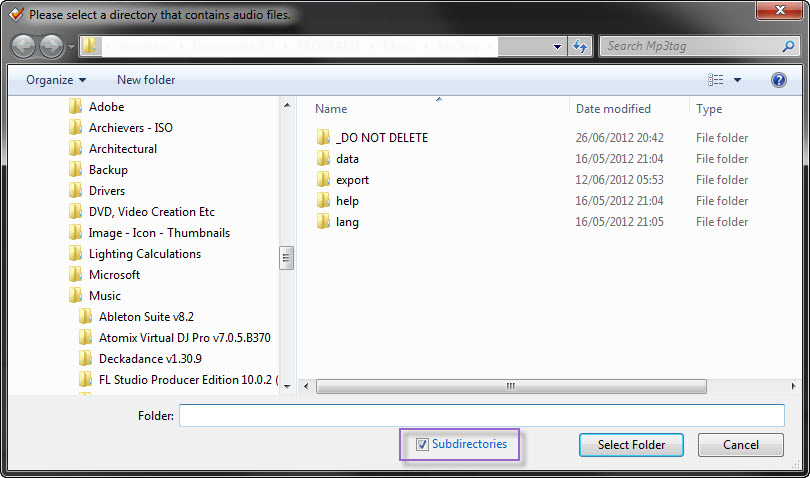
I hate to be the bearer of more bad news but that already exists.
1. Click 
2. See :]

---
### Author:  [@system](https://community.mp3tag.de/u/system)
#### Post date: [February 9, 2026, 12:23pm UTC](https://community.mp3tag.de/t/phantom-duplicate-tracks/13641/5 "2026-02-09T12:23:57Z")