# Positioning "added text" at a specific point within Title text
**URL:** https://community.mp3tag.de/t/positioning-added-text-at-a-specific-point-within-title-text/65997
**Category:** Support
**Created:** [September 21, 2024, 6:14am UTC](https://community.mp3tag.de/t/positioning-added-text-at-a-specific-point-within-title-text/65997 "2024-09-21T06:14:51Z")
**Posts on this page:** 7
**Page:** 1
### Author:  [@djScottie](https://community.mp3tag.de/u/djScottie)
#### Post date: [September 21, 2024, 6:14am UTC](https://community.mp3tag.de/t/positioning-added-text-at-a-specific-point-within-title-text/65997/1 "2024-09-21T06:14:52Z")
I would like to insert an abbreviated DJ Service identifier, i.e. [SI], in the Title, but ensure that it's placed immediately after the song title, but before any following text.
_Here is my example._
Often the title of a track has things after the actual title like:
**Song Title (Remix) (Clean) 120 bpm**
**Song Title [Spinmaster Medley] (Clean) 120 bpm**
Other times, it's just the **Title**.
Can an action with regular expression tools insert " [SI]" at the end of a line, when it's just a title, but position it before any existing "open parentheses "(" or open-brackets "[" when they exist.
Thanks for any help!
(And yes, I did the best search of the forums I could, before posting.)
---
### Author:  [@poster](https://community.mp3tag.de/u/poster)
#### Post date: [September 21, 2024, 6:26am UTC](https://community.mp3tag.de/t/positioning-added-text-at-a-specific-point-within-title-text/65997/2 "2024-09-21T06:26:42Z")
> [@djScottie](#):
>
> Often the title of a track has things after the actual title like:
> **Song Title (Remix) (Clean) 120 bpm**
Are we really talking about the title (title tag-field) or is your example the filename?
---
### Author:  [@LyricsLover](https://community.mp3tag.de/u/LyricsLover)
#### Post date: [September 21, 2024, 8:38am UTC](https://community.mp3tag.de/t/positioning-added-text-at-a-specific-point-within-title-text/65997/3 "2024-09-21T08:38:52Z")
> [@djScottie](#):
>
> Can an action with regular expression tools insert " [SI]" at the end of a line, when it's just a title, but position it before any existing "open parentheses "(" or open-brackets "[" when they exist.
Maybe this is possible with a very complicated regular expression.
I suggest to do it in two steps:
First use an Action "Replace with regular expression" like this:

Format string:
`(\(|\[)(.*(\)|\]))`
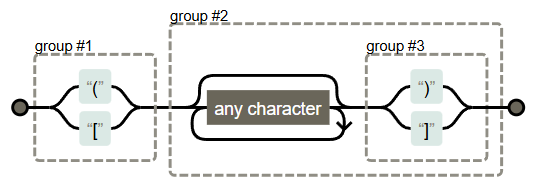
Replace matches with:
`[SI] $1$2`
This would add `[SI]` and a space in front of the first opening bracket or opening square bracket.
* * *
For the second step, [Filter](https://docs.mp3tag.de/filter/) F3 your songs for all TITLE content that has not yet your [SI] added:
`NOT %TITLE% HAS [SI]`
Then use another Action like "Format value"
with a Format string:
`%TITLE% '['SI']'`
_(the square brackets need a special syntax)_
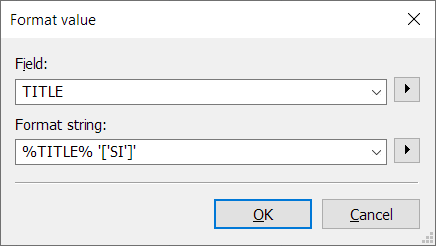
This would add a space and `[SI]` at the end of the existing TITLE content.
Please test it carefully with various possible TITLEs from your collection.
**Hint** :
You can NOT use the regular expression twice for the same TITLE.
It would add [SI] again and again.
---
### Author:  [@djScottie](https://community.mp3tag.de/u/djScottie)
#### Post date: [September 21, 2024, 11:35am UTC](https://community.mp3tag.de/t/positioning-added-text-at-a-specific-point-within-title-text/65997/4 "2024-09-21T11:35:45Z")
Yes, the Title (tag-field). Once I have the Artist and Title tag fields cleaned up, I use the Tag-\>Filename converter to make a cleaner/shorter file name.
---
### Author:  [@djScottie](https://community.mp3tag.de/u/djScottie)
#### Post date: [September 21, 2024, 12:03pm UTC](https://community.mp3tag.de/t/positioning-added-text-at-a-specific-point-within-title-text/65997/5 "2024-09-21T12:03:43Z")
**@LyricsLover, the process worked perfectly.** Here are the steps that yielded perfect Titles! (I added a "Replace" action as the last step in case I somehow create a double [Abbr] [Abbr].)
1. Regular Expression
2. Filter out newly changed "Titles"
3. Format String
4. (Added) Replace "double occurrences"
---
### Author:  [@LyricsLover](https://community.mp3tag.de/u/LyricsLover)
#### Post date: [September 21, 2024, 12:08pm UTC](https://community.mp3tag.de/t/positioning-added-text-at-a-specific-point-within-title-text/65997/6 "2024-09-21T12:08:37Z")
Thanks for your feedback.
Before the next execution of the regular expression, I recommend that you first use a filter that only lists songs with a TITLE that do not yet contain [SI] or another used [Abbr].
This also reduces the risk of creating "double occurrences".
---
### Author:  [@system](https://community.mp3tag.de/u/system)
#### Post date: [October 21, 2024, 12:09pm UTC](https://community.mp3tag.de/t/positioning-added-text-at-a-specific-point-within-title-text/65997/7 "2024-10-21T12:09:03Z")
This topic was automatically closed 30 days after the last reply. New replies are no longer allowed.