# Preserving Modification Time?
**URL:** https://community.mp3tag.de/t/preserving-modification-time/71487
**Category:** Support
**Created:** [June 24, 2026, 2:14pm UTC](https://community.mp3tag.de/t/preserving-modification-time/71487 "2026-06-24T14:14:46Z")
**Posts on this page:** 7
**Page:** 1
### Author:  [@crazyanimal](https://community.mp3tag.de/u/crazyanimal)
#### Post date: [June 24, 2026, 2:14pm UTC](https://community.mp3tag.de/t/preserving-modification-time/71487/1 "2026-06-24T14:14:46Z")
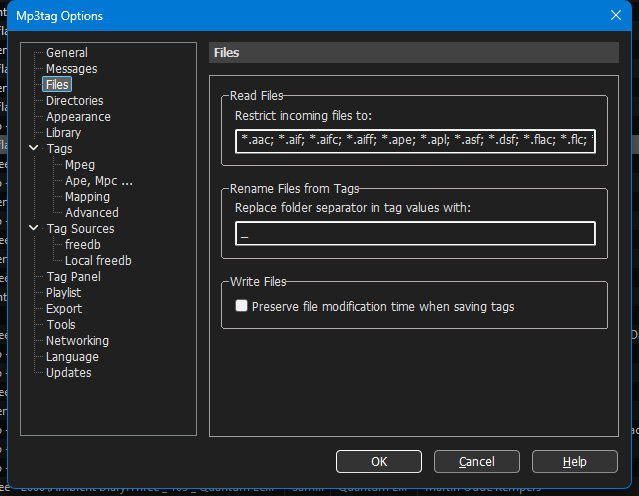
I noticed that MP3Tag is changing the modification dates on my files. Luckily no damage has been done. Of course googling around, i found that there should be an option to preserve the modifcation time under File\>Options\>Tags......but there is no such option with version 3.35. I have also had no luck toggling with the Actions.
Any insight?
---
### Author:  [@ohrenkino](https://community.mp3tag.de/u/ohrenkino)
#### Post date: [June 24, 2026, 2:17pm UTC](https://community.mp3tag.de/t/preserving-modification-time/71487/2 "2026-06-24T14:17:27Z")
> [@crazyanimal](#):
>
> Of course googling around
Was this an AI generated answer?
See here:
---
### Author:  [@crazyanimal](https://community.mp3tag.de/u/crazyanimal)
#### Post date: [June 24, 2026, 2:31pm UTC](https://community.mp3tag.de/t/preserving-modification-time/71487/3 "2026-06-24T14:31:57Z")
Actually, i saw screenshots and answer here: [Unwanted File Timestamp Updates - #3 by Freddy](https://community.mp3tag.de/t/unwanted-file-timestamp-updates/59178/3) not google AI
But of course, the Preserve File Modification option is not there for me.
---
### Author:  [@ohrenkino](https://community.mp3tag.de/u/ohrenkino)
#### Post date: [June 24, 2026, 2:32pm UTC](https://community.mp3tag.de/t/preserving-modification-time/71487/4 "2026-06-24T14:32:51Z")
Please supply a screenshot of the same Options section
---
### Author:  [@LyricsLover](https://community.mp3tag.de/u/LyricsLover)
#### Post date: [June 24, 2026, 2:33pm UTC](https://community.mp3tag.de/t/preserving-modification-time/71487/5 "2026-06-24T14:33:53Z")
> [@crazyanimal](#):
>
> Actually, i saw screenshots and answer here: [Unwanted File Timestamp Updates - #3 by Freddy](https://community.mp3tag.de/t/unwanted-file-timestamp-updates/59178/3) not google AI
This was true in November 2022.
In the meantime, the same Option "Preserve file modification time when saving tags" is available in
**File** -\> **Options** -\> **Files**
From the [changelog](https://www.mp3tag.de/changelog.html) for v3.35:

See also the documentation:
> **[Write Files - Files – Mp3tag Documentation](https://docs.mp3tag.de/customization/options/files/#write-files)**
>
> Mp3tag will read all supported files with the specified file extensions. | Documentation of Files configuration options. Mp3tag is the universal Tag Editor.
---
### Author:  [@crazyanimal](https://community.mp3tag.de/u/crazyanimal)
#### Post date: [June 24, 2026, 3:21pm UTC](https://community.mp3tag.de/t/preserving-modification-time/71487/6 "2026-06-24T15:21:30Z")
Thank You! Yeah I didnt see the release notes for v3.19. I see the option now, and it works!
---
### Author:  [@system](https://community.mp3tag.de/u/system)
#### Post date: [July 1, 2026, 3:22pm UTC](https://community.mp3tag.de/t/preserving-modification-time/71487/7 "2026-07-01T15:22:10Z")
This topic was automatically closed 7 days after the last reply. New replies are no longer allowed.