# Q: Actions - How to Apply to Multiple Fields at Once
**URL:** https://community.mp3tag.de/t/q-actions-how-to-apply-to-multiple-fields-at-once/12089
**Category:** Support
**Created:** [June 4, 2011, 3:11am UTC](https://community.mp3tag.de/t/q-actions-how-to-apply-to-multiple-fields-at-once/12089 "2011-06-04T03:11:50Z")
**Posts on this page:** 7
**Page:** 1
### Author:  [@Flskydiver](https://community.mp3tag.de/u/Flskydiver)
#### Post date: [June 4, 2011, 3:11am UTC](https://community.mp3tag.de/t/q-actions-how-to-apply-to-multiple-fields-at-once/12089/1 "2011-06-04T03:11:50Z")
Forgive me if there is an obvious way to do this and I just haven't been able to find it.
I'm creating a lot of Action Groups as I work my way through updating the tags in my library.
Many actions (such as trimming white space and adjusting spacing, grammar or capitalization) I need to run on several different fields (typically %artistsort%, %artist%, %albumsort%, %album%, %titlesort% and $title%), but by no means all of them.
I have an aversion to using global tags like "\_TAG" lest my actions un-intentionally screw up any other tag fields, like %unsyncedlyrics%, or any comment fields, or any fields used behind the scenes by my playback software that I'm not even aware of.
So when I want to create my own actions, or for example, modify something like the "Title Case" group of Actions compiled by **yog-sothoth** known as "Grammartron", I have to change all of the included global actions from "\_TAG" to, say, %artist% and then duplicate each one of those five or six times (for each applicable tag).
At least I think I have to. Am I missing something?
I wind up with reeaaallly long list of actions when I do this.
It seems the tag field has room to allow a multiple tags if I can only figure out the correct way to separate them. Wouldn't that have the same result as 6 identical actions listed in sequence? Or is this just not possible?
Thanks!
---
### Author:  [@JJ\_Johnson](https://community.mp3tag.de/u/JJ_Johnson)
#### Post date: [June 4, 2011, 3:22am UTC](https://community.mp3tag.de/t/q-actions-how-to-apply-to-multiple-fields-at-once/12089/2 "2011-06-04T03:22:43Z")
I don't believe there is any other way except to duplicate actions within an action group. I use the duplicate button for this. In the end you only have to do it one time, so it's really not too much work in the long run.
---
### Author:  [@Flskydiver](https://community.mp3tag.de/u/Flskydiver)
#### Post date: [June 4, 2011, 3:23am UTC](https://community.mp3tag.de/t/q-actions-how-to-apply-to-multiple-fields-at-once/12089/3 "2011-06-04T03:23:14Z")
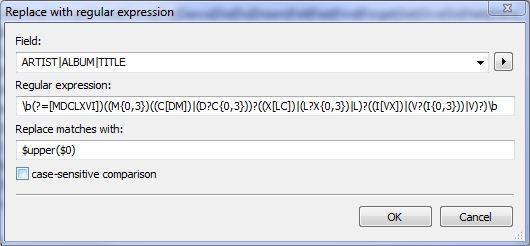
Perhaps this picture will better explain.
Using DetlevD's expression for capitalizing Roman Numberals to 4000, applied to the artist, album, and title tags only.
As 1 action instead of 3. Possible?
---
### Author:  [@Flskydiver](https://community.mp3tag.de/u/Flskydiver)
#### Post date: [June 4, 2011, 3:27am UTC](https://community.mp3tag.de/t/q-actions-how-to-apply-to-multiple-fields-at-once/12089/4 "2011-06-04T03:27:56Z")
> [@JJ Johnson](#):
>
> I don't believe there is any other way except to duplicate actions within an action group. I use the duplicate button for this. In the end you only have to do it one time, so it's really not too much work in the long run.
Thanks, JJ, I think I posted my pic after you replied.
Actually, if you happen to be using a $replace(,a1,b1,a2,b2) type expressions, you have to duplicate the action a lot of times and also change the tag name in the expression each time too. Perhaps the \<\_ALL\> tag could be used there though, I'm not sure.
\*\*\* EDIT TO ADD BELOW:
Actually I make a lot of extra work for myself because I now have these 6 identical actions applied to 6 different tags and when I realize I need to update one of the actions, I have to update SIX different actions instead of just the one. Gets hard to keep track of sometimes. Perhaps that's just user error, not getting it right the first time. 🙂
---
### Author:  [@JJ\_Johnson](https://community.mp3tag.de/u/JJ_Johnson)
#### Post date: [June 4, 2011, 3:33am UTC](https://community.mp3tag.de/t/q-actions-how-to-apply-to-multiple-fields-at-once/12089/5 "2011-06-04T03:33:00Z")
A couple of actions permit specifying multiple fields, separated by semicolons. See 'Remove fields' and 'Remove field except'. Since it's quite explicitly shown that these actions permit multiple fields, I think it's unlikely that others do.
Is there a place-holder variable for "self"? Without one, it would be difficult to define actions that can modify multiple fields.
---
### Author:  [@Flskydiver](https://community.mp3tag.de/u/Flskydiver)
#### Post date: [June 4, 2011, 3:40am UTC](https://community.mp3tag.de/t/q-actions-how-to-apply-to-multiple-fields-at-once/12089/6 "2011-06-04T03:40:01Z")
Place holder variable for "Self" --- Exactly!
Well, If we are sure this isn't possible with the current program, do you think adding such capability (and the "self" placeholder) would be worth asking the author for? I have no idea, unfortunately, how difficult a task that might be ... or if anyone but me might appreciate it.
Perhaps people who have been using this much longer than me know a better way to do what I'm trying to do, that already works. Thanks for the responses!
---
### Author:  [@system](https://community.mp3tag.de/u/system)
#### Post date: [February 9, 2026, 12:23pm UTC](https://community.mp3tag.de/t/q-actions-how-to-apply-to-multiple-fields-at-once/12089/7 "2026-02-09T12:23:08Z")