# Remove "(" and the characters that follow
**URL:** https://community.mp3tag.de/t/remove-and-the-characters-that-follow/3575
**Category:** Support
**Created:** [July 18, 2006, 6:12pm UTC](https://community.mp3tag.de/t/remove-and-the-characters-that-follow/3575 "2006-07-18T18:12:56Z")
**Posts on this page:** 5
**Page:** 1
### Author:  [@Slimfoot](https://community.mp3tag.de/u/Slimfoot)
#### Post date: [July 18, 2006, 6:12pm UTC](https://community.mp3tag.de/t/remove-and-the-characters-that-follow/3575/1 "2006-07-18T18:12:56Z")
How do I make this:
Cupido (Ft. Freddy Fender & Ri
Look like this:
Cupido
My apologies for not knowing the action to fix this with. I have searched help section.
Slim
---
### Author:  [@DetlevD](https://community.mp3tag.de/u/DetlevD)
#### Post date: [July 18, 2006, 6:45pm UTC](https://community.mp3tag.de/t/remove-and-the-characters-that-follow/3575/2 "2006-07-18T18:45:19Z")
> [@Slimfoot](#):
>
> ... [convert from] 'Cupido (Ft. Freddy Fender & Ri' [to] 'Cupido'
Try _Replace by RegExp_ as following:
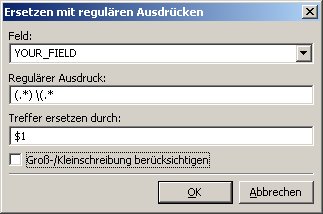
DD.20060718.2245

---
### Author:  [@Sebastian\_Mares](https://community.mp3tag.de/u/Sebastian_Mares)
#### Post date: [July 18, 2006, 6:45pm UTC](https://community.mp3tag.de/t/remove-and-the-characters-that-follow/3575/3 "2006-07-18T18:45:48Z")
Action #1:
_Action type:_ **Replace with regular expression**
_Field:_ **FIELD**
_Regular expression:_ **(.\*$**
_Replace matches with:_
[] case-sensitive comparison
Notice that you have to replace FIELD with the field you want (TITLE, ARTIST, \_FILENAME, etc.).
---
### Author:  [@Slimfoot](https://community.mp3tag.de/u/Slimfoot)
#### Post date: [July 18, 2006, 7:17pm UTC](https://community.mp3tag.de/t/remove-and-the-characters-that-follow/3575/4 "2006-07-18T19:17:04Z")
Thanks to both of you that responded. Both methods work. I wish I could understand the actions and regular expressions better. Are either of these methods mentioned in the FAQ?
Slim
---
### Author:  [@system](https://community.mp3tag.de/u/system)
#### Post date: [February 9, 2026, 12:19pm UTC](https://community.mp3tag.de/t/remove-and-the-characters-that-follow/3575/5 "2026-02-09T12:19:49Z")