# Remove Itunes Comment field
**URL:** https://community.mp3tag.de/t/remove-itunes-comment-field/71502
**Category:** Support
**Created:** [June 25, 2026, 10:46pm UTC](https://community.mp3tag.de/t/remove-itunes-comment-field/71502 "2026-06-25T22:46:07Z")
**Posts on this page:** 5
**Page:** 1
### Author:  [@Ramtrol](https://community.mp3tag.de/u/Ramtrol)
#### Post date: [June 25, 2026, 10:46pm UTC](https://community.mp3tag.de/t/remove-itunes-comment-field/71502/1 "2026-06-25T22:46:07Z")
I discovered a very easy way to update that [COMMENT ITUNNORM] that confuses the comment field in windows vs mp3 tags.
First, I used Alt-T to view those hidden fields.
Then simply select the files you want to update. Select ALL if you want to do it wholesale.
Then using the Tag - Tag function from the menu.
In the drop-down box select the Field you want to update, in this case COMMENT ITUNNORM
Leave the Format String empty. Press OK
Works like a champ and can help clearing out other tags you want to globally empty or fill for that matter.
Worked for me!
---
### Author:  [@LyricsLover](https://community.mp3tag.de/u/LyricsLover)
#### Post date: [June 26, 2026, 6:09am UTC](https://community.mp3tag.de/t/remove-itunes-comment-field/71502/2 "2026-06-26T06:09:52Z")
Alternatively, you can select the unwanted field directly in Alt+T and delete it by clicking the red x button:

Deleting a field completely is the same as update it with an "empty content".
---
### Author:  [@ohrenkino](https://community.mp3tag.de/u/ohrenkino)
#### Post date: [June 26, 2026, 7:03am UTC](https://community.mp3tag.de/t/remove-itunes-comment-field/71502/3 "2026-06-26T07:03:05Z")
If you have a list of fields that you always want to keep or a list of fields that you always want to remove, then an action to treat fields could make it easier for you:
> **[Remove Fields Except – Mp3tag Documentation](https://docs.mp3tag.de/actions/remove-fields-except/)**
>
> Documentation on the Remove Fields Except action type that can be performed as Quick Action or as reusable workflow from Action Groups. Mp3tag is the universal Tag Editor.
> **[Remove Fields – Mp3tag Documentation](https://docs.mp3tag.de/actions/remove-fields/)**
>
> Documentation on the Remove Fields action type that can be performed as Quick Action or as reusable workflow from Action Groups. Mp3tag is the universal Tag Editor.
---
### Author:  [@Sergius](https://community.mp3tag.de/u/Sergius)
#### Post date: [June 26, 2026, 3:08pm UTC](https://community.mp3tag.de/t/remove-itunes-comment-field/71502/4 "2026-06-26T15:08:03Z")
Hello @Ramtrol,
Here are two examples of how to remove the [COMMENT ITUNNORM] tag, which interferes with the COMMENT tag...
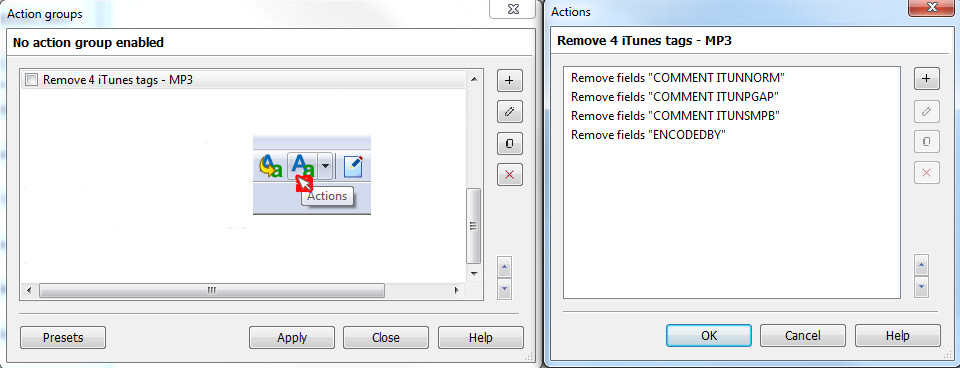
When we receive MP3 audio files from iTunes, we have four iTunes tags. We can easily remove them using the ACTIONS command, as @ohrenkino suggested.
Here are two ways to do it with the Actions command:
1. Directly using the Actions command
2. The Mp3tag program now allows us to program: The two customizable icon bars, by adding icons available in Mp3tag, or you can choose and/or create your own icons as I did...
See my 2 images

---
### Author:  [@system](https://community.mp3tag.de/u/system)
#### Post date: [July 3, 2026, 3:08pm UTC](https://community.mp3tag.de/t/remove-itunes-comment-field/71502/5 "2026-07-03T15:08:45Z")
This topic was automatically closed 7 days after the last reply. New replies are no longer allowed.