# Remove Part of Filename to Comment Field
**URL:** https://community.mp3tag.de/t/remove-part-of-filename-to-comment-field/4161
**Category:** Support
**Created:** [December 9, 2006, 6:32pm UTC](https://community.mp3tag.de/t/remove-part-of-filename-to-comment-field/4161 "2006-12-09T18:32:06Z")
**Posts on this page:** 8
**Page:** 1
### Author:  [@nohart](https://community.mp3tag.de/u/nohart)
#### Post date: [December 9, 2006, 6:32pm UTC](https://community.mp3tag.de/t/remove-part-of-filename-to-comment-field/4161/1 "2006-12-09T18:32:06Z")
I have a file(s) named:
2 Pac - Can't C Me (Ft. George Clinton).mp3
2 Pac - All Bout U (Ft. Snoop Dogg, Nate Dogg & Dru Down).mp3 etc...
I want to take out the part in parenthesis (Ft. George Clinton) along with the leading space and put this in the Comment field minus the leading space.
So the new filename would be:
2 Pac - Can't C Me.mp3
2 Pac - All Bout U.mp3
and the comments added to the tag would be:
(Ft. George Clinton)
(Ft. Snoop Dogg, Nate Dogg & Dru Down)
or (preferred)
Featuring George Clinton
Featuring Snoop Dogg, Nate Dogg & Dru Down
Is there an action for this?
---
### Author:  [@DetlevD](https://community.mp3tag.de/u/DetlevD)
#### Post date: [December 10, 2006, 10:51am UTC](https://community.mp3tag.de/t/remove-part-of-filename-to-comment-field/4161/2 "2006-12-10T10:51:32Z")
> [@nohart](#):
>
> ... 2 Pac - All Bout U (Ft. Snoop Dogg, Nate Dogg & Dru Down).mp3 etc. ...
> I want to take out the part in parenthesis (Ft. George Clinton) along with the leading space and put this in the Comment field minus the leading space. ...
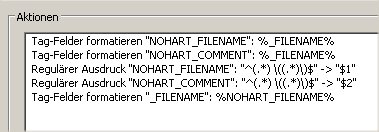
You may try something like this (adapt the fieldname to your needs):

---
### Author:  [@nohart](https://community.mp3tag.de/u/nohart)
#### Post date: [December 10, 2006, 8:32pm UTC](https://community.mp3tag.de/t/remove-part-of-filename-to-comment-field/4161/3 "2006-12-10T20:32:35Z")
> [@DetlevD](#):
>
> You may try something like this (adapt the fieldname to your needs):
> 
WOW! How do I do that? It looks like something written another language... I am sorry I dont understand what the fields are?
Like:
Tag\_Felder formatieren etc...
My program is in english.
---
### Author:  [@DetlevD](https://community.mp3tag.de/u/DetlevD)
#### Post date: [December 11, 2006, 3:54am UTC](https://community.mp3tag.de/t/remove-part-of-filename-to-comment-field/4161/4 "2006-12-11T03:54:44Z")
> [@nohart](#):
>
> WOW! How do I do that? It looks like something written another language... I am sorry I dont understand what the fields are?
> Like:
> Tag\_Felder formatieren etc...
> My program is in english.
_Aktionstyp:_ **Tag-Felder formatieren**
_Action type:_ **Format value**
_Aktionstyp:_ **Ersetzen mit regulären Ausdrücken**
_Action type:_ **Replace with regular expression**
DD.20061211.0554
---
### Author:  [@nohart](https://community.mp3tag.de/u/nohart)
#### Post date: [December 11, 2006, 5:37am UTC](https://community.mp3tag.de/t/remove-part-of-filename-to-comment-field/4161/5 "2006-12-11T05:37:01Z")
Thanks for the reply but what does Regularer Ausdruck mean? Also what Action Type should I use?
Here is what I want:
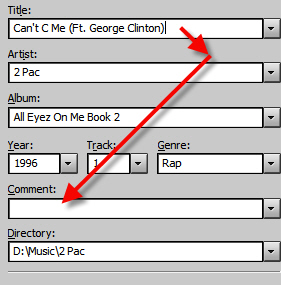
So the tag looks like this:
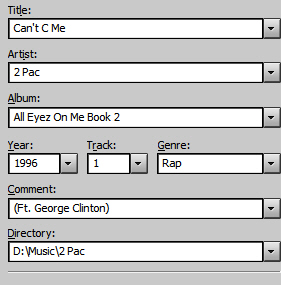
So I created an action as you sugested:
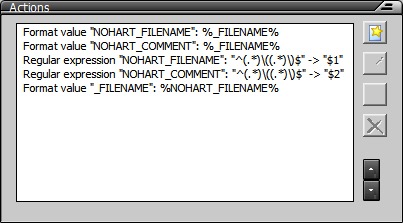
As you can see what happened is that what was in parenthesis did not move but that 2 new fields were created:
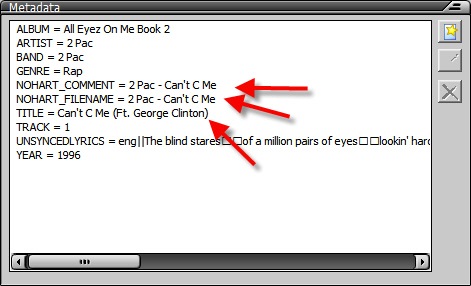




---
### Author:  [@nohart](https://community.mp3tag.de/u/nohart)
#### Post date: [December 11, 2006, 6:14am UTC](https://community.mp3tag.de/t/remove-part-of-filename-to-comment-field/4161/6 "2006-12-11T06:14:33Z")
Here is what I did from reading several posts and putting a few of them together to create an action:
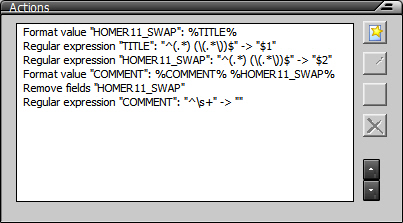
Which moved what was in parenthesis in the Title Field to the Comment Field then the script removed the leading space:



---
### Author:  [@DetlevD](https://community.mp3tag.de/u/DetlevD)
#### Post date: [December 11, 2006, 8:12am UTC](https://community.mp3tag.de/t/remove-part-of-filename-to-comment-field/4161/7 "2006-12-11T08:12:45Z")
> [@nohart](#):
>
> Thanks for the reply but what does Regularer Ausdruck mean? ...
Regular expressions can be used for validating data fields and manipulating information.
> [@nohart](#):
>
> Also what Action Type should I use? ...
> As you can see what happened is that what was in parenthesis did not move but that 2 new fields were created: ...
So far so good, but make sure to use the correct regular expression string : **^(._) ((._))$**
Note the space char after the first group.
DD.20061211.1012
And make sure not to mix up %\_FILENAME% with %TITLE%.
%\_FILENAME% means the name of the data file used within the storage filesystem.
%TITLE% means the MP3 data tag used within the MP3 file.
DD.20061211.1020
---
### Author:  [@system](https://community.mp3tag.de/u/system)
#### Post date: [February 9, 2026, 12:20pm UTC](https://community.mp3tag.de/t/remove-part-of-filename-to-comment-field/4161/8 "2026-02-09T12:20:02Z")