# Remove random number in title
**URL:** https://community.mp3tag.de/t/remove-random-number-in-title/13544
**Category:** Support
**Created:** [June 12, 2012, 4:41pm UTC](https://community.mp3tag.de/t/remove-random-number-in-title/13544 "2012-06-12T16:41:09Z")
**Posts on this page:** 7
**Page:** 1
### Author:  [@motom](https://community.mp3tag.de/u/motom)
#### Post date: [June 12, 2012, 4:41pm UTC](https://community.mp3tag.de/t/remove-random-number-in-title/13544/1 "2012-06-12T16:41:09Z")
HI,
Thanks to the forum, I managed to make some big changes on the title of the podcast i downloaded
Filename to tag, make action group to add and remove text on title and thing like that. However I'm not so good with the regular expressions or scripting, not sure what you calls it.
So here's the last problem i'm facing.
the podcast file name is something like this
revolution\_2010-11-26\_1\_91fc.mp3,
revolution\_2010-11-26\_2\_c7d6.mp3,
revolution\_2010-11-26\_3\_f5c1.mp3
...etc
while 91fc, c7d6, f5c1 are random numbers and char
They all don't have titles.
i've managed to put titles and add the date to the title also remove revolution\_ using action group.
so the title look like this.
2010-11-26\_1\_91fc\_Bele Bala 女同事
2010-11-26\_2\_c7d6\_職場上位要埋堆
2010-11-26\_3\_f5c1\_點搞女波士?
...etc
So i'm wondering how can i remove the random numbers and char.
The action group i use is
Field: TITLE
Regualr expression: ^\l\*\_
Is there anything i can add to the action group to remove those random numbers and char or should I make another action group and what would it be?
Thanks for the help 🙂))
---
### Author:  [@stevehero](https://community.mp3tag.de/u/stevehero)
#### Post date: [June 12, 2012, 6:13pm UTC](https://community.mp3tag.de/t/remove-random-number-in-title/13544/2 "2012-06-12T18:13:15Z")
> [@motom](#):
>
> so the title look like this.
>
> 2010-11-26\_1\_91fc\_Bele Bala 女同事
>
> 2010-11-26\_2\_c7d6\_職場上位要埋堆
> 2010-11-26\_3\_f5c1\_點搞女波士?
> ...etc
>
>
>
> So i'm wondering how can i remove the random numbers and char.
Use the following:
_Action type:_ **Format value**
_Field:_ **TITLE**
_Formatstring:_ **$regexp(%title%,'^(\d{4}-\d{2}-\d{2}_\d+_)[\w]+\_(.+)',$1$2)**
---
### Author:  [@motom](https://community.mp3tag.de/u/motom)
#### Post date: [June 13, 2012, 2:26am UTC](https://community.mp3tag.de/t/remove-random-number-in-title/13544/3 "2012-06-13T02:26:26Z")
> [@stevehero](#):
>
> Use the following:
>
> _Action type:_ **Format value**
> _Field:_ **TITLE**
> _Formatstring:_ **$regexp(%title%,'^(\d{4}-\d{2}-\d{2}_\d+_)[\w]+\_(.+)',$1$2)**
Thank you It works perfectly 🙂
I can understand the meaning of most of the code.
If I want to learn about the expression. where can I find tutorial. I'm looking at the help page but it didnt say much.
I can understand ^(\d{4}-\d{2}-\d{2}_\d+_), but not [\w]+\_(.+)',$1$2) and the use of ' '
Thanks again
---
### Author:  [@stevehero](https://community.mp3tag.de/u/stevehero)
#### Post date: [June 13, 2012, 11:35am UTC](https://community.mp3tag.de/t/remove-random-number-in-title/13544/4 "2012-06-13T11:35:34Z")
> [@motom](#):
>
> but not [\w]+\_(.+)',$1$2) and the use of ' '
No prob, I've attached this screenshot of the program where I basically learned regexp. Its called 'RegexBuddy' See the video for it [HERE.](http://www.regexbuddy.com/democreate.html)
**ATTACHMENT** Study this  Notice where you can put the specific text you want in the box and it automatically brings back the result.
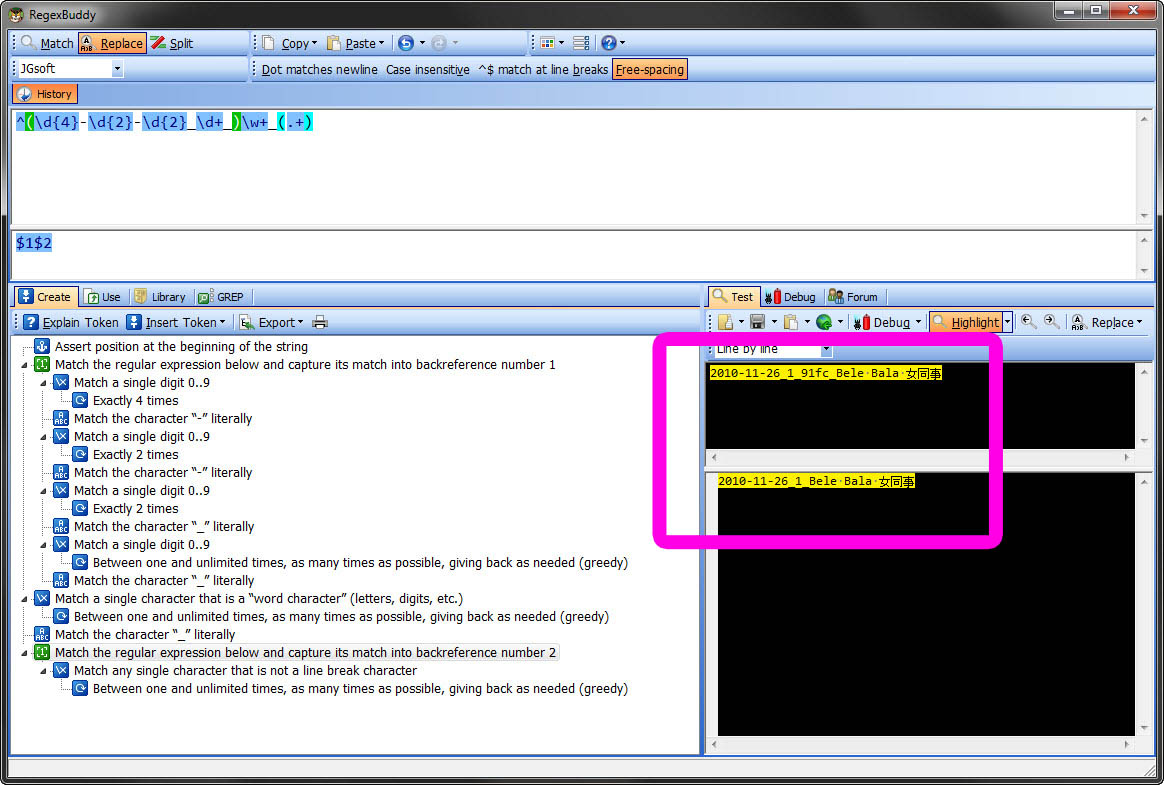
In [https://docs.mp3tag.de/actions](https://docs.mp3tag.de/actions) it states that:
_\w Any word character - all alphanumeric characters plus the underscore_
Wrapping that in '' doesn't make any difference in this case.
For the ' ' in the regexp [https://docs.mp3tag.de/scripting](https://docs.mp3tag.de/scripting) states there that:
_,() These characters must only be escaped when they are inside a scripting function._
As you can see there is so thats why. Is the same for the part of $regexp(what, **expr,repl** ) highlighted bold. If you want the **repl** to have a _,()_ then you have to escape it otherwise it won't work.
But to learn more this is a good place to start:
[http://www.regular-expressions.info/tutorialcnt.html](http://www.regular-expressions.info/tutorialcnt.html)
regexp is really additive once you start and its a godsend when you want to batch rename files on your computer not JUST your audio files.

---
### Author:  [@motom](https://community.mp3tag.de/u/motom)
#### Post date: [June 13, 2012, 1:13pm UTC](https://community.mp3tag.de/t/remove-random-number-in-title/13544/5 "2012-06-13T13:13:09Z")
> [@stevehero](#):
>
> **ATTACHMENT** Study this  Notice where you can put the specific text you want in the box and it automatically brings back the result.
>
> 
>
> regexp is really additive once you start and its a godsend when you want to batch rename files on your computer not JUST your audio files.
haha thank you. I understand a bit more again now. 😆
Still trying to understand what escape means. Is that why you have to use '' ? for "escape"?
yeah actually just know about regexp not long ago. I just start to know I can use it to edit text with notepad++, only the basic stuff tho.
just started to use mp3tag, I have a collection of songs. It should be useful to make changing to them.
Thanks a lot with the link. gonna take time to learn about it now.
How long does it take for you to become good at regexp ? 😛
---
### Author:  [@stevehero](https://community.mp3tag.de/u/stevehero)
#### Post date: [June 13, 2012, 1:40pm UTC](https://community.mp3tag.de/t/remove-random-number-in-title/13544/6 "2012-06-13T13:40:14Z")
> [@motom](#):
>
> haha thank you. I understand a bit more again now. 😆
> Still trying to understand what escape means. Is that why you have to use '' ? for "escape"?
the the following regexp **^(\d{4}-\d{2}-\d{2}_\d+_)[\w]+\_(.+)** must be wrapped with '' because it contains both ( and ). The can be said for the , character.
> [@motom](#):
>
> How long does it take for you to become good at regexp ? 😛
if you get stuck in prob a couple of days.
I just googled  a free tester and came back with this wedsite [http://regexpal.com/](http://regexpal.com/) so just type in the bottom box the specific text you want to match the it will give you live feedback as to what's doing what.
Glad to be of help.
---
### Author:  [@system](https://community.mp3tag.de/u/system)
#### Post date: [February 9, 2026, 12:23pm UTC](https://community.mp3tag.de/t/remove-random-number-in-title/13544/7 "2026-02-09T12:23:54Z")