# Replace last comma in title with colon
**URL:** https://community.mp3tag.de/t/replace-last-comma-in-title-with-colon/71594
**Category:** Support
**Created:** [July 11, 2026, 3:15pm UTC](https://community.mp3tag.de/t/replace-last-comma-in-title-with-colon/71594 "2026-07-11T15:15:40Z")
**Posts on this page:** 5
**Page:** 1
### Author:  [@dvdr](https://community.mp3tag.de/u/dvdr)
#### Post date: [July 11, 2026, 3:15pm UTC](https://community.mp3tag.de/t/replace-last-comma-in-title-with-colon/71594/1 "2026-07-11T15:15:40Z")
Hi
with classical music, I often get a mix of different ways, a title is written.
xxxx, xxxx, op.2, I. Largo
or
xxxx op. 2, I. Largo
Is there a way, I can always just address the LAST comma in the title (no matter, how many commas the title contains) and replace it with a colon ?
Thanks for you help!
---
### Author:  [@LyricsLover](https://community.mp3tag.de/u/LyricsLover)
#### Post date: [July 11, 2026, 3:34pm UTC](https://community.mp3tag.de/t/replace-last-comma-in-title-with-colon/71594/2 "2026-07-11T15:34:05Z")
> [@dvdr](#):
>
> xxxx op. 2, I. Largo
You could try Convert Tag -\> Tag with
`$regexp(%title%,',\s*(?!.*,)',': ')`
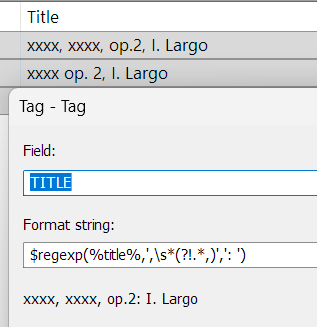
Examples:
xxxx, xxxx, op.2, I. Largo
---\>
xxxx, xxxx, op.2: I. Largo
or
xxxx op. 2, I. Largo
---\>
xxxx op. 2: I. Largo
The regular expression
`,\s*(?!.*,)`
works as follows:
- `,` → matches a literal comma.
- `\s*` → matches zero or more whitespace characters after the comma.
- `(?!.*,)` → negative lookahead: verifies that there is **no other comma** anywhere to the right of the current position.
As a result, only the **last comma** in the string is matched.
We can provide more specific suggestions if you show us complete, real-life examples.
---
### Author:  [@ohrenkino](https://community.mp3tag.de/u/ohrenkino)
#### Post date: [July 11, 2026, 3:41pm UTC](https://community.mp3tag.de/t/replace-last-comma-in-title-with-colon/71594/3 "2026-07-11T15:41:36Z")
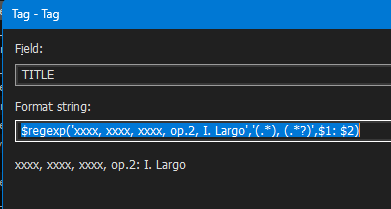
As there are many ways to skin a cat, here an alternative:
`$regexp('xxxx, xxxx, xxxx, op.2, I. Largo','(.*), (.*?)',$1: $2)`
---
### Author:  [@dvdr](https://community.mp3tag.de/u/dvdr)
#### Post date: [July 11, 2026, 3:49pm UTC](https://community.mp3tag.de/t/replace-last-comma-in-title-with-colon/71594/4 "2026-07-11T15:49:13Z")
> [@LyricsLover](#):
>
> You could try Convert Tag -\> Tag with
> `$regexp(%title%,',\s*(?!.*,)',': ')`
Thank you very much - that does the trick!
Especially thank you for explaining, how that regexp works: that makes me understand and hopefully be able to apply that lookup for a "last character" to other use-cases!
---
### Author:  [@system](https://community.mp3tag.de/u/system)
#### Post date: [July 18, 2026, 3:49pm UTC](https://community.mp3tag.de/t/replace-last-comma-in-title-with-colon/71594/5 "2026-07-18T15:49:51Z")
This topic was automatically closed 7 days after the last reply. New replies are no longer allowed.