You could ask the same question about the other tags that you are seeing in that Foobar screenshot including Album Artist, Total Tracks, Disc Number, Total Discs, etc. Clearly either you are looking at two different files, or Foobar has kept these additional details in a library file that isn't being written back to the actual metadata within the file.
The COMPILATION field is the name used in mp3tag. It is actually mapped differently based on filetype as found here.
Not here. If I add the tagfield ITUNESCOMPILATION in Foobar it shows as COMPILATION in MP3Tag and if I add a tagfield COMPILATION in MP3Tag it shows as ITUNESCOMPLILATION in Foobar.
thanks for your reply.
I edited several other albums in foobar's properties window and added itunescompilation value set to 1 and the foobar android is able to sort these out fine.
I wonder why their version of compilation works and mp3tag doesn't. I would've loved to do this operation in mp3tag because of its nondestructive capability and preserve the modification time. Maybe try and older version of mp3tag?
Also who knows how foo-android will behave when it has 40K of these....
Up in post #32 your screenshot shows that you have both id3v1 and id3v2.3 tags saved in your files. You may want to check your setting to ensure the v2.3 tags are being read and displayed in mp3tag. With modern players there is no reason to continue to have v1 tags there to confuse things.
Well, I use Mp3Tag version 3.23b (64 bit) and foobar2000 version 2.1 (32 bit) and I bet that if you have different versions, that it has nothing to do with this.
You wrote that you deleted the compilation tag in Mp3Tag.
Did you refresh the view in foobar after deleting this tag outside foobar or did you close foobar and load the files again? Otherwise you will still see the content that you deleted with an external program.
To refresh in foobar:
Properties -> Tools -> Reload info
The same is valid for Mp3Tag. If you change tag-content outside of Mp3Tag you have to refresh the view or reload the files. (CTRL-t or )
**
firstly , i want to thank you all once again for your help and patiently answering my questions.
this kind of exchanges can get a bit tidous after a while.
and it's also important for everyone to remember that both foobar and mp3tag are non-commercial programs. besides, you can never get this kind of support for the commercial stuff.so i would like to thank those that make it possible and those that try to help the users. And when something goes wrong, I start by questioning myself not the programs, if I have given a different impression please do accept my apologies. Also going through my previous messages, I see that I might have done that. This is already a busy thread and partially due to my confusion at the beginning. (It took me a while to realize that foobar-android was behaving differently when fed with 40K files vs 200 files)
**
Ok, now that I'm done with my disclaimer
re: Clearly either you are looking at two different files, or Foobar has kept these additional details in a library file that isn't being written back to the actual metadata within the file. re: refresh the view in foobar + mp3tag
Both of these replies were in a way related, and very helpful in preventing to jump to wrong conclusions. Thank you!
I can now confirm that indeed I was mistaken! The compilation set to 1 in mp3tag transfers to foobar as itunescompilation.
re: you have both id3v1 and id3v2.3 tags saved in your files. You may want to check your setting to ensure the v2.3 tags are being read and displayed in mp3tag.
Thank you for the warning. I didn't want to further bother you with my questions. I had to look up other threads and try yo figure how to change the settings and I'm afraid I'm totally lost. I cannot remove id3v1 from the tags.
I presume the enclosed screenshot shows that mp3tag reads v2.3 tags, am I correct please?
Could older version tags be causing android-foobar's confusion?
IS there a safe way to convert all tags to v2.3 only? (i couldn't find the answer to this in other threads)
Many thanks!
The settings in the screenshot look OK for mp3 files.
So if you want to remove tags, then make sure that you only treat this file type.
To remove ID3V1 tags,
select the files
right-click on the selected files
select "Cut tag"
wait until the files have been saved.
Check with a filter %_tag% HAS ID3V1
and a hopefully resulting empty file list that the V1 tags have gone.
As always: try it with test files first, if it works, then the real thing.
In contrary to APE-tags, that can lead to a many confusions. it is not essential to remove ID3V1-Tags.
There only could be problems if they get out of sync.
The setting that you have for "Remove" is o.k. in order to remove ID3v1 tags and APE-tags.
To remove just mark your files and click on the red-cross-icon. All ID3V1 an APE-Tags get removed.
Again there could be a problem, if your tags are out of sync and your ID3v2-tags don't contain all taginfo.
If you kept your settings for writing ID3v2-tags all the time in the past, this cannot have happend.
I see...
Ok, I have a test library with 200+ mp3 files...I'll experiment before doing anything drastic.
I may come back with more questions
Here are my extended tags.
I'm pretty much sure this is true for all my library not just the 200 mp3 that i picked for compilation conundrum (I went on their forum too. But no replies yet. I also see that foobar has a new android version)
an important PS:
re: The compilation failure in large foobar android library..
I am using UpNP with foobar v2 on PC to share the files with android. I wonder if this is also a problem?
Just a small side note:
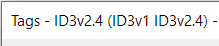
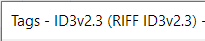
If you click on a single file (not multiple selected files) and then view the Extended Tags, you see the tag types in the title of the popup window like this:
DONE, SUCCESS!
First of group Albums (5977 tracks) successfully converted.
Who knows what it was?
Maybe it was just a matter of properties refresh in foobar? v.1 vs v.2 conflict? I doubt today's foobar android update had anything to do with it.
After the operation:
-All tags are v2.3
-Albums with more than single "artist" (in my case "composer") are now labeled under single cover with a "various artists" label in foobar ANDROID
Thank you all!

 )
)