# Shift+Del broken

**URL:** https://community.mp3tag.de/t/shift-del-broken/60573
**Category:** Fixed Bugs
**Tags:** bug-fixed
**Created:** [April 1, 2023, 8:17am UTC](https://community.mp3tag.de/t/shift-del-broken/60573 "2023-04-01T08:17:43Z")
**Posts on this page:** 7
**Page:** 2

<div class="post-metadata">

### Author: ![Florian](https://community.mp3tag.de/user_avatar/community.mp3tag.de/florian/32/5759_2.png) [@Florian](https://community.mp3tag.de/u/Florian)
#### Post date: [October 14, 2026, 7:12am UTC](https://community.mp3tag.de/t/shift-del-broken/60573/22 "2026-10-14T07:12:41Z")

</div>

v3.36 uses Shift+Return and Shift+Del for adding and removing the custom field values. Pressing Ctrl doesn't have an effect there.

You wrote before that Shift+Ctrl+Return and Shift+Ctrl+Del work on one Windows 10 system, but not on the other with v3.37-beta.2. Can you investigate what's different (maybe wrt. to the keyboard)?

---

<div class="post-metadata">

### Author: ![Sergius](https://community.mp3tag.de/letter_avatar_proxy/v4/letter/s/ebca7d/32.png) [@Sergius](https://community.mp3tag.de/u/Sergius)
#### Post date: [October 14, 2026, 4:52pm UTC](https://community.mp3tag.de/t/shift-del-broken/60573/23 "2026-10-14T16:52:53Z")

</div>

Hello @Florian,

After reading the comments from the two members who couldn't use the keys on the left side of their keyboards—whereas I could use both the left and right ones—I figured you would be able to come up with a way to set up a standard key configuration for all keyboards.

I have no issues with Mp3tag v3.36.  
Testing with Mp3tag v3.37-beta.2:

On my Windows 7 machine, the keys on the right side don't work for either keyboard... I tried a third keyboard with the same result; all three keyboards are from different manufacturers.

On my first Windows 10 machine, the keys on the right side work for both keyboards...  
On my second Windows 10 machine, the keys on the right side don't work for either keyboard...

I'm baffled by these results; I don't understand it at all...

I thought your idea of ​​testing with different keyboards would be the solution—it seemed logical to me, given the known differences between computer keyboards in Germany, France, and Canada. In the past, when I was working with a programmer from France on the AutoBoot program, we ran into an issue where French keyboards (France) couldn't use the Ctrl+0 through Ctrl+9 shortcuts in Mp3tag.

A friend of mine in France who uses Mp3tag confirmed this; he also couldn't use the Ctrl+0 through Ctrl+9 keys. Instead, he right-clicks on the audio file and uses the "Tools" list—he told me that method worked fine for him...

When configuring the Toolsbar in the Hot Virtual Keyboard program, I encountered the same issue with French keyboard (France) layouts: the CTRL+0 through CTRL+9 key combinations could not be used.

The French programmer who created my AutoBoot program told me he had encountered an accidental conflict with the Caps Lock key; when he tried to use his French keyboard (France) for the CTRL+0 through CTRL+9 commands in Mp3tag, it worked, but it ended up toggling Caps Lock on his keyboard.

That gave me an idea: I programmed my Toolsbar using the "Hot Virtual Keyboard" software in a specific way that allows keyboards from any country to use my toolbar without issues:

```auto
CTRL+1 <KEY Caps><KEY Ctrl+1><KEY Caps>
CTRL+2 <KEY Caps><KEY Ctrl+2><KEY Caps>
CTRL+3 <KEY Caps><KEY Ctrl+1><KEY Caps>...

```

If I may offer a piece of advice, Florian: unless you can find a universal method that works for all keyboards and solves the problem, it would be great to keep both programming approaches—the one in Mp3tag v3.36 and the one in Mp3tag v3.37-beta.2 (beta-1)—by adding an option in the settings that lets us choose between these two command methods.

---

<div class="post-metadata">

### Author: ![Florian](https://community.mp3tag.de/user_avatar/community.mp3tag.de/florian/32/5759_2.png) [@Florian](https://community.mp3tag.de/u/Florian)
#### Post date: [October 15, 2026, 3:39pm UTC](https://community.mp3tag.de/t/shift-del-broken/60573/24 "2026-10-15T15:39:54Z")

</div>

I don't plan to add a dedicated configuration setting for that, but I've also tried with a French (Canadian) and French (France) keyboard layout and it still works (using Windows 11, though).

Can you try again with [Mp3tag v3.37-beta.3](https://community.mp3tag.de/t/455) (I've slightly changed Ctrl key press detection), also make sure to check **Options → Field Values** to confirm a field value was successfully added/removed.

---

<div class="post-metadata">

### Author: ![Sergius](https://community.mp3tag.de/letter_avatar_proxy/v4/letter/s/ebca7d/32.png) [@Sergius](https://community.mp3tag.de/u/Sergius)
#### Post date: [October 15, 2026, 6:52pm UTC](https://community.mp3tag.de/t/shift-del-broken/60573/25 "2026-10-15T18:52:20Z")

</div>

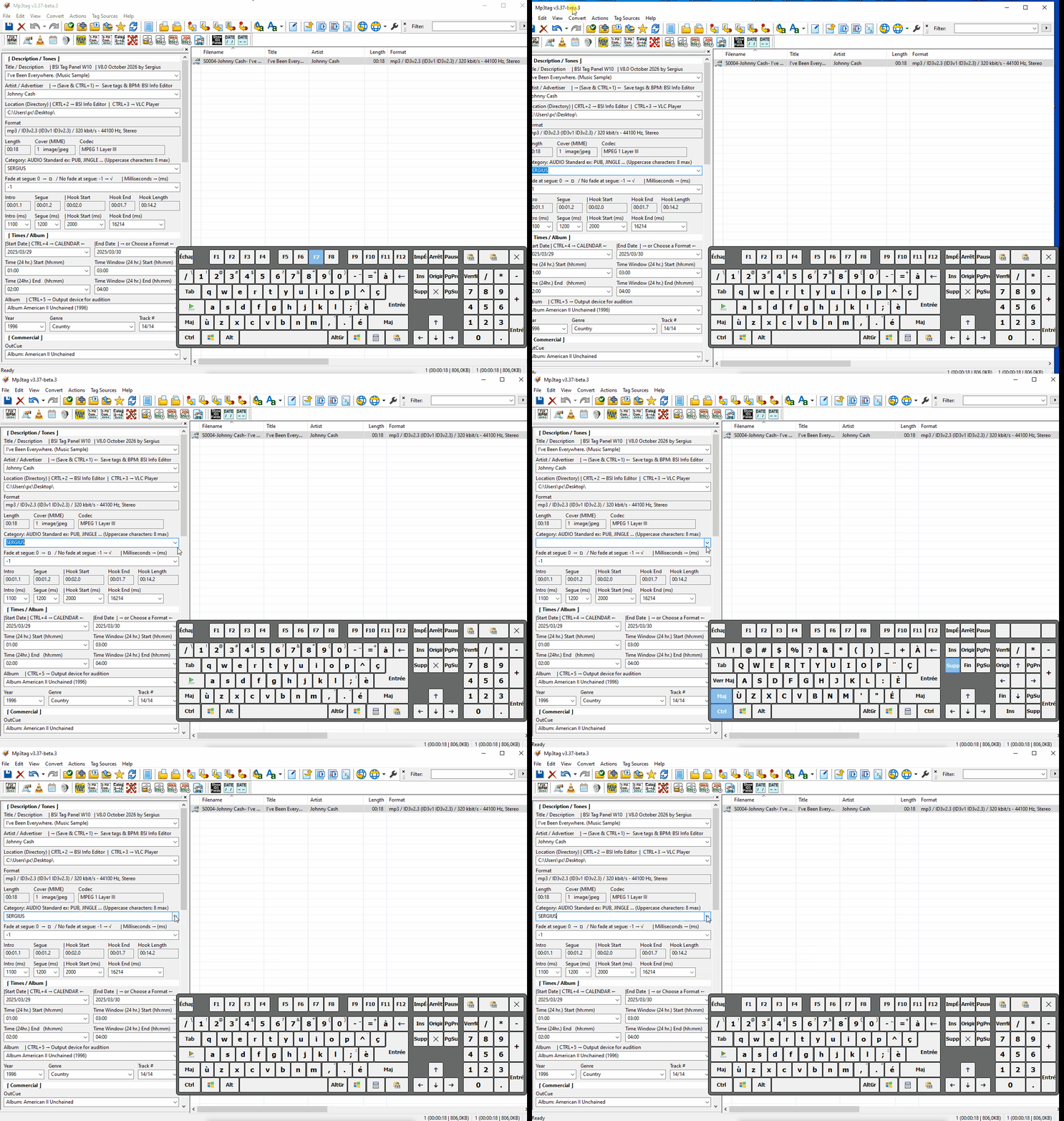
The 3nd video using Mp3tag v3.37-beta.3 (Windows 10)

Hello @Florian, unfortunately, it didn't work with this new update.

(Left) Shift+CTRL Return & Delete - This feature works very well  
(Right) Shift+CTRL Return & Delete - This feature does not work
![03) Mp3tag v3_37-beta_3 (Yes-Left) Shift+CTRL Return & Delete -- (No-Right) Shift+CTRL Return & Delete (Thursday 15 oct 2026)](https://community.mp3tag.de/uploads/default/original/3X/8/0/80bf110281319be37c9f0983979e83b15c7b03bb.gif)

---

<div class="post-metadata">

### Author: ![Florian](https://community.mp3tag.de/user_avatar/community.mp3tag.de/florian/32/5759_2.png) [@Florian](https://community.mp3tag.de/u/Florian)
#### Post date: [October 16, 2026, 3:03pm UTC](https://community.mp3tag.de/t/shift-del-broken/60573/26 "2026-10-16T15:03:46Z")

</div>

I've now also tried to reproduce this under Windows 10 with both French (Canadian) and French (France) keyboard layouts, and it works without problems for both left and right ctrl keys.

I'm still not sure why you have these different results. One possibility is, that a different tool is interfering with the keyboard shortcuts on your system. I'll leave it as it is now.

---

<div class="post-metadata">

### Author: ![Sergius](https://community.mp3tag.de/letter_avatar_proxy/v4/letter/s/ebca7d/32.png) [@Sergius](https://community.mp3tag.de/u/Sergius)
#### Post date: [October 16, 2026, 3:27pm UTC](https://community.mp3tag.de/t/shift-del-broken/60573/27 "2026-10-16T15:27:21Z")

</div>

Hello @Florian, I don't understand it either; I also wonder why Mp3tag v3.36 works perfectly on all my computers, whereas Mp3tag v3.37-beta.2 and beta.3 don't work on most of them. Perhaps, as you suggested, another tool might be interfering with the keyboard shortcuts... I hope you manage to find the problem someday... thanks for trying...

---

<div class="post-metadata">

### Author: ![Florian](https://community.mp3tag.de/user_avatar/community.mp3tag.de/florian/32/5759_2.png) [@Florian](https://community.mp3tag.de/u/Florian)
#### Post date: [October 16, 2026, 3:31pm UTC](https://community.mp3tag.de/t/shift-del-broken/60573/28 "2026-10-16T15:31:24Z")

</div>

> [@Sergius](#):
>
> I don't understand it either; I also wonder why Mp3tag v3.36 works perfectly on all my computers, whereas Mp3tag v3.37-beta.2 and beta.3 don't work on most of them.

> [@Florian](#):
>
> v3.36 uses Shift+Return and Shift+Del for adding and removing the custom field values. Pressing Ctrl doesn't have an effect there.

This is the explanation. The shortcut didn't require the Ctrl key in v3.36, and it seems that pressing the right Ctrl key on most (but not all) of your systems doesn't send the actual key code that's associated with the Ctrl key (as if it was remapped to something different).

[Previous page](https://community.mp3tag.de/t/shift-del-broken/60573.md?page=1)
