# Sort by year issue
**URL:** https://community.mp3tag.de/t/sort-by-year-issue/64939
**Category:** Support
**Created:** [June 3, 2024, 9:20am UTC](https://community.mp3tag.de/t/sort-by-year-issue/64939 "2024-06-03T09:20:25Z")
**Posts on this page:** 12
**Page:** 1
### Author:  [@Aurelio](https://community.mp3tag.de/u/Aurelio)
#### Post date: [June 3, 2024, 9:20am UTC](https://community.mp3tag.de/t/sort-by-year-issue/64939/1 "2024-06-03T09:20:25Z")
Hello I sort by the artist column like this: "%artist%%year%%album%%discnumber%$num(%track%,2)" but (in this case only, see screenshot) the year 1992 goes after the year 2014. Perhaps the issue is caused by the title of the album wich is very strange?

---
### Author:  [@LyricsLover](https://community.mp3tag.de/u/LyricsLover)
#### Post date: [June 3, 2024, 9:24am UTC](https://community.mp3tag.de/t/sort-by-year-issue/64939/2 "2024-06-03T09:24:38Z")
Just to be sure:
You have entered the "Sort by" for the Artist column like this?

What column do you have clicked to get this sort order?
The Artist column ascending or descending? Any other column?
You see the currently clicked column with the little "arrow up" = ascending sort
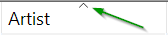
or "arrow down" = descending sort
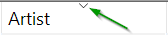
---
### Author:  [@Aurelio](https://community.mp3tag.de/u/Aurelio)
#### Post date: [June 3, 2024, 10:47am UTC](https://community.mp3tag.de/t/sort-by-year-issue/64939/3 "2024-06-03T10:47:07Z")
Yes I have entered just like this and then click on the column "Artist" ascending. If I click descending the sorting goes like this:

---
### Author:  [@MotleyG](https://community.mp3tag.de/u/MotleyG)
#### Post date: [June 3, 2024, 11:02am UTC](https://community.mp3tag.de/t/sort-by-year-issue/64939/4 "2024-06-03T11:02:49Z")
Do you have the numeric sort checked? This can give unexpected results when text is primarily the data type. Make sure this box is not checked and see what results you get.

---
### Author:  [@Aurelio](https://community.mp3tag.de/u/Aurelio)
#### Post date: [June 3, 2024, 11:07am UTC](https://community.mp3tag.de/t/sort-by-year-issue/64939/5 "2024-06-03T11:07:10Z")
No it's not checked.
---
### Author:  [@MotleyG](https://community.mp3tag.de/u/MotleyG)
#### Post date: [June 3, 2024, 11:27am UTC](https://community.mp3tag.de/t/sort-by-year-issue/64939/6 "2024-06-03T11:27:11Z")
Given the sort string you have provided
`%artist%%year%%album%%discnumber%$num(%track%,2)`
the sorting is breaking _before_ the year field. I would look at the Artist field more closely in the tracks for the album 99.9F° and check for perhaps a trailing space or hidden character. Maybe even the space between "Suzanne" and "Vega" is not the standard keyboard space.
---
### Author:  [@ohrenkino](https://community.mp3tag.de/u/ohrenkino)
#### Post date: [June 3, 2024, 1:06pm UTC](https://community.mp3tag.de/t/sort-by-year-issue/64939/7 "2024-06-03T13:06:10Z")
> [@MotleyG](#):
>
> check for perhaps a trailing space or hidden character
An easy way would be to select all files that should have the same data in a field, e.g. ARTIST and check in the tag panel if the corresponding entry box shows the data or `` - if it shows `` then the data is not the same.
---
### Author:  [@LyricsLover](https://community.mp3tag.de/u/LyricsLover)
#### Post date: [June 3, 2024, 7:13pm UTC](https://community.mp3tag.de/t/sort-by-year-issue/64939/8 "2024-06-03T19:13:37Z")
> [@Aurelio](#):
>
> %artist%%year%%album%%discnumber%$num(%track%,2)
Does it make a difference if you try it with a space character between the `%variables%`?
`%artist% %year% %album% %discnumber% $num(%track%,2)`
instead of your
`%artist%%year%%album%%discnumber%$num(%track%,2)`
---
### Author:  [@MotleyG](https://community.mp3tag.de/u/MotleyG)
#### Post date: [June 4, 2024, 3:49am UTC](https://community.mp3tag.de/t/sort-by-year-issue/64939/9 "2024-06-04T03:49:41Z")
This is exactly what I found using my own string for AlbumArtist. For the exercise I used an Artist where I have several albums, and renamed one of the middle year releases as "99.9F°" for testing.
When I use my usual personal string as
`%albumartistsort% %year% %albumsort% %discnumber% %track% %titlesort%`
everything sorts as expected.
When I use the same sort criteria _without any spaces_ between field placeholders like
`%albumartistsort%%year%%albumsort%%discnumber%%track%%titlesort%`
I get the undesired result of the album named "99.9F°" moving to the end of the list, even though the year tag should place it in the middle.
---
### Author:  [@ohrenkino](https://community.mp3tag.de/u/ohrenkino)
#### Post date: [June 4, 2024, 5:11am UTC](https://community.mp3tag.de/t/sort-by-year-issue/64939/10 "2024-06-04T05:11:52Z")
> [@MotleyG](#):
>
> When I use the same sort criteria _without any spaces_ between field placeholders like
See this thread
> [@Title sorting with Roman Numerals](https://community.mp3tag.de/t/title-sorting-with-roman-numerals/61965):
>
> I have a number of Classical pieces with titles such as: Bassoon Concerto in F, RV 486; I-Allegro Bassoon Concerto in F, RV 486; II-Largo Bassoon Concerto in F, RV 486; III-Allegro When I sort by title in ascending order I get: Bassoon Concerto in F, RV 486; I-Allegro Bassoon Concerto in F, RV 486; III-Allegro Bassoon Concerto in F, RV 486; II-Largo where III always comes before II. I have version 3.22, but have noticed this in previous versions. Now, I realize that with more movements i…
about problems with the sorting in Windows.
---
### Author:  [@Aurelio](https://community.mp3tag.de/u/Aurelio)
#### Post date: [June 4, 2024, 6:39am UTC](https://community.mp3tag.de/t/sort-by-year-issue/64939/11 "2024-06-04T06:39:52Z")
Yes! This is the solution, thanks!
---
### Author:  [@system](https://community.mp3tag.de/u/system)
#### Post date: [July 4, 2024, 6:40am UTC](https://community.mp3tag.de/t/sort-by-year-issue/64939/12 "2024-07-04T06:40:44Z")
This topic was automatically closed 30 days after the last reply. New replies are no longer allowed.