# Strange album art issue
**URL:** https://community.mp3tag.de/t/strange-album-art-issue/9696
**Category:** Support
**Created:** [January 13, 2010, 1:28am UTC](https://community.mp3tag.de/t/strange-album-art-issue/9696 "2010-01-13T01:28:43Z")
**Posts on this page:** 4
**Page:** 1
### Author:  [@dwid](https://community.mp3tag.de/u/dwid)
#### Post date: [January 13, 2010, 1:28am UTC](https://community.mp3tag.de/t/strange-album-art-issue/9696/1 "2010-01-13T01:28:43Z")
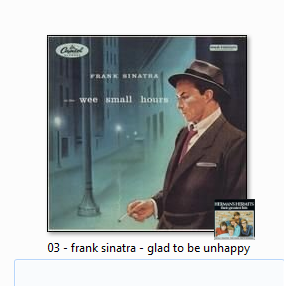
I have been having the strangest problem after updating the album art for mp3s. After updating, the album art I chose for specific files works, showing up embedded in the file, but with an odd caveat. I am using Windows 7, and when I opt to view my files by icons (whether large or small) a small picture of a completely unrelated album appears in the bottom right corner (see attached picture). The unrelated picture is the same on all files I have changed with Mp3tag. It's not a huge issue, but it is rather annoying to see all over all of my files. If anyone could offer some advice, it would be most appreciated. Thanks.
---
### Author:  [@dano](https://community.mp3tag.de/u/dano)
#### Post date: [January 13, 2010, 10:49am UTC](https://community.mp3tag.de/t/strange-album-art-issue/9696/2 "2010-01-13T10:49:29Z")
That mini picture is usually the icon of the program that is associated with the audio file.
---
### Author:  [@dwid](https://community.mp3tag.de/u/dwid)
#### Post date: [January 13, 2010, 2:02pm UTC](https://community.mp3tag.de/t/strange-album-art-issue/9696/3 "2010-01-13T14:02:41Z")
I know, that's why I'm so confused as to why it should be another album's art. I just use the standard media player 12 that came with the computer. Before using Mp3tag, it did show the WMP icon. The files only started doing this strange transformation after editing the album art in Mp3tag. Also, as one might expect, when I play those files in media player, the album art shows up normally, without the random album art. Very strange.
---
### Author:  [@system](https://community.mp3tag.de/u/system)
#### Post date: [February 9, 2026, 12:22pm UTC](https://community.mp3tag.de/t/strange-album-art-issue/9696/4 "2026-02-09T12:22:05Z")