# Strange tags
**URL:** https://community.mp3tag.de/t/strange-tags/13731
**Category:** Support
**Created:** [August 6, 2012, 9:40pm UTC](https://community.mp3tag.de/t/strange-tags/13731 "2012-08-06T21:40:14Z")
**Posts on this page:** 8
**Page:** 1
### Author:  [@Morbeas](https://community.mp3tag.de/u/Morbeas)
#### Post date: [August 6, 2012, 9:40pm UTC](https://community.mp3tag.de/t/strange-tags/13731/1 "2012-08-06T21:40:14Z")
I have this one file that contains some strange tags, which seem to only be detectable by my Squezebox server software. I cannot get MP3Tag to read or edit them. I guess a picture is worth a thousand words. See all those tags at the bottom (TALB, TCON, TDRC etc)? What are they and how can I get MP3Tag to edit/delete them?
Thanks.

---
### Author:  [@Morbeas](https://community.mp3tag.de/u/Morbeas)
#### Post date: [August 6, 2012, 9:50pm UTC](https://community.mp3tag.de/t/strange-tags/13731/2 "2012-08-06T21:50:57Z")
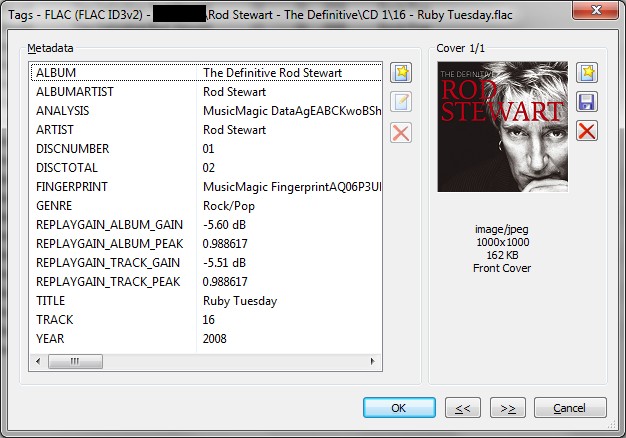
For reference, this is all that MP3Tag shows.
---
### Author:  [@dano](https://community.mp3tag.de/u/dano)
#### Post date: [August 7, 2012, 4:35am UTC](https://community.mp3tag.de/t/strange-tags/13731/3 "2012-08-07T04:35:14Z")
TALB, TCON, ... are ID3v2 tags. But Mp3tag does not support them on flac files.
It can only remove them.
---
### Author:  [@LyricsLover](https://community.mp3tag.de/u/LyricsLover)
#### Post date: [August 7, 2012, 4:48am UTC](https://community.mp3tag.de/t/strange-tags/13731/4 "2012-08-07T04:48:36Z")
> [@Morbeas](#):
>
> What are they...
You can see all the possible tags and a description for [id3v23 on this page](http://www.id3.org/id3v2.3.0/).
---
### Author:  [@Morbeas](https://community.mp3tag.de/u/Morbeas)
#### Post date: [August 7, 2012, 9:06am UTC](https://community.mp3tag.de/t/strange-tags/13731/5 "2012-08-07T09:06:20Z")
> [@dano](#):
>
> TALB, TCON, ... are ID3v2 tags. But Mp3tag does not support them on flac files.
> It can only remove them.
Right, so how exactly do I remove them?
Edit: Spelling.
---
### Author:  [@dano](https://community.mp3tag.de/u/dano)
#### Post date: [August 7, 2012, 9:35am UTC](https://community.mp3tag.de/t/strange-tags/13731/6 "2012-08-07T09:35:18Z")
> [@Morbeas](#):
>
> Right, so how exactly do I remove tem?
Select the files and press Ctrl+X and then Ctrl+V
It removes all tags (flac+id3v2) and writes back only the flac tags.
---
### Author:  [@Morbeas](https://community.mp3tag.de/u/Morbeas)
#### Post date: [August 7, 2012, 3:31pm UTC](https://community.mp3tag.de/t/strange-tags/13731/7 "2012-08-07T15:31:35Z")
> [@dano](#):
>
> Select the files and press Ctrl+X and then Ctrl+V
> It removes all tags (flac+id3v2) and writes back only the flac tags.
That worked like a charm. Thank you so much, dano! 🙂
---
### Author:  [@system](https://community.mp3tag.de/u/system)
#### Post date: [February 9, 2026, 12:23pm UTC](https://community.mp3tag.de/t/strange-tags/13731/8 "2026-02-09T12:23:59Z")