# Tag to Filename moves all songs into a random folder
**URL:** https://community.mp3tag.de/t/tag-to-filename-moves-all-songs-into-a-random-folder/71660
**Category:** Support
**Created:** [July 26, 2026, 2:56pm UTC](https://community.mp3tag.de/t/tag-to-filename-moves-all-songs-into-a-random-folder/71660 "2026-07-26T14:56:02Z")
**Posts on this page:** 5
**Page:** 1
### Author:  [@vesmp3](https://community.mp3tag.de/u/vesmp3)
#### Post date: [July 26, 2026, 2:56pm UTC](https://community.mp3tag.de/t/tag-to-filename-moves-all-songs-into-a-random-folder/71660/1 "2026-07-26T14:56:02Z")
Hi there,
I have a folder for all new downloads, let's call this folder "new downloads"
When I use the below format in Tag to Filename, it should create an Artist Name folder and then the Album folder within it and then the songs. It does do this, but it moves the Artist Name into a random subfolder within the new downloads folder.
%artist%\%album%\%artist% - %album% - $num(%track%,2) - %title%
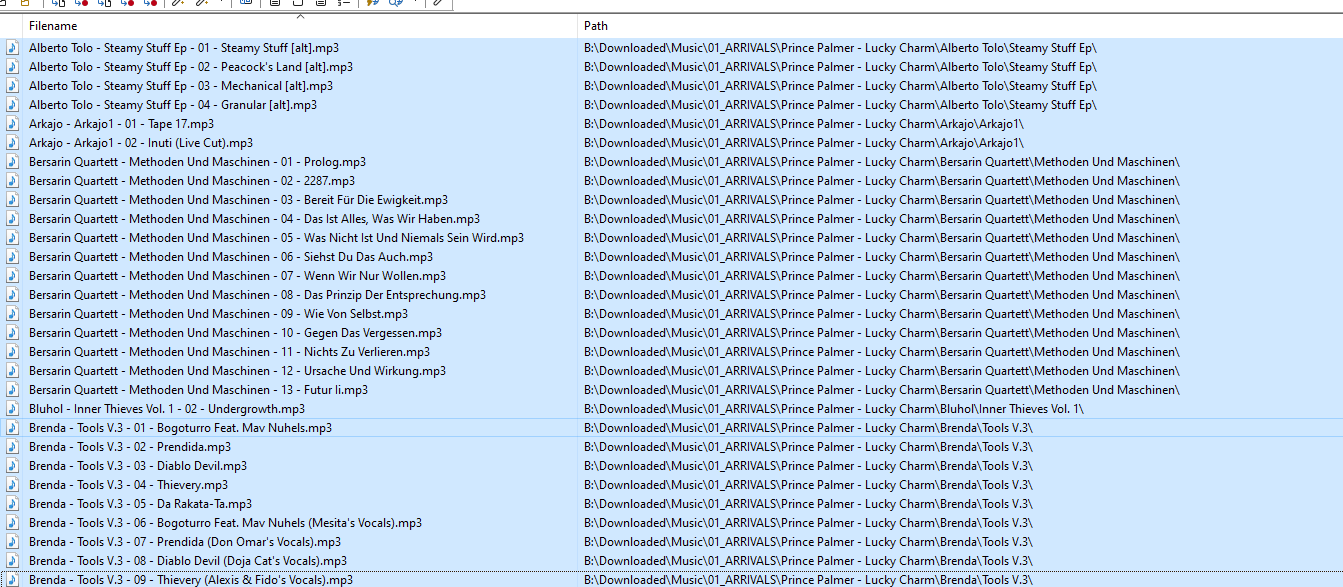
You can see below it has moved every folder inside an existing folder called "Prince Palmer - Lucky Charm" - I am using latest version and upgraded it because it was doing the same thing in the older version but it chose a different folder, so i think it varies each time you load it up.
I am having to then move all of these Artist Folders back out of the Prince Palmer folder.
---
### Author:  [@LyricsLover](https://community.mp3tag.de/u/LyricsLover)
#### Post date: [July 26, 2026, 3:08pm UTC](https://community.mp3tag.de/t/tag-to-filename-moves-all-songs-into-a-random-folder/71660/2 "2026-07-26T15:08:47Z")
As a quick fix, you can define a fixed base folder ("absolute path"):
For example:
`C:\Temp\MyMovedSongs\` in front of your `%artist%\%album%\%artist% - %album% - $num(%track%,2) - %title%`.
Please have a look at the documentation:
> **[Create Folder Structures based on Tags - Rename Files – Mp3tag Documentation](https://docs.mp3tag.de/converters/rename-files/#create-folder-structures-based-on-tags)**
>
> Renaming files, creating folders and complete directory structures from tags can be done by using Convert → Tag - Filename with a format string. The format string is used to describe the structure of the desired filename. | Documentation on Tag to...
With your format string the second part of the documentation have been applied:
> The same is also possible **using relative path names** (instead of an absolute path in the example above) which **creates the new directory relative to the current working directory**.
---
### Author:  [@vesmp3](https://community.mp3tag.de/u/vesmp3)
#### Post date: [July 27, 2026, 7:02am UTC](https://community.mp3tag.de/t/tag-to-filename-moves-all-songs-into-a-random-folder/71660/3 "2026-07-27T07:02:13Z")
Ok thanks for that i will just specify the Arrivals folder which is where they are anyway AND older software would default to creating the folders in the directory that they were already in, e.g. if the folder/artist to be renamed was in Arrivals folder, it would create the new folder underneath Arrivals and not in a random subfolder of it. How strange.
---
### Author:  [@ohrenkino](https://community.mp3tag.de/u/ohrenkino)
#### Post date: [July 27, 2026, 7:09am UTC](https://community.mp3tag.de/t/tag-to-filename-moves-all-songs-into-a-random-folder/71660/4 "2026-07-27T07:09:56Z")
> [@vesmp3](#):
>
> and not in a random subfolder of it
The folder is not random but branches from the current working directory - which is the folder in which the current file is residing.
The folder creation follows the pattern that you defined in the format string - you have not yet shown us the format string and the data that you use to rename the files.
So, check the format string and also define it according to the rules for file names as set by the OS - which means that only partially qualified filenames are treated relative to the current position.
---
### Author:  [@system](https://community.mp3tag.de/u/system)
#### Post date: [July 31, 2026, 6:38am UTC](https://community.mp3tag.de/t/tag-to-filename-moves-all-songs-into-a-random-folder/71660/5 "2026-07-31T06:38:45Z")
This topic was automatically closed 2 days after the last reply. New replies are no longer allowed.