# Tagging AAC files
**URL:** https://community.mp3tag.de/t/tagging-aac-files/71579
**Category:** Support
**Tags:** player
**Created:** [July 7, 2026, 3:17pm UTC](https://community.mp3tag.de/t/tagging-aac-files/71579 "2026-07-07T15:17:15Z")
**Posts on this page:** 8
**Page:** 1
### Author:  [@Fjorse](https://community.mp3tag.de/u/Fjorse)
#### Post date: [July 7, 2026, 3:17pm UTC](https://community.mp3tag.de/t/tagging-aac-files/71579/1 "2026-07-07T15:17:15Z")
Hello together,
by MP3TAG I can tag AAC files. If I playback these files artist and track are set to "unknown". So what to do? In settings most is set to ID3v2 (UTF-16), but there is no extra section for AAC, only MPEG...
Any suggestions?
Regards
---
### Author:  [@LyricsLover](https://community.mp3tag.de/u/LyricsLover)
#### Post date: [July 7, 2026, 3:22pm UTC](https://community.mp3tag.de/t/tagging-aac-files/71579/2 "2026-07-07T15:22:40Z")
> [@Fjorse](#):
>
> If I playback these files artist and track are set to "unknown".
Where exactly do you see "unknown"? In the Windows File Explorer?
In (which) player software?
Could you please show us a [screenshot](https://community.mp3tag.de/t/hints-for-asking-support-requests/56190#p-168842-use-screenshots-to-exemplify-the-issue-2)?
---
### Author:  [@Fjorse](https://community.mp3tag.de/u/Fjorse)
#### Post date: [July 7, 2026, 3:30pm UTC](https://community.mp3tag.de/t/tagging-aac-files/71579/3 "2026-07-07T15:30:24Z")

First is AAC, second MP3... - several player.
---
### Author:  [@LyricsLover](https://community.mp3tag.de/u/LyricsLover)
#### Post date: [July 7, 2026, 3:32pm UTC](https://community.mp3tag.de/t/tagging-aac-files/71579/4 "2026-07-07T15:32:04Z")
Thanks for the player screenshot.
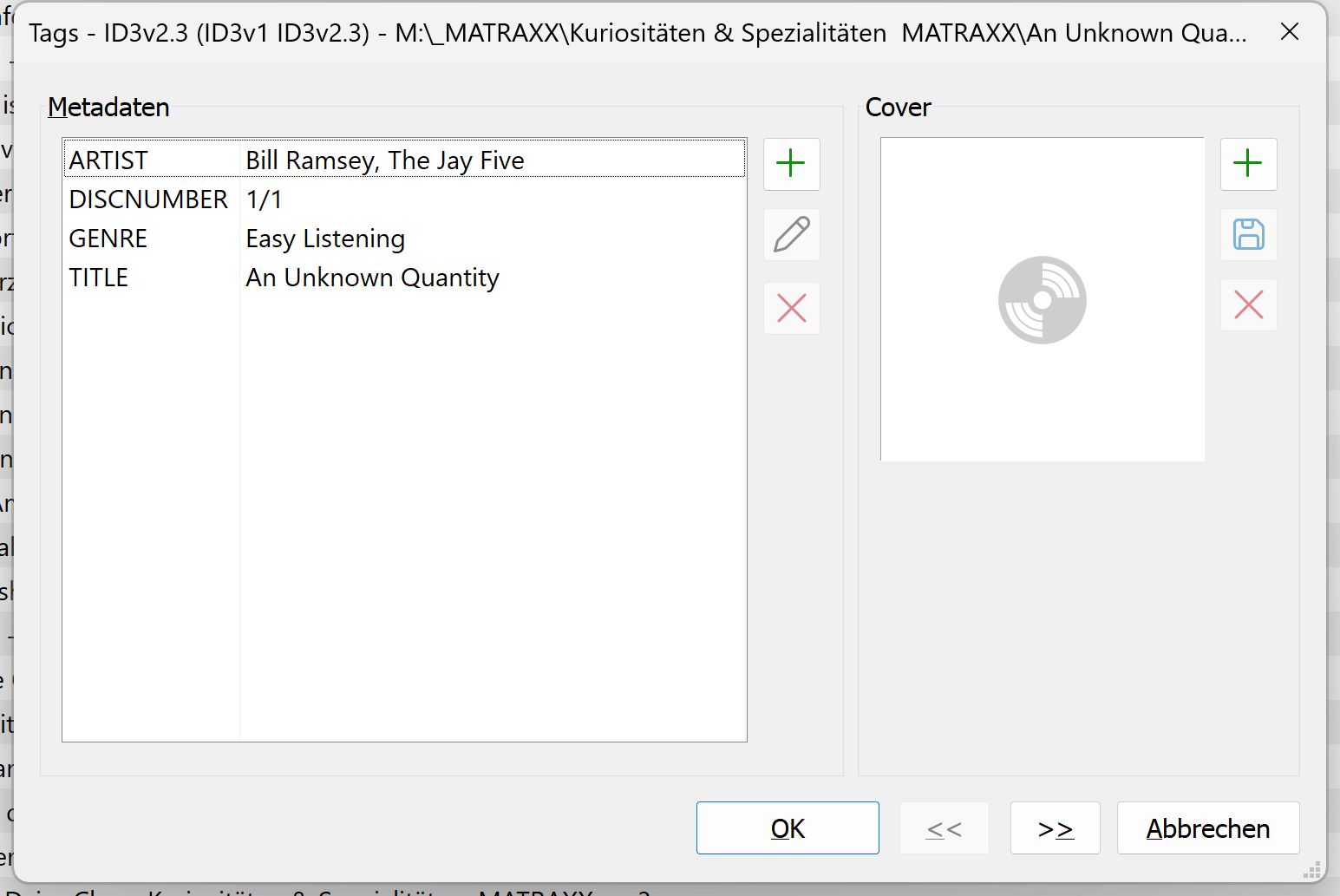
Please show us one more screenshot from Alt + T from the same first AAC track in Mp3tag.
---
### Author:  [@Fjorse](https://community.mp3tag.de/u/Fjorse)
#### Post date: [July 7, 2026, 5:35pm UTC](https://community.mp3tag.de/t/tagging-aac-files/71579/5 "2026-07-07T17:35:47Z")
---
### Author:  [@LyricsLover](https://community.mp3tag.de/u/LyricsLover)
#### Post date: [July 7, 2026, 6:25pm UTC](https://community.mp3tag.de/t/tagging-aac-files/71579/6 "2026-07-07T18:25:41Z")
As you can see from the screenshot, the metadata is still present inside your file.
You can now carry out a simple test for your AAC track:
Just change the `ARTIST` content from
`Bill Ramsey, The Jay Five`
to
`Bill and Jay`
save it and let us see what your player is showing.
If you still see
`An Unknown Quantity - Bill Ramsey,...`
your player is not reading the changed metadata from your AAC track.
Perhaps it's using the file name instead?
---
### Author:  [@Florian](https://community.mp3tag.de/u/Florian)
#### Post date: [July 7, 2026, 6:37pm UTC](https://community.mp3tag.de/t/tagging-aac-files/71579/7 "2026-07-07T18:37:37Z")
As an aside, metadata support for AAC is non-standardized and usually not supported everywhere. One way to alleviate this would be to warp the AAC into an MP4 container, which has good metadata support.
```plaintext
ffmpeg -i input.aac -c:a copy output.m4a
```
---
### Author:  [@system](https://community.mp3tag.de/u/system)
#### Post date: [July 25, 2026, 8:57am UTC](https://community.mp3tag.de/t/tagging-aac-files/71579/8 "2026-07-25T08:57:39Z")
This topic was automatically closed 2 days after the last reply. New replies are no longer allowed.