# The scripting function $fmtDate(fmt,x) used with a number shows 1 hour plus
**URL:** https://community.mp3tag.de/t/the-scripting-function-fmtdate-fmt-x-used-with-a-number-shows-1-hour-plus/71938
**Category:** Support
**Created:** [October 9, 2026, 5:00pm UTC](https://community.mp3tag.de/t/the-scripting-function-fmtdate-fmt-x-used-with-a-number-shows-1-hour-plus/71938 "2026-10-09T17:00:28Z")
**Posts on this page:** 6
**Page:** 1
### Author:  [@yorickausyps](https://community.mp3tag.de/u/yorickausyps)
#### Post date: [October 9, 2026, 5:00pm UTC](https://community.mp3tag.de/t/the-scripting-function-fmtdate-fmt-x-used-with-a-number-shows-1-hour-plus/71938/1 "2026-10-09T17:00:28Z")
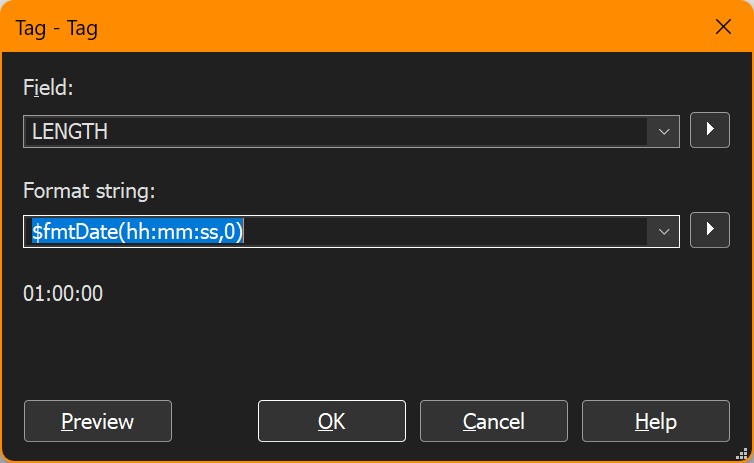
The scripting function `$fmtDate(hh:mm:ss,x)` used with an integer number for the second parameter x, to give the number of seconds to be converted in the format hour:minutes:seconds, always shows one hour more than it should. So e.g. zero seconds are one hour long, 3600 seconds are two hours and so on. The result seems to be correct in other cases, e.g. if used with no second parameter for the clock on the wall. This issue perhaps could be caused by the fact, that we currently still have west european _summer_ time here, which is one hour plus.
---
### Author:  [@Florian](https://community.mp3tag.de/u/Florian)
#### Post date: [October 9, 2026, 5:51pm UTC](https://community.mp3tag.de/t/the-scripting-function-fmtdate-fmt-x-used-with-a-number-shows-1-hour-plus/71938/2 "2026-10-09T17:51:43Z")
It takes a raw timestamp as second parameter, not the number of seconds.
> The scripting function `$fmtDate(fmt,x)` formats the raw timestamp `x` (e.g., `%_file_mod_datetime_raw%`) as a human-readable date using the format string fmt. If `x` is omitted, the current timestamp is used.
> **[Date and Time Formatting - Scripting Functions – Mp3tag Documentation](https://docs.mp3tag.de/scripting/#date-and-time-formatting)**
>
> Mp3tag offers various built-in scripting functions, which can be used at various places in the program. | Documentation on Mp3tag's scripting functions. Mp3tag is the universal Tag Editor.
---
### Author:  [@yorickausyps](https://community.mp3tag.de/u/yorickausyps)
#### Post date: [October 9, 2026, 7:43pm UTC](https://community.mp3tag.de/t/the-scripting-function-fmtdate-fmt-x-used-with-a-number-shows-1-hour-plus/71938/3 "2026-10-09T19:43:32Z")
So sad that it isn't so easy as I first thought, to convert a duration in number of seconds into a human readable format with hours, minutes and seconds. But with the following expression I get the desired result (in a web source script)
```auto
json_select "duration"
sayformat "$num($div(%_current%,3600),2):$num($div($mod(%_current%,3600),60),2):$num($div($mod(%_current%,60)),2)"
```
---
### Author:  [@Florian](https://community.mp3tag.de/u/Florian)
#### Post date: [October 9, 2026, 8:28pm UTC](https://community.mp3tag.de/t/the-scripting-function-fmtdate-fmt-x-used-with-a-number-shows-1-hour-plus/71938/4 "2026-10-09T20:28:42Z")
> [@yorickausyps](#):
>
> convert a duration in number of seconds into a human readable format with hours, minutes and seconds.
You can use `$fmtDuration(%_current%,s,1)`
---
### Author:  [@yorickausyps](https://community.mp3tag.de/u/yorickausyps)
#### Post date: [October 9, 2026, 9:35pm UTC](https://community.mp3tag.de/t/the-scripting-function-fmtdate-fmt-x-used-with-a-number-shows-1-hour-plus/71938/5 "2026-10-09T21:35:06Z")
> [@Florian](#):
>
> $fmtDuration(%\_current%,s,1)
Thank you for pointing me to the best solution. I see I shouldn't have stopped reading the documentation at $fmtDate but continue reading the rest of it also.
---
### Author:  [@system](https://community.mp3tag.de/u/system)
#### Post date: [October 11, 2026, 9:35pm UTC](https://community.mp3tag.de/t/the-scripting-function-fmtdate-fmt-x-used-with-a-number-shows-1-hour-plus/71938/6 "2026-10-11T21:35:47Z")
This topic was automatically closed 2 days after the last reply. New replies are no longer allowed.