# Time Display
**URL:** https://community.mp3tag.de/t/time-display/10233
**Category:** Support
**Created:** [April 3, 2010, 10:06am UTC](https://community.mp3tag.de/t/time-display/10233 "2010-04-03T10:06:47Z")
**Posts on this page:** 3
**Page:** 1
### Author:  [@Didier](https://community.mp3tag.de/u/Didier)
#### Post date: [April 3, 2010, 10:06am UTC](https://community.mp3tag.de/t/time-display/10233/1 "2010-04-03T10:06:47Z")
Hello,
Having one track (which is a track obtained by concatenating a live album is its entirety) whom length is longer than one hour, I can't do a correct sorting based on time : time is correctly displayed (01:17:26), but, in place of considering it as one hour, 17 minutes and 26 seconds, it considers it as one minute, 17 seconds and 26 hundredths of second, resulting in placing it in a false place when doing a sort upon time! Displaying time in seconds changes nothing : 4646 is displayed but lenghts longer than 3600 (one hour) are not correctly displayed too! It seems only the three first digits are used.
Have I missing something in the options, or is it a bug? I use the 2.46a version.
Thanks
Didier

---
### Author:  [@DetlevD](https://community.mp3tag.de/u/DetlevD)
#### Post date: [April 3, 2010, 11:50am UTC](https://community.mp3tag.de/t/time-display/10233/2 "2010-04-03T11:50:57Z")
> [@Didier](#):
>
> ... a live album is its entirety) whom length is longer than one hour, I can't do a correct sorting based on time ...
I do not have any problem with sorting on duration.
See attached screenshot of some unprocessed complete live files.
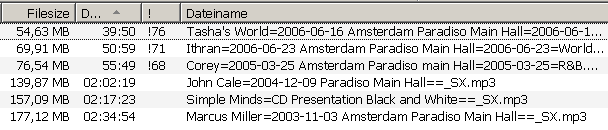
DD.20100403.1550.CEST
Following picture shows how to set the column in Mp3tag list view ...
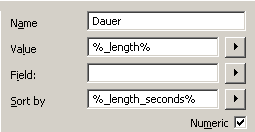
DD.20100403.1825.CEST


---
### Author:  [@system](https://community.mp3tag.de/u/system)
#### Post date: [February 9, 2026, 12:22pm UTC](https://community.mp3tag.de/t/time-display/10233/3 "2026-02-09T12:22:17Z")