# Title: From front of title, removing characters up to/including ':' followed by removing a following 'space'
**URL:** https://community.mp3tag.de/t/title-from-front-of-title-removing-characters-up-to-including-followed-by-removing-a-following-space/70244
**Category:** Support
**Created:** [November 28, 2025, 9:53pm UTC](https://community.mp3tag.de/t/title-from-front-of-title-removing-characters-up-to-including-followed-by-removing-a-following-space/70244 "2025-11-28T21:53:15Z")
**Posts on this page:** 6
**Page:** 1
### Author:  [@brucemoreg](https://community.mp3tag.de/u/brucemoreg)
#### Post date: [November 28, 2025, 9:53pm UTC](https://community.mp3tag.de/t/title-from-front-of-title-removing-characters-up-to-including-followed-by-removing-a-following-space/70244/1 "2025-11-28T21:53:15Z")
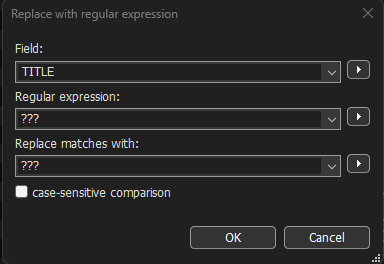
I’ve got some digital box sets that I’d like to clean up, where the leading characters are the composers name (sometimes just surname) up to the colon (‘:’) character, followed by a space. I’d lie to remove all of these. Seems like I could do this via remove using ‘replace with regular expression’ for the Title field, but can’t figure out how to do this.

---
### Author:  [@ohrenkino](https://community.mp3tag.de/u/ohrenkino)
#### Post date: [November 28, 2025, 9:58pm UTC](https://community.mp3tag.de/t/title-from-front-of-title-removing-characters-up-to-including-followed-by-removing-a-following-space/70244/2 "2025-11-28T21:58:50Z")
You could try an action of the type "Guess value"
Source format: `%title%`
Guessing pattern: `%composer%: %title%`
Or, if you want to delete the composer:
Guessing pattern: `%dummy%: %title%`
---
### Author:  [@brucemoreg](https://community.mp3tag.de/u/brucemoreg)
#### Post date: [November 28, 2025, 10:43pm UTC](https://community.mp3tag.de/t/title-from-front-of-title-removing-characters-up-to-including-followed-by-removing-a-following-space/70244/3 "2025-11-28T22:43:38Z")
The first removes the %composer% from %title%?, but I don’t understand the syntax of what you provided, plus how it works.
Does ‘Guessing pattern: `%composer%: %title%' mean: from the title string, remove the composer string plus the : and space?`
Reading the docs on mp3tag, I don’t at all understand what you did in your first suggestion, plus what %dummy% represents in 'Guessing pattern: `%dummy%: %title%'.`
Sigh . . .
---
### Author:  [@brucemoreg](https://community.mp3tag.de/u/brucemoreg)
#### Post date: [November 28, 2025, 10:48pm UTC](https://community.mp3tag.de/t/title-from-front-of-title-removing-characters-up-to-including-followed-by-removing-a-following-space/70244/4 "2025-11-28T22:48:56Z")
Plus, I don’t have anything in the %composer% field, and yet this still works? 🤯
---
### Author:  [@ohrenkino](https://community.mp3tag.de/u/ohrenkino)
#### Post date: [November 28, 2025, 10:49pm UTC](https://community.mp3tag.de/t/title-from-front-of-title-removing-characters-up-to-including-followed-by-removing-a-following-space/70244/5 "2025-11-28T22:49:02Z")
"Guess values" works similar to Convert\>Filename-Tag only that you can set any string as source not just the filename.
In this case it means: take the string from TITLE and then put the data into the fields COMPOSER and TITLE split by the colon.
You should get some data in the COMPOSER field after the execution.
If you set DUMMY as field, the data on the one side of the colon to a non-existing dummy field and the rest into TITLE (again) - which means that the part which represents the composer gets deleted.
---
### Author:  [@system](https://community.mp3tag.de/u/system)
#### Post date: [December 28, 2025, 10:49pm UTC](https://community.mp3tag.de/t/title-from-front-of-title-removing-characters-up-to-including-followed-by-removing-a-following-space/70244/6 "2025-12-28T22:49:15Z")
This topic was automatically closed 30 days after the last reply. New replies are no longer allowed.