# Trying to tag using Discogs.com & dealing with medleys
**URL:** https://community.mp3tag.de/t/trying-to-tag-using-discogs-com-dealing-with-medleys/71710
**Category:** Support
**Created:** [August 8, 2026, 2:39pm UTC](https://community.mp3tag.de/t/trying-to-tag-using-discogs-com-dealing-with-medleys/71710 "2026-08-08T14:39:22Z")
**Posts on this page:** 4
**Page:** 1
### Author:  [@wfriedwald](https://community.mp3tag.de/u/wfriedwald)
#### Post date: [August 8, 2026, 2:39pm UTC](https://community.mp3tag.de/t/trying-to-tag-using-discogs-com-dealing-with-medleys/71710/1 "2026-08-08T14:39:22Z")
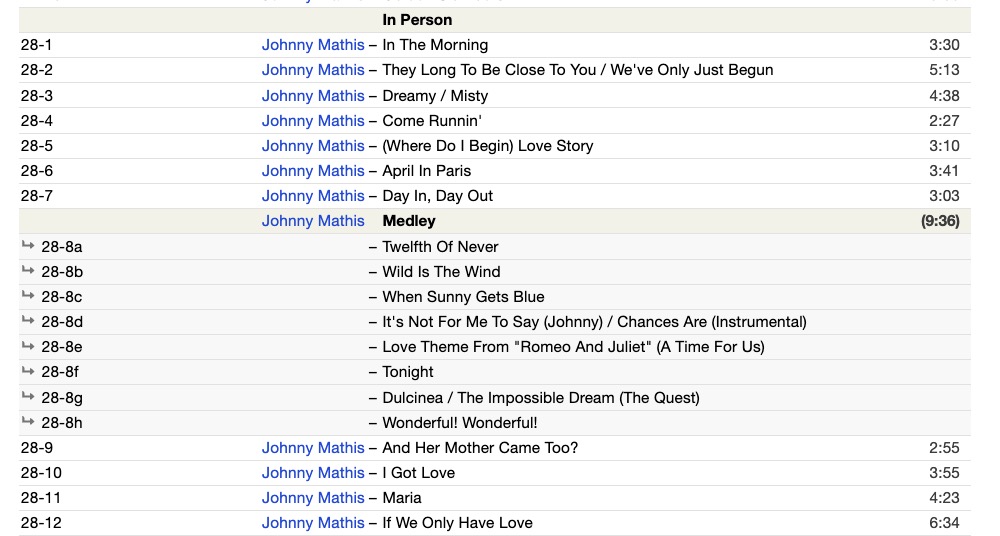
question: when I use the program to tag from [discogs.com](http://discogs.com), I always get messed up by medleys. For instance, this is a listing on a Johnny Mathis album (see below)
Of course, on the album itself, track #8 is just "Medley" - but the program tries to tag it as the next eight songs .... so the tagging is thrown completely off.
my question: is there any way to adjust the program so it just tags that one track as "medley" without it trying to tag it as eight individual songs?
(below, a sample listing from discogs—a Johnny Mathis albuum with a medley.)
I would be grateful for any suggestions!
w
---
### Author:  [@poster](https://community.mp3tag.de/u/poster)
#### Post date: [August 8, 2026, 3:21pm UTC](https://community.mp3tag.de/t/trying-to-tag-using-discogs-com-dealing-with-medleys/71710/2 "2026-08-08T15:21:25Z")
You can take a pragmatic approach and work around this issue.
Alternative options:
1. In the right-hand pane, select the local files listed after the medley and move them down until they align with the files in the left-hand pane.
2. Look for a different edition of the album. Album tracks on Discogs aren't always listed in the same order.
3. Use another web source script (not discogs) and check if the entries found there use the desired format.
---
### Author:  [@wfriedwald](https://community.mp3tag.de/u/wfriedwald)
#### Post date: [August 8, 2026, 6:42pm UTC](https://community.mp3tag.de/t/trying-to-tag-using-discogs-com-dealing-with-medleys/71710/3 "2026-08-08T18:42:23Z")
thank you! I'll give it a try. yes!
---
### Author:  [@system](https://community.mp3tag.de/u/system)
#### Post date: [August 11, 2026, 5:46am UTC](https://community.mp3tag.de/t/trying-to-tag-using-discogs-com-dealing-with-medleys/71710/4 "2026-08-11T05:46:18Z")
This topic was automatically closed 2 days after the last reply. New replies are no longer allowed.