# use directories and filename all in one go?
**URL:** https://community.mp3tag.de/t/use-directories-and-filename-all-in-one-go/12199
**Category:** Support
**Created:** [June 26, 2011, 11:50am UTC](https://community.mp3tag.de/t/use-directories-and-filename-all-in-one-go/12199 "2011-06-26T11:50:13Z")
**Posts on this page:** 5
**Page:** 1
### Author:  [@hooly](https://community.mp3tag.de/u/hooly)
#### Post date: [June 26, 2011, 11:50am UTC](https://community.mp3tag.de/t/use-directories-and-filename-all-in-one-go/12199/1 "2011-06-26T11:50:13Z")
was wondering if anyone knows how to do this. my directory structure is:
%\_parentdirectory% = %artist
%\_directory% = %year% - %album%
%filename% = %track% - %title%
was wondering what the syntax would be to transfer %\_parentdirectory%, %\_directory%, and %filename% to the appropriate tags using ... "Filename - Tag"? in other words, all in one shot.
i've managed to do this in an action group be breaking it down into three steps but judging from what i've seen elsewhere in the documentation ("You can mark directories via the backslash within the format string") i'm thinking i should be able to do it in a single step using "Filename - Tag" or somesuch. i've tried a few variations but haven't had much luck with it.
possible? suggestions?
thx
---
### Author:  [@DetlevD](https://community.mp3tag.de/u/DetlevD)
#### Post date: [June 26, 2011, 12:26pm UTC](https://community.mp3tag.de/t/use-directories-and-filename-all-in-one-go/12199/2 "2011-06-26T12:26:20Z")
> [@hooly](#):
>
> ... i've seen elsewhere in the documentation ("You can mark directories via the backslash within the format string") i'm thinking i should be able to do it in a single step using "Filename - Tag" or somesuch. ...
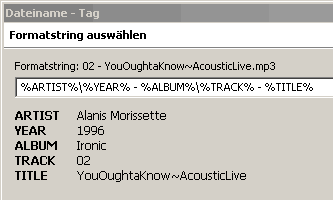
DD.20110626.1627.CEST

---
### Author:  [@hooly](https://community.mp3tag.de/u/hooly)
#### Post date: [June 26, 2011, 3:51pm UTC](https://community.mp3tag.de/t/use-directories-and-filename-all-in-one-go/12199/3 "2011-06-26T15:51:03Z")
thank you. i'm afraid i'm such a noobie that i'm not 100% sure how to use the info you've given but i expect i'll figure it out. 
thanks again.
---
### Author:  [@hooly](https://community.mp3tag.de/u/hooly)
#### Post date: [June 27, 2011, 4:43pm UTC](https://community.mp3tag.de/t/use-directories-and-filename-all-in-one-go/12199/4 "2011-06-27T16:43:54Z")
> [@hooly](#):
>
> ... not 100% sure how to use the info you've given ....
ah, got it! use the "%artist%\%year% - %album%\%track% - %title%" thing in the Filename - Tag operation, works beautifully! thanks again! 🙂
---
### Author:  [@system](https://community.mp3tag.de/u/system)
#### Post date: [February 9, 2026, 12:23pm UTC](https://community.mp3tag.de/t/use-directories-and-filename-all-in-one-go/12199/5 "2026-02-09T12:23:11Z")