# Why to copy the whole filename into the Title field?
**URL:** https://community.mp3tag.de/t/why-to-copy-the-whole-filename-into-the-title-field/54328
**Category:** General Discussion
**Created:** [September 10, 2021, 9:56am UTC](https://community.mp3tag.de/t/why-to-copy-the-whole-filename-into-the-title-field/54328 "2021-09-10T09:56:53Z")
**Posts on this page:** 12
**Page:** 1
### Author:  [@Sn1p3r31173](https://community.mp3tag.de/u/Sn1p3r31173)
#### Post date: [September 10, 2021, 9:56am UTC](https://community.mp3tag.de/t/why-to-copy-the-whole-filename-into-the-title-field/54328/1 "2021-09-10T09:56:53Z")
Why to copy the whole filename into the Title field, then separate the Artist and the Title manually, when you have such a wonderful program as MP3Tag?
★ Maybe, it would be more useful to copy filename to Artist and to Title using any separator, for example: the "-" dash as a separator?
★ However, if you need to make columns in Excel, then you can make a new action in MP3Tag, which would replace or remove or move the dashes to where the Microsoft Excel can separate them as columns prior to export the tags for Excel columns.

Here is the MP3Tag Action, but this one is not for Excel:
[Filename 2 Tag And Tag 2 Tag.mta](https://community.mp3tag.de/uploads/short-url/sQoynaVHNNB1FNDSa4XNebP1L8d.mta) (808 Bytes)
I updated the downloadable file "Filename 2 Tag And Tag 2 Tag.mta" above not to include the case conversion for the fields "Lyrics" and "Comments".

---
### Author:  [@LyricsLover](https://community.mp3tag.de/u/LyricsLover)
#### Post date: [September 10, 2021, 10:10am UTC](https://community.mp3tag.de/t/why-to-copy-the-whole-filename-into-the-title-field/54328/2 "2021-09-10T10:10:52Z")
I suggest that you add some real examples, one "before" and one "after" using your action.
This would help others to decide if such a "do-it-all-but-exactly-how Sn1p3r31173-wanted" is useful.
For example: I assume not everyone needs/wants "Mixed Case" in all the tags.
---
### Author:  [@Sn1p3r31173](https://community.mp3tag.de/u/Sn1p3r31173)
#### Post date: [September 10, 2021, 10:16am UTC](https://community.mp3tag.de/t/why-to-copy-the-whole-filename-into-the-title-field/54328/3 "2021-09-10T10:16:53Z")
OK. Here is the live example:

★ Before the Action Filename 2 Tag And Tag 2 Tag

★ After applying the Action Filename 2 Tag And Tag 2 Tag
---
### Author:  [@Sn1p3r31173](https://community.mp3tag.de/u/Sn1p3r31173)
#### Post date: [September 10, 2021, 10:24am UTC](https://community.mp3tag.de/t/why-to-copy-the-whole-filename-into-the-title-field/54328/4 "2021-09-10T10:24:27Z")
> [@LyricsLover](#):
>
> "Mixed Case"
The "Mixed Case" you can easily replace to what case you would prefer, also you can easily remove it by opening the Action in MP3Tag Menu: Actions ► Actions. And just editing it. So easy.

---
### Author:  [@LyricsLover](https://community.mp3tag.de/u/LyricsLover)
#### Post date: [September 10, 2021, 10:41am UTC](https://community.mp3tag.de/t/why-to-copy-the-whole-filename-into-the-title-field/54328/5 "2021-09-10T10:41:47Z")
**I** know that. 😉
But other users finding this thread because of your title are tempted to use your \*.mta - not knowing, that they destroy their lyrics syntax and every intended special syntax for the artist, title and album.
Therefore you should make some special hints, what exactly your actions are doing and where the users have to be careful.
I for myself would never ever use Mixed Case for all my tags. Not for my lyrics, not for my artist, title, album or any other tag.
---
### Author:  [@Sn1p3r31173](https://community.mp3tag.de/u/Sn1p3r31173)
#### Post date: [September 10, 2021, 10:46am UTC](https://community.mp3tag.de/t/why-to-copy-the-whole-filename-into-the-title-field/54328/6 "2021-09-10T10:46:20Z")
The Action "Filename 2 Tag And Tag 2 Tag.mta" has nothing to do with the Lyrics field.
It just copies the Artist and the Title from the file name to their corresponding fields.
And if you don't prefer the "Mixed Case", then you can easily edit it and replace it with another case or even remove it easily.
---
### Author:  [@LyricsLover](https://community.mp3tag.de/u/LyricsLover)
#### Post date: [September 10, 2021, 10:47am UTC](https://community.mp3tag.de/t/why-to-copy-the-whole-filename-into-the-title-field/54328/7 "2021-09-10T10:47:46Z")
> [@Sn1p3r31173](#):
>
> The Action "Filename 2 Tag And Tag 2 Tag.mta" has nothing to do with the Lyrics field.
Unfortunately, this is not true.
Your "Case conversion" in step #7 converts ALL - and I really mean ALL - tags to Mixed Case. Including your Lyrics.
---
### Author:  [@Sn1p3r31173](https://community.mp3tag.de/u/Sn1p3r31173)
#### Post date: [September 10, 2021, 10:53am UTC](https://community.mp3tag.de/t/why-to-copy-the-whole-filename-into-the-title-field/54328/8 "2021-09-10T10:53:17Z")
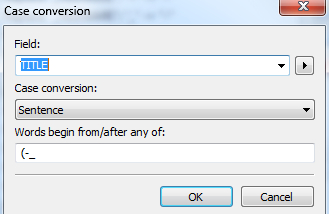
OK. You can easily change the "-All" with only the "Artist" and the "Title" by duplicating and editing the Case Conversion Action.

---
### Author:  [@Sn1p3r31173](https://community.mp3tag.de/u/Sn1p3r31173)
#### Post date: [September 10, 2021, 11:04am UTC](https://community.mp3tag.de/t/why-to-copy-the-whole-filename-into-the-title-field/54328/9 "2021-09-10T11:04:36Z")
**Thank you for warning** about the case relating to the field "Lyrics". **I updated the downloadable file according to it above leaving the fields "Lyrics" and "Comments" untouchable.**
However, to recover the Lyrics' character case, I can use my written action "Import Lyrics From Filename", and it imports the lyrics outside of audio file from the "filename.lrc" file.
★ Do you know a short method how to convert the case of all the tags except the Lyrics field without explicitly writing the names of all fields except the Lyrics field? Thanks for any answer.
---
### Author:  [@LyricsLover](https://community.mp3tag.de/u/LyricsLover)
#### Post date: [September 10, 2021, 12:02pm UTC](https://community.mp3tag.de/t/why-to-copy-the-whole-filename-into-the-title-field/54328/10 "2021-09-10T12:02:52Z")
Thank you for the update in your first post!
> [@Sn1p3r31173](#):
>
> all fields except the Lyrics field
AFAIK there is no such function.
If you think about files with many more tags from sources like iTunes, Discogs, Musicbrainz or other sources it is more safe to use the case conversion for the few tags you really want to change.
Otherwise `_ALL` is pretty dangerous because you never know what kind of tags could be affected.
Even with a not existing function like `_ALL_Except(Lyrics, Conductor, Director, InvolvedPeople...)` you are never sure, if you really have excluded all tags you don't want to be changed.
---
### Author:  [@Sn1p3r31173](https://community.mp3tag.de/u/Sn1p3r31173)
#### Post date: [September 10, 2021, 12:05pm UTC](https://community.mp3tag.de/t/why-to-copy-the-whole-filename-into-the-title-field/54328/11 "2021-09-10T12:05:18Z")
Thank you very much.
---
### Author:  [@ohrenkino](https://community.mp3tag.de/u/ohrenkino)
#### Post date: [September 10, 2021, 5:06pm UTC](https://community.mp3tag.de/t/why-to-copy-the-whole-filename-into-the-title-field/54328/12 "2021-09-10T17:06:18Z")
I do not find it too elegant to first fumble with the filename and then import the data into the tag.
Each modification in the filename causes a write and read operation in the file system whereas manipulations in the tag data are first carried out in electric memory and then written to file.
So getting most of modifications done in the tag and as few as possible in the file system would probably speed up things - a little.