# Wine + mp3tag: CJK characters are showing up as squares
**URL:** https://community.mp3tag.de/t/wine-mp3tag-cjk-characters-are-showing-up-as-squares/65081
**Category:** Support
**Created:** [June 18, 2024, 11:15pm UTC](https://community.mp3tag.de/t/wine-mp3tag-cjk-characters-are-showing-up-as-squares/65081 "2024-06-18T23:15:45Z")
**Posts on this page:** 3
**Page:** 1
### Author:  [@tvrxujfdtzds](https://community.mp3tag.de/u/tvrxujfdtzds)
#### Post date: [June 18, 2024, 11:15pm UTC](https://community.mp3tag.de/t/wine-mp3tag-cjk-characters-are-showing-up-as-squares/65081/1 "2024-06-18T23:15:45Z")
Might be best explained with an example:
* * *
So this is the folder selection dialog (this album list is from a Korean singer). The first album should be displayed as "사랑하는 사람들을 위한 지침서".

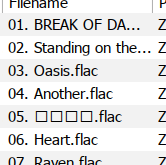
This next screenshot is the track listing after selecting an album/folder from a Japanese band. (The Japanese track should be displayed as "05. 心の地図.flac")
* * *
Some info/things I've tried:
1. I tried using LANG=ja\_JP.UTF-8 or ja\_JP.SHIFT\_JIS and more than half of the characters are still showing up as squares. Since I also have Chinese/Korean albums, I think this is not the ideal solution since I do not want to switch locales/languages.
2. I ran "winetricks allfonts" which seems to install all Windows fonts. No change to earlier results.
3. I ran winecfg =\> Desktop Integration =\> Appearance and I changed the fonts (if option is available) of all items to "Noto Sans CJK JP".
4. I checked mp3tag and it does not have font settings like other apps (example: foobar2000).
5. As a another test, I installed foobar2000 and it automatically selected "Noto Sans CJK JP" as the default font. (the track/album listing shows the correct characters. It's only the folder selection dialog that is wrong. I'm guessing that feature uses built-in "Windows" dialog.
6. I am running the latest version of both foobar2000 and mp3tag.
Any ideas on how to fix? Thanks
---
### Author:  [@ohrenkino](https://community.mp3tag.de/u/ohrenkino)
#### Post date: [June 19, 2024, 6:42am UTC](https://community.mp3tag.de/t/wine-mp3tag-cjk-characters-are-showing-up-as-squares/65081/2 "2024-06-19T06:42:12Z")
> [@tvrxujfdtzds](#):
>
> It's only the folder selection dialog that is wrong. I'm guessing that feature uses built-in "Windows" dialog.
I think that MP3tag relies on these standard dialogues and that what the OS (emulator) returns... So I would assume, it is a Wine problem.
---
### Author:  [@system](https://community.mp3tag.de/u/system)
#### Post date: [February 9, 2026, 12:30pm UTC](https://community.mp3tag.de/t/wine-mp3tag-cjk-characters-are-showing-up-as-squares/65081/3 "2026-02-09T12:30:18Z")