# Wow, we can customize the Toolbar with Tools, that's incredible! I'm requesting a second row of icons
**URL:** https://community.mp3tag.de/t/wow-we-can-customize-the-toolbar-with-tools-thats-incredible-im-requesting-a-second-row-of-icons/70953
**Category:** General Discussion
**Created:** [March 27, 2026, 5:12am UTC](https://community.mp3tag.de/t/wow-we-can-customize-the-toolbar-with-tools-thats-incredible-im-requesting-a-second-row-of-icons/70953 "2026-03-27T05:12:03Z")
**Posts on this page:** 6
**Page:** 1
### Author:  [@Sergius](https://community.mp3tag.de/u/Sergius)
#### Post date: [March 27, 2026, 5:12am UTC](https://community.mp3tag.de/t/wow-we-can-customize-the-toolbar-with-tools-thats-incredible-im-requesting-a-second-row-of-icons/70953/1 "2026-03-27T05:12:04Z")
I want to congratulate you, @Florian, you've done a remarkable and incredible job programming. We can customize the icons on the Toolbar...
I thought we only had an update bringing back the old, modernized icons. I was expecting a new update for programming personal icons.. 😄
Thanks to @LyricsLover for your photos: View: Customize Toolbar... and the toolbar.ini file. I'm speechless. I'll say the same as you... Just great!
I had a blast! You can reprogram the icons with other .ico images, and you can place your Actions and Tools commands on the Toolbar.
I can finally program my Tools! Now I can create a "Toolsbar" directly with Mp3tag, without using an intermediary program. This program is incredible, I can't say it enough!
Now we can program a huge number of icons according to our needs, with the long lists I saw in Customize Toolbar...
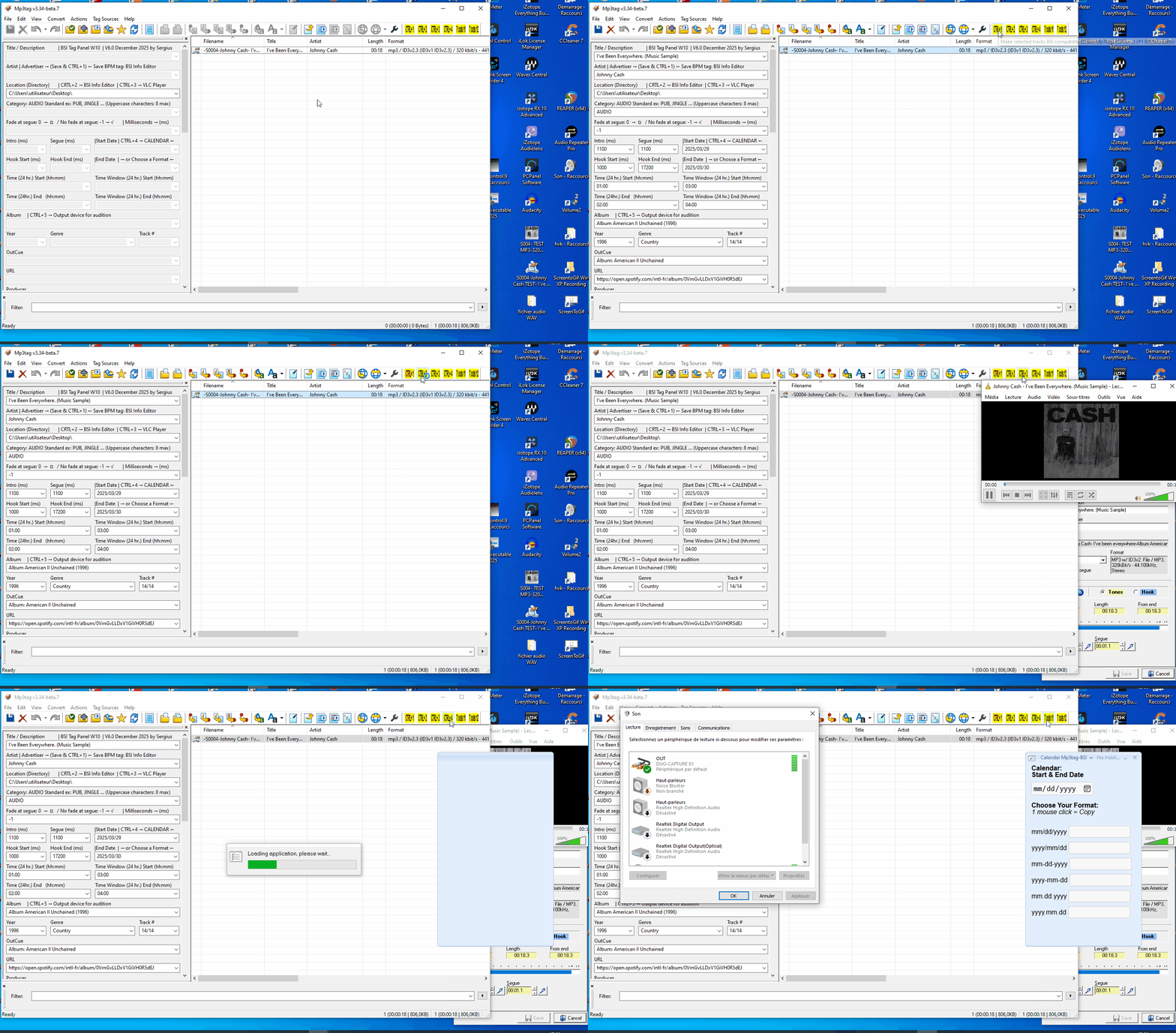
Florian, it would be great to also have a second row of icons, allowing us to add more personal icons, for those who would like this option, directly below the first row. I want to keep the icons you've placed on the first row because they're my work tools, and I don't want to put too many icons on that row. With my work laptops, my screens are smaller...
Would it be... It's possible to place two commands in the Customize Toolbar: a "Hide" button to uncheck all the icons at once, and a "Show" button to check and uncheck all the icons simultaneously, because doing them one by one is very time-consuming.
@LyricsLover, how do you program separators in the Customize Toolbar? I haven't figured it out...
I cheat by programming it directly in the toolbar.ini file; just copy and paste. 😉
Florant, your new image management commands are truly impressive! Congratulations again on this fantastic icon management program in Mp3tag!
Here are my images, for my request for a second row of icons, and a short video where I'm having fun with the Tools icons (Toolsbar) directly with Mp3tag.


---
### Author:  [@LyricsLover](https://community.mp3tag.de/u/LyricsLover)
#### Post date: [March 27, 2026, 8:10am UTC](https://community.mp3tag.de/t/wow-we-can-customize-the-toolbar-with-tools-thats-incredible-im-requesting-a-second-row-of-icons/70953/2 "2026-03-27T08:10:09Z")
> [@Sergius](#):
>
> @LyricsLover, how do you program separators in the Customize Toolbar? I haven't figured it out...
>
> I cheat by programming it directly in the toolbar.ini file; just copy and paste.
Just press the New-Button in the "Customize toolbar..." popup window and choose the "Separator" entry:

(from the [same place](https://community.mp3tag.de/t/dramatically-changed-icons-in-newest-v3-34-beta-6-what-do-you-think/70900/23) where you add a single Action, Tool or Web Source Script)
You can add as many separators as you need.
Then you can move this new separator _to the left_ or _to the right_ in your toolbar with the Move up or Move down buttons.

---
### Author:  [@Florian](https://community.mp3tag.de/u/Florian)
#### Post date: [March 29, 2026, 4:38pm UTC](https://community.mp3tag.de/t/wow-we-can-customize-the-toolbar-with-tools-thats-incredible-im-requesting-a-second-row-of-icons/70953/3 "2026-03-29T16:38:04Z")
Glad you like it, thank you for the nice feedback!
> [@Sergius](#):
>
> it would be great to also have a second row of icons, allowing us to add more personal icons, for those who would like this option, directly below the first row.
I've added support for a second Custom Toolbar with [Mp3tag v3.34-beta.8](https://community.mp3tag.de/t/455). You can configure it via **View → Toolbars → Customize custom toolbar...**.
> [@Sergius](#):
>
> Would it be... It's possible to place two commands in the Customize Toolbar: a "Hide" button to uncheck all the icons at once, and a "Show" button to check and uncheck all the icons simultaneously, because doing them one by one is very time-consuming.
You can use keyboard shortcuts CtrlE (Show) and CtrlD (Hide) for that.
---
### Author:  [@LyricsLover](https://community.mp3tag.de/u/LyricsLover)
#### Post date: [March 29, 2026, 9:17pm UTC](https://community.mp3tag.de/t/wow-we-can-customize-the-toolbar-with-tools-thats-incredible-im-requesting-a-second-row-of-icons/70953/4 "2026-03-29T21:17:33Z")
> [@Florian](#):
>
> I've added support for a second Custom Toolbar with [Mp3tag v3.34-beta.8](https://community.mp3tag.de/t/455). You can configure it via **View → Toolbars → Customize custom toolbar...**.
For future readers:
There are now 2 Toolbars, which can be activated/deactivated and customised via **View -\> Toolbars -\>**
a) Customize **main** toolbar (the one we already know)
b) Customize **custom** toolbar (a new additional one)

---
### Author:  [@Sergius](https://community.mp3tag.de/u/Sergius)
#### Post date: [March 29, 2026, 10:45pm UTC](https://community.mp3tag.de/t/wow-we-can-customize-the-toolbar-with-tools-thats-incredible-im-requesting-a-second-row-of-icons/70953/5 "2026-03-29T22:45:48Z")
Hello @LyricsLover,
Thanks for the info, I've been playing around with the 2nd row of icons for a few hours now, it's really great, Florian did an excellent job 😊 👍
---
### Author:  [@system](https://community.mp3tag.de/u/system)
#### Post date: [April 5, 2026, 10:46pm UTC](https://community.mp3tag.de/t/wow-we-can-customize-the-toolbar-with-tools-thats-incredible-im-requesting-a-second-row-of-icons/70953/6 "2026-04-05T22:46:33Z")
This topic was automatically closed 7 days after the last reply. New replies are no longer allowed.