# \[WS\] Beatport.com by stevehero \[Release, Single Track & Artwork tagging\]
**URL:** https://community.mp3tag.de/t/ws-beatport-com-by-stevehero-release-single-track-artwork-tagging/12568
**Category:** Web Sources Scripts
**Created:** [October 4, 2011, 9:07pm UTC](https://community.mp3tag.de/t/ws-beatport-com-by-stevehero-release-single-track-artwork-tagging/12568 "2011-10-04T21:07:57Z")
**Posts on this page:** 20
**Page:** 14
### Author:  [@DetlevD](https://community.mp3tag.de/u/DetlevD)
#### Post date: [March 4, 2015, 12:55pm UTC](https://community.mp3tag.de/t/ws-beatport-com-by-stevehero-release-single-track-artwork-tagging/12568/265 "2015-03-04T12:55:00Z")
> [@skrippi](#):
>
> Hi, very nice script. I'd like to have artist and mixartist in the field for ARTIST and seperated by a comma. How can I code this? Can someone help me?
> The Problem is, if there is no mixartist there should be no comma. I need a code snipped with an "if..." I think but dunno how to code this. Greez, skrippi 🙂
If you do not know, how to write the proper code in the websource script, ...
then you can code it afterwards into a Mp3tag action.
Action: Format value
Field: ARTIST
Formatstring: **%ARTIST%$if2(', '%MIXARTIST%,)**
... or ...
Formatstring: **%ARTIST%[', '%MIXARTIST%]**
... or ...
Formatstring: **$trimRight(%ARTIST%,',')**
See also ...
[beatport.com scripts by stevehero (search & direct) - jaimz mod](https://community.mp3tag.de/t/12568/199)
[beatport.com scripts by stevehero (search & direct) - jaimz mod](https://community.mp3tag.de/t/12568/201)
[Need some help with IF](https://community.mp3tag.de/t/16614/1)
[beatport.com scripts by stevehero (search & direct) - jaimz mod](https://community.mp3tag.de/t/12568/264)
[beatport.com scripts by stevehero (search & direct) - jaimz mod](https://community.mp3tag.de/t/12568/88)
DD.20150304.1517.CET
---
### Author:  [@Electrohouse95](https://community.mp3tag.de/u/Electrohouse95)
#### Post date: [March 4, 2015, 5:49pm UTC](https://community.mp3tag.de/t/ws-beatport-com-by-stevehero-release-single-track-artwork-tagging/12568/266 "2015-03-04T17:49:29Z")
> [@stevehero](#):
>
> Your error relates to using the wrong URL to parse [beatport.com](http://beatport.com). Instead of using the track url use the release one such as [http://www.beatport.com/release/so-much-love/438196](http://www.beatport.com/release/so-much-love/438196) whereas track is like the url you posted relates to the individual track itself.
>
> The script is not intended for individual tracks. The way I use it if there I have only one track from a release But in is to parse the album it relates too.
>
> But in your case the track you are parsing is the only one on your realease.
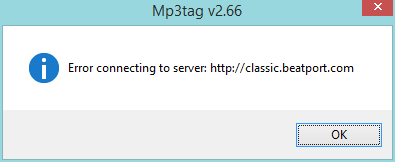
I get an error saying Error Connecting to server [Classic.beatport.com](http://Classic.beatport.com)
Could you kindly help here. please. 
---
### Author:  [@stevehero](https://community.mp3tag.de/u/stevehero)
#### Post date: [March 7, 2015, 7:12pm UTC](https://community.mp3tag.de/t/ws-beatport-com-by-stevehero-release-single-track-artwork-tagging/12568/267 "2015-03-07T19:12:19Z")
> [@Electrohouse95](#):
>
> I get an error saying Error Connecting to server [Classic.beatport.com](http://Classic.beatport.com)
>
> Could you kindly help here. please. 
Not sure. No problem my side.
---
### Author:  [@stevehero](https://community.mp3tag.de/u/stevehero)
#### Post date: [March 9, 2015, 12:05am UTC](https://community.mp3tag.de/t/ws-beatport-com-by-stevehero-release-single-track-artwork-tagging/12568/268 "2015-03-09T00:05:54Z")
For a small bugfix for **ALL** WWW(URL) scripts change:
```
$lower($regexp($regexp($if2(%www%,%www%),^www,http://www,1),www.beatport,classic.beatport))
```
TO
```
$lower($replace($regexp($if2(%www%,%www%),^www,http://www,1),www.beatport,classic.beatport,https://pro.beatport,http://classic.beatport))
```
---
### Author:  [@stavrello](https://community.mp3tag.de/u/stavrello)
#### Post date: [April 1, 2015, 6:20am UTC](https://community.mp3tag.de/t/ws-beatport-com-by-stevehero-release-single-track-artwork-tagging/12568/269 "2015-04-01T06:20:52Z")
Thank you for that amazing tool! i was searching for something like this but i didn't till yesterday.
lol probably i used wrong keywords.
Used the latest version and i have a problem at Genres. I see House Deep instead of Deep House, could you please help me how to fix it? its not a big deal to do this manually but it will be better to fill it automatically.
Another think i would like to avoid is the big Album name like [BP SINGLE TRACK #5891105]
thank you!
---
### Author:  [@stevehero](https://community.mp3tag.de/u/stevehero)
#### Post date: [April 1, 2015, 1:14pm UTC](https://community.mp3tag.de/t/ws-beatport-com-by-stevehero-release-single-track-artwork-tagging/12568/270 "2015-04-01T13:14:01Z")
No probs. Open the scripts an replace those strings with what you want. BTW it's not a bug because I like to have my music genres in order. ;]
---
### Author:  [@stavrello](https://community.mp3tag.de/u/stavrello)
#### Post date: [April 1, 2015, 4:16pm UTC](https://community.mp3tag.de/t/ws-beatport-com-by-stevehero-release-single-track-artwork-tagging/12568/271 "2015-04-01T16:16:25Z")
> [@stevehero](#):
>
> No probs. Open the scripts an replace those strings with what you want. BTW it's not a bug because I like to have my music genres in order. ;]
Thanks a lot i've figured it out. i see you reasons for genre types nice work.
---
### Author:  [@stevehero](https://community.mp3tag.de/u/stevehero)
#### Post date: [April 2, 2015, 2:29pm UTC](https://community.mp3tag.de/t/ws-beatport-com-by-stevehero-release-single-track-artwork-tagging/12568/272 "2015-04-02T14:29:44Z")
> [@stavrello](#):
>
> Thanks a lot i've figured it out. i see you reasons for genre types nice work.
That bits easy enough to figure out 🙂 And yes, there was a method in my madness 😳
---
### Author:  [@Soul\_Sensation](https://community.mp3tag.de/u/Soul_Sensation)
#### Post date: [May 8, 2015, 1:12pm UTC](https://community.mp3tag.de/t/ws-beatport-com-by-stevehero-release-single-track-artwork-tagging/12568/273 "2015-05-08T13:12:10Z")
Hello Stevehero,
I use your web script quite often as it is very handy.. 
I would just need to make the parsing of the genre tag conditional.
I would like to parse genre from your wonderful web script only conditionally to the genre tag in
the following way:
If the genre tag exists already and starts with " **H\_"** (that is capital H followed by space
- here the underscore represents the space) do not parse the genre from Beatport.
Parse the genre only if the genre tag is empty or when it does not follow the above "H\_" format,
in otherwords overwrite the current tag
I believe that this can be done with checking through regex: **H\s+(.+)** and the $if scripting
command, but I do not know how put set it up together and how to incorporate it into your web script? 
Could you please help?
---
### Author:  [@DetlevD](https://community.mp3tag.de/u/DetlevD)
#### Post date: [May 8, 2015, 1:37pm UTC](https://community.mp3tag.de/t/ws-beatport-com-by-stevehero-release-single-track-artwork-tagging/12568/274 "2015-05-08T13:37:22Z")
> [@Soul Sensation](#):
>
> ... If the genre tag exists already and starts with ... I believe that this can be done ...
I do not believe that a WS script has any read access to any existing tag field.
DD.20150508.1737.CEST
---
### Author:  [@Soul\_Sensation](https://community.mp3tag.de/u/Soul_Sensation)
#### Post date: [May 8, 2015, 1:45pm UTC](https://community.mp3tag.de/t/ws-beatport-com-by-stevehero-release-single-track-artwork-tagging/12568/275 "2015-05-08T13:45:23Z")
> [@DetlevD](#):
>
> I do not believe that a WS script has any read access to any existing tag field.
>
> DD.20150508.1737.CEST
DetlevD thanks for your response..
So it does not have any way of checking if tag exists and what is inside? 
---
### Author:  [@DetlevD](https://community.mp3tag.de/u/DetlevD)
#### Post date: [May 8, 2015, 2:06pm UTC](https://community.mp3tag.de/t/ws-beatport-com-by-stevehero-release-single-track-artwork-tagging/12568/276 "2015-05-08T14:06:13Z")
> [@Soul Sensation](#):
>
> ... So it does not have any way of checking if tag exists and what is inside?
You can copy an existing genre value into a helper tag-field, then apply the WS script, ....
afterwards do the comparison between the GENRE tag-field and the helper tag-field, ...
and do what you want to do.
DD.20150508.1806.CEST
---
### Author:  [@Soul\_Sensation](https://community.mp3tag.de/u/Soul_Sensation)
#### Post date: [May 9, 2015, 2:45pm UTC](https://community.mp3tag.de/t/ws-beatport-com-by-stevehero-release-single-track-artwork-tagging/12568/277 "2015-05-09T14:45:56Z")
> [@DetlevD](#):
>
> You can copy an existing genre value into a helper tag-field, then apply the WS script, ....
> afterwards do the comparison between the GENRE tag-field and the helper tag-field, ...
> and do what you want to do.
>
> DD.20150508.1806.CEST
Thanks... Looks like the way throught the helper tag is the only way
---
### Author:  [@stevehero](https://community.mp3tag.de/u/stevehero)
#### Post date: [May 12, 2015, 6:52pm UTC](https://community.mp3tag.de/t/ws-beatport-com-by-stevehero-release-single-track-artwork-tagging/12568/278 "2015-05-12T18:52:37Z")
Scripts can't read existing tag names. They tag tracks from web sources. Temp GENRE tag is the only way I'm afraid.
_FIX Problem on INITIALKEY on ( [http://classic.beatport.com/release/treasu...remixes/1520130](http://classic.beatport.com/release/treasured-soul-the-remixes/1520130) ) where name contained Amin._
Search in ALL scripts for a chuck of code similar to this and replace it with code below.
```
replace "♯" "#" # Fix
replace "\"A♭min\"" "\"01A\""
replace "\"G#min\"" "\"01A\"" # SAME KEY #
replace "\"E♭min\"" "\"02A\""
replace "\"D#min\"" "\"02A\"" # SAME KEY #
replace "\"B♭min\"" "\"03A\""
replace "\"A#min\"" "\"03A\"" # SAME KEY #
replace "\"Fmin\"" "\"04A\""
replace "\"Cmin\"" "\"05A\""
replace "\"Gmin\"" "\"06A\""
replace "\"Dmin\"" "\"07A\""
replace "\"Amin\"" "\"08A\""
replace "\"Emin\"" "\"09A\""
replace "\"Bmin\"" "\"10A\""
replace "\"F#min\"" "\"11A\""
replace "\"D♭min\"" "\"12A\""
replace "\"C#min\"" "\"12A\"" # SAME KEY #
replace "\"Bmaj\"" "\"01B\""
replace "\"F#maj\"" "\"02B\""
replace "\"D♭maj\"" "\"03B\""
replace "\"C#maj\"" "\"03B\"" # SAME KEY #
replace "\"A♭maj\"" "\"04B\""
replace "\"G#maj\"" "\"04B\"" # SAME KEY #
replace "\"E♭maj\"" "\"05B\""
replace "\"D#maj\"" "\"05B\"" # SAME KEY #
replace "\"B♭maj\"" "\"06B\""
replace "\"A#maj\"" "\"06B\"" # SAME KEY #
replace "\"Fmaj\"" "\"07B\""
replace "\"Cmaj\"" "\"08B\""
replace "\"Gmaj\"" "\"09B\""
replace "\"Dmaj\"" "\"10B\""
replace "\"Amaj\"" "\"11B\""
replace "\"Emaj\"" "\"12B\""
```
---
### Author:  [@Raphi111](https://community.mp3tag.de/u/Raphi111)
#### Post date: [May 14, 2015, 7:56am UTC](https://community.mp3tag.de/t/ws-beatport-com-by-stevehero-release-single-track-artwork-tagging/12568/279 "2015-05-14T07:56:06Z")
Thank you for this wonderful script 🙂
I modified it a bit to suit my needs and I'm using it daily for quite a while now 🙂
---
### Author:  [@stevehero](https://community.mp3tag.de/u/stevehero)
#### Post date: [May 14, 2015, 8:03am UTC](https://community.mp3tag.de/t/ws-beatport-com-by-stevehero-release-single-track-artwork-tagging/12568/280 "2015-05-14T08:03:47Z")
Thanks Raphi! 😉
---
### Author:  [@jaydnb](https://community.mp3tag.de/u/jaydnb)
#### Post date: [June 6, 2015, 7:36am UTC](https://community.mp3tag.de/t/ws-beatport-com-by-stevehero-release-single-track-artwork-tagging/12568/281 "2015-06-06T07:36:25Z")
well i'd like to say a big thank you for creating and updating this script, i speak for myself and i'm sure of many others who are silent users of this script but appreciate it immensely, if i had to manually locate and add tags and pictures of each and every track i own i would of gave up long ago.
keep up the amazing work stevehero much appreciated! 😆
---
### Author:  [@stevehero](https://community.mp3tag.de/u/stevehero)
#### Post date: [June 6, 2015, 12:30pm UTC](https://community.mp3tag.de/t/ws-beatport-com-by-stevehero-release-single-track-artwork-tagging/12568/282 "2015-06-06T12:30:01Z")
Thanks for taking the time to write such kind words. Yours in music - stevehero
---
### Author:  [@incheyeg](https://community.mp3tag.de/u/incheyeg)
#### Post date: [June 21, 2015, 12:08am UTC](https://community.mp3tag.de/t/ws-beatport-com-by-stevehero-release-single-track-artwork-tagging/12568/283 "2015-06-21T00:08:37Z")
great tool absolutely love it!
I do have a problem with editing the script tho, even when I remove the # from set "TRACK" the track field still populates? scratching my head trying to figure it out ☹ all the other fields that I have omitted are working no problem
fixed it:
#outputto "TRACKS"
#say "|"
---
### Author:  [@Toby\_D](https://community.mp3tag.de/u/Toby_D)
#### Post date: [June 29, 2015, 11:29am UTC](https://community.mp3tag.de/t/ws-beatport-com-by-stevehero-release-single-track-artwork-tagging/12568/284 "2015-06-29T11:29:35Z")
**stevehero**
Cant msg you in PM, so will ask you in this topic. For example, i have about 200 tracks, they have only Artist and Title tags. When I select them, and choise Release search by Artist + Title, script search only for the first track in list. How to run this for all tracks?
Just need to find tags and covers for all tracks, but atm its not possible. Script ask me to do this things for each track ☹ Can you help me with this problem?
[Previous page](https://community.mp3tag.de/t/ws-beatport-com-by-stevehero-release-single-track-artwork-tagging/12568.md?page=13)
[Next page](https://community.mp3tag.de/t/ws-beatport-com-by-stevehero-release-single-track-artwork-tagging/12568.md?page=15)