# \[WS\] Discogs (pone mod)
**URL:** https://community.mp3tag.de/t/ws-discogs-pone-mod/9226
**Category:** Broken Web Sources
**Created:** [October 29, 2009, 3:18am UTC](https://community.mp3tag.de/t/ws-discogs-pone-mod/9226 "2009-10-29T03:18:24Z")
**Posts on this page:** 20
**Page:** 36
### Author:  [@mp3taglover](https://community.mp3tag.de/u/mp3taglover)
#### Post date: [January 14, 2016, 3:48am UTC](https://community.mp3tag.de/t/ws-discogs-pone-mod/9226/706 "2016-01-14T03:48:03Z")
Of course, everything is possible. To get rid of actions you need to perform everything in script, though I find it less convinient. I was using discogs xml script for quite some time when there was XML support on discogs, so kinda get used to it. That's the reason there is a need to apply some actions. I could rewrite it completely but I'm simply don't want invest my time into it.
---
### Author:  [@djepeto](https://community.mp3tag.de/u/djepeto)
#### Post date: [January 14, 2016, 3:44pm UTC](https://community.mp3tag.de/t/ws-discogs-pone-mod/9226/707 "2016-01-14T15:44:12Z")
I'm pretty sure it could be done with changing file settings:
Discogs Pone 4 Web Script Settings.mp3
With cutting 6 characters from right side YYYY-MM-DD I will get only year...but I don't know how to make right order. I have to think...
---
### Author:  [@cr4zy2oo3](https://community.mp3tag.de/u/cr4zy2oo3)
#### Post date: [March 9, 2016, 5:00pm UTC](https://community.mp3tag.de/t/ws-discogs-pone-mod/9226/708 "2016-03-09T17:00:38Z")
> [@Andromedych](#):
>
> Any idea or any suggestion on how to fix cover art issue? It's been a while since the issue appeared. After all the years of using pone mod (THE BEST OF ALL TIMES!) I can't let it go and keep my library tagged but containing no cover art in files. Really need a solution how to keep it organized the way I'm used to. Maybe there is any tool which will read discogs ID from audio files and match it and download cover art? Or any script fixes available but I was blind to find one? Please reply anyone, need your help! Thank you
Hello,
I use only the script Discogs &Pone# Standard &Search.src
To fix the cover issue, you must do:
1. Delete the following lines at line 230
2. Insert the following lines at line 145
3. Insert the following line at line 8
[UserAgent]=1
---
### Author:  [@blackbeen](https://community.mp3tag.de/u/blackbeen)
#### Post date: [March 14, 2016, 11:58pm UTC](https://community.mp3tag.de/t/ws-discogs-pone-mod/9226/709 "2016-03-14T23:58:33Z")
This pone has stopped working correctly tonight, it was working fine a few hours ago.
[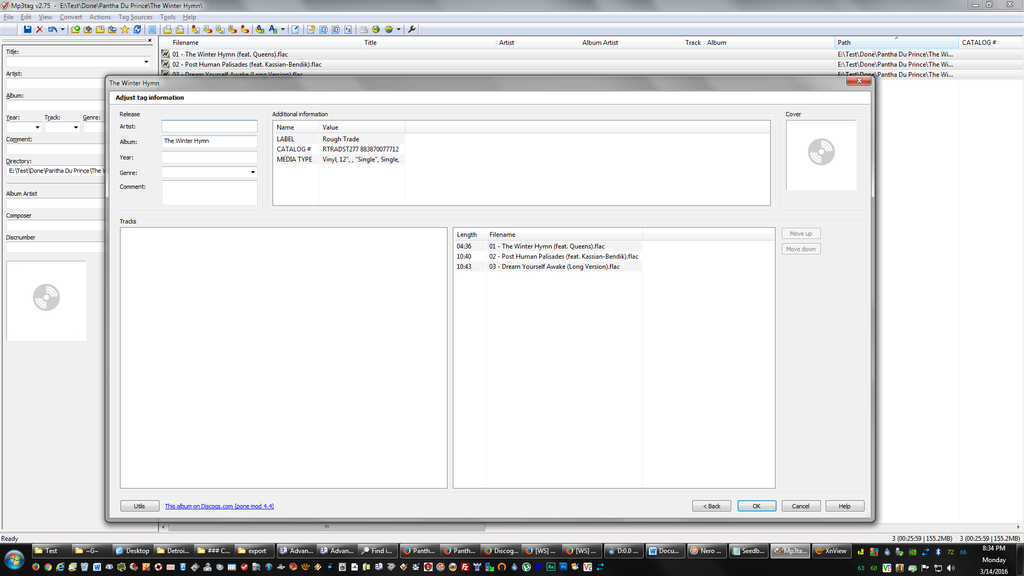](http://s932.photobucket.com/user/blackbeen2/media/Capture-1_zps7uqww8t4.png.html)
---
### Author:  [@mp3taglover](https://community.mp3tag.de/u/mp3taglover)
#### Post date: [March 15, 2016, 2:04am UTC](https://community.mp3tag.de/t/ws-discogs-pone-mod/9226/710 "2016-03-15T02:04:30Z")
> [@blackbeen](#):
>
> This pone has stopped working correctly tonight, it was working fine a few hours ago.
1. Update mp3tag to its latest version v2.75
2. Change in scripts URLs to https://:
---
### Author:  [@blackbeen](https://community.mp3tag.de/u/blackbeen)
#### Post date: [March 15, 2016, 2:56am UTC](https://community.mp3tag.de/t/ws-discogs-pone-mod/9226/711 "2016-03-15T02:56:16Z")
QUOTE (mp3taglover @ Mar 15 2016, 05:04) \<{POST\_SNAPBACK}\>
1. Update mp3tag to its latest version v2.75
1. Change in scripts URLs to https://:
So just adding a s to http:// to https:// correct? Using **Direct by Discogs ID** this doesn't change the result.
---
### Author:  [@mp3taglover](https://community.mp3tag.de/u/mp3taglover)
#### Post date: [March 15, 2016, 3:28am UTC](https://community.mp3tag.de/t/ws-discogs-pone-mod/9226/712 "2016-03-15T03:28:00Z")
> [@blackbeen](#):
>
> So just adding a s to http:// to https:// correct? Using **Direct by Discogs ID** this doesn't change the result.
try my version of scripts i've published [here](https://community.mp3tag.de/t/9226/704).
NOTE: you need to change url in my scripts to https:// and make sure you use mp3tag v2.75 also don't foget to apply actions after you tag with my script.
---
### Author:  [@blackbeen](https://community.mp3tag.de/u/blackbeen)
#### Post date: [March 15, 2016, 1:09pm UTC](https://community.mp3tag.de/t/ws-discogs-pone-mod/9226/713 "2016-03-15T13:09:54Z")
> [@mp3taglover](#):
>
> try my version of scripts i've published [here](https://community.mp3tag.de/t/9226/704).
>
> NOTE: you need to change url in my scripts to https:// and make sure you use mp3tag v2.75 also don't foget to apply actions after you tag with my script.
I forgot to mention that I've been using mp3tag v2.75 all along, I tried your script & it works (though it doesn't display Artist under Release) but no offense but most to all of the Additional Information categories are not ones I use & few to none I use are included so this wouldn't work for me.
I'm pretty minimal in tagging style this is the Metadata entries I use:

[Discogs\_\_Pone\_\_Direct\_by\_Discogs\_\_ID.src](https://community.mp3tag.de/uploads/default/original/2X/6/6fc498cb86de9b1bc5fb5b2a69164683ccb15368.src) (16.7 KB)
---
### Author:  [@mp3taglover](https://community.mp3tag.de/u/mp3taglover)
#### Post date: [March 15, 2016, 1:29pm UTC](https://community.mp3tag.de/t/ws-discogs-pone-mod/9226/714 "2016-03-15T13:29:42Z")
> [@blackbeen](#):
>
> (though it doesn't display Artist under Release)
What do you mean it doesn't display? In tagging window?
If so - this is how script works it populates artists etc after you apply actions on files.
You can read few pages back, I just left whole logic of dealing with tags in actions instead of moving this into websources script. It's easier and I'm just used to it.
> [@](#):
>
> I'm pretty minimal in tagging style this is the Metadata entries I use:
You can edit actions/1. Discogs\_XML.mta and in action #74 list all tags you don't need so they will be erased after applying action.
---
### Author:  [@blackbeen](https://community.mp3tag.de/u/blackbeen)
#### Post date: [March 15, 2016, 1:43pm UTC](https://community.mp3tag.de/t/ws-discogs-pone-mod/9226/715 "2016-03-15T13:43:27Z")
> [@mp3taglover](#):
>
> What do you mean it doesn't display? In tagging window?
Under Release / Artist:

---
### Author:  [@blackbeen](https://community.mp3tag.de/u/blackbeen)
#### Post date: [March 15, 2016, 1:48pm UTC](https://community.mp3tag.de/t/ws-discogs-pone-mod/9226/716 "2016-03-15T13:48:42Z")
I'm unclear on why Pone Mod 4.4 stopped working, it worked fine up to around 4:30PM EST yesterday, I don't know what changed.
---
### Author:  [@mp3taglover](https://community.mp3tag.de/u/mp3taglover)
#### Post date: [March 15, 2016, 1:53pm UTC](https://community.mp3tag.de/t/ws-discogs-pone-mod/9226/717 "2016-03-15T13:53:53Z")
> [@blackbeen](#):
>
> Under Release / Artist:
Re-read my comment above:
> [@](#):
>
> This is how script works it populates artists etc after you apply actions on files.
>
> You can read few pages back, I just left whole logic of dealing with tags in actions instead of moving this into websources script. It's easier and I'm just used to it.
It's normal. After you apply actions everything will be tagged properly.
> [@](#):
>
> I'm unclear on why Pone Mod 4.4 stopped working, it worked fine up to around 4:30PM EST yesterday, I don't know what changed.
Sorry, I have no idea. I'm not maintaining Pone Mod at all. All i'm using from Pone is his search that's all. Maybe discogs changed something apart from https://.
---
### Author:  [@OoNebsoO](https://community.mp3tag.de/u/OoNebsoO)
#### Post date: [March 15, 2016, 3:56pm UTC](https://community.mp3tag.de/t/ws-discogs-pone-mod/9226/718 "2016-03-15T15:56:56Z")
Hi mp3taglover, tried your script from previous page and quite like it. Have just one problem with CREDITS tag. Basically, would like to behave just like NOTES tag, like a simple text field, and just like how they look on discogs release page for instance.
Here's the screenshot how values look like pasted into notepad (and my unsuccessful tinkering with your original script on the left):

All's well with NOTES, but CREDITS are a mess. And here's a discogs page for that particular release, and how I'd like it to look after tagging. [https://www.discogs.com/release/2406749](https://www.discogs.com/release/2406749)
Any ideas?
Btw, CHAPTER tag, would that be complicated to add?
Thanks!
---
### Author:  [@Fetttler](https://community.mp3tag.de/u/Fetttler)
#### Post date: [March 15, 2016, 5:49pm UTC](https://community.mp3tag.de/t/ws-discogs-pone-mod/9226/719 "2016-03-15T17:49:12Z")
I'm having similar problems today too. It's not working properly.
I changed the http to https and I can now get onto Discogs but there is info missing in the results section.
For example, I looked for an album (in Pone Standard Search). I found it but when the results came up, it doesn't actually show the track titles.
I also tried using the Pone URL search - again, it finds the album but does not show track titles.
Does anyone know why this is and if there is a fix?
Any info much appreciated.
Thanks in advance.
---
### Author:  [@Fetttler](https://community.mp3tag.de/u/Fetttler)
#### Post date: [March 15, 2016, 5:50pm UTC](https://community.mp3tag.de/t/ws-discogs-pone-mod/9226/720 "2016-03-15T17:50:32Z")
P.S. I am using v2.75
---
### Author:  [@OoNebsoO](https://community.mp3tag.de/u/OoNebsoO)
#### Post date: [March 15, 2016, 6:12pm UTC](https://community.mp3tag.de/t/ws-discogs-pone-mod/9226/721 "2016-03-15T18:12:22Z")
Oh yeah, about the actual discogs pone 4.4 script. I too have problems with it. Tried just "Direct by direct ID" option and missing ARTIST, YEAR, GENRE, TRACKNUMBER, TITLE,...maybe something more.
Luckily, mp3taglover's one is a great alternative.
---
### Author:  [@blackbeen](https://community.mp3tag.de/u/blackbeen)
#### Post date: [March 15, 2016, 6:12pm UTC](https://community.mp3tag.de/t/ws-discogs-pone-mod/9226/722 "2016-03-15T18:12:37Z")
Pone hasn't been seen since November, I'm worried his script won't be updated, there seems to be 2 pones working with Discogs presently the stock & mp3taglover's I'm attempting to modify the stock to fit my needs, I'm stuck at adding a Albumartist field sometimes I think it would be faster to manual tag as I've been at this all day & I'm literally years behind in tagging with 4 GB left on my hard drive presently.
---
### Author:  [@Fetttler](https://community.mp3tag.de/u/Fetttler)
#### Post date: [March 15, 2016, 7:09pm UTC](https://community.mp3tag.de/t/ws-discogs-pone-mod/9226/723 "2016-03-15T19:09:34Z")
I feel exactly the same @ blackbeen. I really like and appreciate mp3taglover's script too but it has far too many fields for my needs and sadly, I am so so rubbish at editing scripts and things, I'm clueless. I end up making things worse. It looks like I too may have to resort to manually tagging things, or use foobar again - which I don't particularly want to ☹
---
### Author:  [@bfr1028](https://community.mp3tag.de/u/bfr1028)
#### Post date: [March 15, 2016, 11:29pm UTC](https://community.mp3tag.de/t/ws-discogs-pone-mod/9226/724 "2016-03-15T23:29:45Z")
I usedDiscogs json all ID and I don't get the artist either. any help would be appreciated on what to change and where? cover is also missing, im not great with scrips but dangerous enough.. It looks like artist has been commented out and missing a line or 2 of code maybe??
Thanks
BFR1028
---
### Author:  [@mp3taglover](https://community.mp3tag.de/u/mp3taglover)
#### Post date: [March 16, 2016, 2:03am UTC](https://community.mp3tag.de/t/ws-discogs-pone-mod/9226/725 "2016-03-16T02:03:44Z")
> [@OoNebsoO](#):
>
> Hi mp3taglover, tried your script from previous page and quite like it. Have just one problem with CREDITS tag. Basically, would like to behave just like NOTES tag, like a simple text field, and just like how they look on discogs release page for instance.
>
> All's well with NOTES, but CREDITS are a mess. And here's a discogs page for that particular release, and how I'd like it to look after tagging. [https://www.discogs.com/release/2406749](https://www.discogs.com/release/2406749)
What's wrong with credits? It looks exactly like on discogs:
and on discogs:
> [@](#):
>
> Any ideas?
>
> Btw, CHAPTER tag, would that be complicated to add?
> Thanks!
I think it's possible to add, will look later into it.
[Previous page](https://community.mp3tag.de/t/ws-discogs-pone-mod/9226.md?page=35)
[Next page](https://community.mp3tag.de/t/ws-discogs-pone-mod/9226.md?page=37)