# \[WS\] Google Images Cover Search
**URL:** https://community.mp3tag.de/t/ws-google-images-cover-search/11166
**Category:** Web Sources Scripts
**Created:** [November 22, 2010, 12:43pm UTC](https://community.mp3tag.de/t/ws-google-images-cover-search/11166 "2010-11-22T12:43:56Z")
**Posts on this page:** 20
**Page:** 1
### Author:  [@pone](https://community.mp3tag.de/u/pone)
#### Post date: [November 22, 2010, 12:43pm UTC](https://community.mp3tag.de/t/ws-google-images-cover-search/11166/1 "2010-11-22T12:43:56Z")
This script is not working anymore!
The problem is that google images is only accessible via HTTPS URLs, which can't be parsed by Mp3tag.
If anyone knows a way to to access it via a HTTP URL, please let me know!
Thank you for almost 3000 downloads of the last version!
---
### Author:  [@pone](https://community.mp3tag.de/u/pone)
#### Post date: [November 22, 2010, 2:50pm UTC](https://community.mp3tag.de/t/ws-google-images-cover-search/11166/2 "2010-11-22T14:50:54Z")
first update (v 1.1)
The "List of search results" dialog has now a extra column for the filesize.
The Results are now presented in the following way:
filename | website | imagesize (pixel) | filesize (KB)
---
### Author:  [@pone](https://community.mp3tag.de/u/pone)
#### Post date: [November 22, 2010, 9:50pm UTC](https://community.mp3tag.de/t/ws-google-images-cover-search/11166/3 "2010-11-22T21:50:17Z")
another update on the first day of the script (v 1.2):
I changed the search to prefer %albumartist% for search if present, otherwise %artist% is chosen.
I made some replaces of URL-encodings of some special characters which were not transformed in all cases. In others they were. I don't know why. If you detect more characters/encodings which make problems, let me know.
The encodings I replaced with their coresponding characters are:
%3F -\> ?
%3D -\> =
%26 -\> &
%25 -\> %
- see starting post for download -
---
### Author:  [@muctuy](https://community.mp3tag.de/u/muctuy)
#### Post date: [January 22, 2011, 12:56am UTC](https://community.mp3tag.de/t/ws-google-images-cover-search/11166/4 "2011-01-22T00:56:54Z")
das plugin funktioniert super! leider ist damit keine automatisierung für mehrere files möglich.
perfekt wärs, wenn mp3tag eine derartige funktion bzw aktion zur autmatisierung von coverimporten über eine bestimmte datenbank (in diesem fall google images) zur verfügung stellt.
---
### Author:  [@pone](https://community.mp3tag.de/u/pone)
#### Post date: [January 22, 2011, 2:03pm UTC](https://community.mp3tag.de/t/ws-google-images-cover-search/11166/5 "2011-01-22T14:03:05Z")
you can do all files of one album in one go
---
### Author:  [@muctuy](https://community.mp3tag.de/u/muctuy)
#### Post date: [January 22, 2011, 2:27pm UTC](https://community.mp3tag.de/t/ws-google-images-cover-search/11166/6 "2011-01-22T14:27:40Z")
i mean hundreds of files of different albums 😉
simply automation:
for each file
- search for cover with google images cover search
- choose first pic
- save it
next
by the way: the simple nice tool mp3coverChanger does the full automated cover tagging very well: [http://digijay.kilu.de/forum1/viewtopic.php?f=11&t=298](http://digijay.kilu.de/forum1/viewtopic.php?f=11&t=298). but it uses amzon as source, which acutally is not as good as google.
---
### Author:  [@pone](https://community.mp3tag.de/u/pone)
#### Post date: [January 22, 2011, 2:35pm UTC](https://community.mp3tag.de/t/ws-google-images-cover-search/11166/7 "2011-01-22T14:35:38Z")
> [@muctuy](#):
>
> i mean hundreds of files of different albums 😉
>
> simply automation:
>
> for each file
>
> - search for cover with google images cover search
> - choose first pic
> - save it
>
> next
I know, but that is something Mp3tag doesn't offer.
Other programs do that, like Windows Media Player and I think iTunes and WinAmp, but they never get 100% correct covers. Often just covers of different albums with similar titles.
---
### Author:  [@muctuy](https://community.mp3tag.de/u/muctuy)
#### Post date: [January 22, 2011, 2:59pm UTC](https://community.mp3tag.de/t/ws-google-images-cover-search/11166/8 "2011-01-22T14:59:47Z")
> [@pone](#):
>
> I know, but that is something Mp3tag doesn't offer.
> Other programs do that, like Windows Media Player and I think iTunes and WinAmp, but they never get 100% correct covers. Often just covers of different albums with similar titles.
hmm.. afaik those tools can do the cover tagging only if the file is currently played. i dont think that they have a full automated cover tagging function - or am i wrong?
---
### Author:  [@pone](https://community.mp3tag.de/u/pone)
#### Post date: [January 22, 2011, 3:08pm UTC](https://community.mp3tag.de/t/ws-google-images-cover-search/11166/9 "2011-01-22T15:08:06Z")
> [@muctuy](#):
>
> hmm.. afaik those tools can do the cover tagging only if the file is currently played. i dont think that they have a full automated cover tagging function - or am i wrong?
I don't know exactly. I've read this about Windows Media Player somewhere. There should be a function which adds coverartwork to the whole library. But in a fixed size which is pretty small I think. But i never tested.
---
### Author:  [@laurin148](https://community.mp3tag.de/u/laurin148)
#### Post date: [March 2, 2011, 8:42pm UTC](https://community.mp3tag.de/t/ws-google-images-cover-search/11166/10 "2011-03-02T20:42:14Z")
Hey pone,
I got a problem with this source.
A made 2 screens to describe my problem:
🙂
You can use the extended google images search for the size. Example:
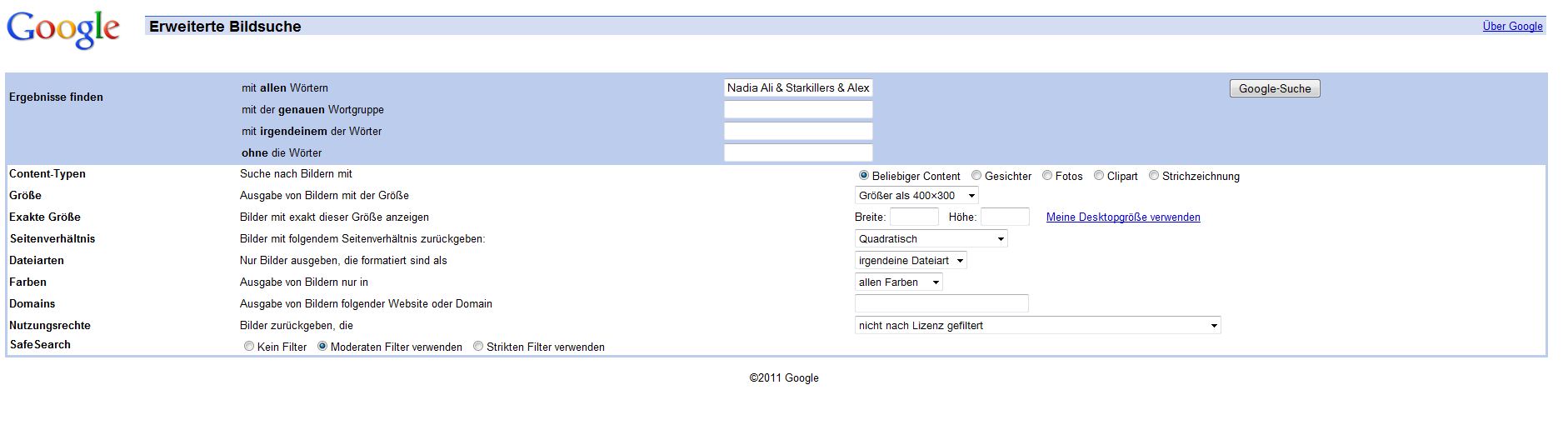
Size: bigger than 400x300
Typ: quadratically
Here The URL for this search with the search parameters if it helps:
[http://www.google.de/images?as\_q=Nadia+Ali...art=0&uss=1](http://www.google.de/images?as_q=Nadia+Ali+%26+Starkillers+%26+Alex+Kenji+-+Pressure+%28Original+Mix%29&hl=de&output=search&tbs=isch:1,isz:lt,islt:qsvga,iar:s&btnG=Google-Suche&as_epq=&as_oq=&as_eq=&as_sitesearch=&as_st=y&start=0&uss=1)
---
### Author:  [@pone](https://community.mp3tag.de/u/pone)
#### Post date: [March 3, 2011, 12:31am UTC](https://community.mp3tag.de/t/ws-google-images-cover-search/11166/11 "2011-03-03T00:31:29Z")
The problem of your search was the **&** character. It cuts everything what comes afterward. I fixed that and added a couple of other replacements of certain characters.
i also thought about limiting the search to certain sizes and aspect ratios. but that will also limit search matches for cover pictures for albums which have not hundreds of pictures in the web. and for more mainstream albums, the first search matches are nearly always good pictures between 300x300 and 700x700.
script updated to v1.3
(over 600 downloads of the last version, wow)
---
### Author:  [@laurin148](https://community.mp3tag.de/u/laurin148)
#### Post date: [March 3, 2011, 12:32pm UTC](https://community.mp3tag.de/t/ws-google-images-cover-search/11166/12 "2011-03-03T12:32:43Z")
first of all, thanks for updating. But i have one last suggestion:
You can search for quadratically pictures like i discribed here:
[http://h-4.abload.de/img/fail3apes.jpg](http://h-4.abload.de/img/fail3apes.jpg)
Then you'll be sure you will find a cover. Its to avoid that you'll find pics which are not the covers, because covers are always quadratically!
And it would be great if i can search the other pages of the google results if its possible, because i've had one titel which only got low resolution (80x80 etc) in the first google page, but in the second a found a good resolution (600x600)
---
### Author:  [@DetlevD](https://community.mp3tag.de/u/DetlevD)
#### Post date: [March 3, 2011, 12:41pm UTC](https://community.mp3tag.de/t/ws-google-images-cover-search/11166/13 "2011-03-03T12:41:19Z")
> [@laurin148](#):
>
> ... because covers are always quadratically! ...
This opinion might not be realistic.
DD.20110303.1445.CET
---
### Author:  [@laurin148](https://community.mp3tag.de/u/laurin148)
#### Post date: [March 3, 2011, 12:48pm UTC](https://community.mp3tag.de/t/ws-google-images-cover-search/11166/14 "2011-03-03T12:48:16Z")
> [@DetlevD](#):
>
> This opinion might not be realistic.
>
> DD.20110303.1445.CET
Hmm every cover I've seen until now had resolutions like 300x300, 700x700 etc and so they are quadratically 😉
---
### Author:  [@pone](https://community.mp3tag.de/u/pone)
#### Post date: [March 3, 2011, 1:04pm UTC](https://community.mp3tag.de/t/ws-google-images-cover-search/11166/15 "2011-03-03T13:04:51Z")
> [@laurin148](#):
>
> Hmm every cover I've seen until now had resolutions like 300x300, 700x700 etc and so they are quadratically 😉
not exactly.
many covers, or at least their digital representaions, have aspect ratios like 700x690. i don't know if goolge treats them as quadratic.
and of course, there are other formats:
- Tapes & DVDs are normally not quadratic
- CDs sometimes have a cover which corresponds to the backside of a standard cd case
- CDs can also have non standard cases with different aspect ratios
- mp3s have no standard aspect, e.g. podcasts have often cover pictures which are not quadratic
- for live recordings you will maybe choose a flyer or a poster of the event as cover, which is also rarely quadratic
---
### Author:  [@pone](https://community.mp3tag.de/u/pone)
#### Post date: [March 3, 2011, 2:16pm UTC](https://community.mp3tag.de/t/ws-google-images-cover-search/11166/16 "2011-03-03T14:16:13Z")
> [@laurin148](#):
>
> first of all, thanks for updating. But i have one last suggestion:
>
> You can search for quadratically pictures like i discribed here:
> [http://h-4.abload.de/img/fail3apes.jpg](http://h-4.abload.de/img/fail3apes.jpg)
>
> Then you'll be sure you will find a cover. Its to avoid that you'll find pics which are not the covers, because covers are always quadratically!
>
> And it would be great if i can search the other pages of the google results if its possible, because i've had one titel which only got low resolution (80x80 etc) in the first google page, but in the second a found a good resolution (600x600)
Anyway, I wrote a guide in the starting post how to costomize the script to use google advanced image search.
I'm sorry, but I don't know how to display more than 20 results.
---
### Author:  [@laurin148](https://community.mp3tag.de/u/laurin148)
#### Post date: [March 4, 2011, 10:07pm UTC](https://community.mp3tag.de/t/ws-google-images-cover-search/11166/17 "2011-03-04T22:07:54Z")
> [@pone](#):
>
> Anyway, I wrote a guide in the starting post how to costomize the script to use google advanced image search.
>
> I'm sorry, but I don't know how to display more than 20 results.
thanks for this guide, now I can be sure to find the right cover in a good resolution .. now more than 20 results are not needed 😉 thanks for help ..
---
### Author:  [@songdog](https://community.mp3tag.de/u/songdog)
#### Post date: [March 29, 2011, 12:56pm UTC](https://community.mp3tag.de/t/ws-google-images-cover-search/11166/18 "2011-03-29T12:56:33Z")
> [@pone](#):
>
> This script searches for cover art with google images.
> It stores only the cover art, no other tags are written.
>
> I used [Google Bilder](http://google.de/images) for search because it's simpler than the .com version.
> The tags album & artist are used for search input.
>
> Feel free to write comments and suggestions for improvement!
>
> **Script Installation & Usage:**
>
> 1. Download the script
>
> 2. Move the file into this folder: **%appdata%\Mp3tag\data\sources**
>
> 3. Run the script from Mp3Tag with this button:
>
> **How to edit the script ot use Google Advanced Image Search:**
> The scipt searches for all picture, regardless of size and aspect ratio.
> But you can customize this:
>
> 1. open the script with a text editior (e.g. notepad.exe or wordpad.exe).
>
> 2. go to the line:
> **[IndexUrl]=[http://www.google.de/images?q=%s](http://www.google.de/images?q=%25s)**
> This is the standard search. By adding certain codes to it, you can make use of Google's Advanced Image Search.
>
> 3. Place this after the index url to use advanced search
> **&tbs=**
>
> 4. Add the following codes separated by comma to limit your search:
> **iar:s** \_ \_ \_ quadratic pictures only
>
> **isz:s** \_ \_ \_ small (side length under 400 px)
> **isz:m** \_ \_ \_ medium (side length between 400 and 800 px)
> **isz:l** \_ \_ \_ large (side length over 800 px)
> **isz:lt,islt:qsvga** \_ \_ \_ larger than 400x300
> **isz:lt,islt:vga** \_ \_ \_ larger than 640x480
> **isz:lt,islt:svga** \_ \_ \_ larger than 800x600
> **isz:lt,islt:xga** \_ \_ \_ larger than 1024x768
> **isz:ex,iszw:500,iszh:500** \_ \_ \_ exact file size (500x500 in this example)
>
> **ift:jpg** \_ \_ \_ .jpg files only
> **ift:png** \_ \_ \_ .png files only
> **ift:bmp** \_ \_ \_ .bmp files only
> **ift:gif** \_ \_ \_ .gif files only
> **ift:svg** \_ \_ \_ .svg files only
>
> Example:
> **[IndexUrl]=[http://www.google.de/images?q=%s&tbs=](http://www.google.de/images?q=%25s&tbs=)iar:s,isz:l,ift:jpg**
> gives you only quadratic large jpg files
>
> If you want, you can make more verions of the script by giving them different filenames.
>
> **download:**
When I save this script what should I name it in order for Mp3tag to recognise it?
-- Songdog
---
### Author:  [@pone](https://community.mp3tag.de/u/pone)
#### Post date: [March 29, 2011, 1:02pm UTC](https://community.mp3tag.de/t/ws-google-images-cover-search/11166/19 "2011-03-29T13:02:24Z")
> [@songdog](#):
>
> When I save this script what should I name it in order for Mp3tag to recognise it?
>
> -- Songdog
**Script Installation & Usage:**
1. Download the script
2. Move the file into this folder: **%appdata%\Mp3tag\data\sources**
3. Run the script from Mp3Tag with this button:
name it _name_ **.src**
---
### Author:  [@songdog](https://community.mp3tag.de/u/songdog)
#### Post date: [March 29, 2011, 8:20pm UTC](https://community.mp3tag.de/t/ws-google-images-cover-search/11166/20 "2011-03-29T20:20:56Z")
QUOTE (pone @ Mar 29 2011, 17:02) \<{POST\_SNAPBACK}\>
**Script Installation & Usage:**
1. Download the script
2. Move the file into this folder: **%appdata%\Mp3tag\data\sources**
3. Run the script from Mp3Tag with this button: 
-- Songdog
[Next page](https://community.mp3tag.de/t/ws-google-images-cover-search/11166.md?page=2)