# \[WS\] Metal Archives
**URL:** https://community.mp3tag.de/t/ws-metal-archives/5923
**Category:** Web Sources Scripts
**Created:** [December 20, 2007, 2:52pm UTC](https://community.mp3tag.de/t/ws-metal-archives/5923 "2007-12-20T14:52:32Z")
**Posts on this page:** 20
**Page:** 10
### Author:  [@Jaeger1349](https://community.mp3tag.de/u/Jaeger1349)
#### Post date: [October 1, 2025, 11:14pm UTC](https://community.mp3tag.de/t/ws-metal-archives/5923/184 "2025-10-01T23:14:51Z")
Yeah, bro, count on me!
---
### Author:  [@anton](https://community.mp3tag.de/u/anton)
#### Post date: [October 3, 2025, 4:23am UTC](https://community.mp3tag.de/t/ws-metal-archives/5923/185 "2025-10-03T04:23:28Z")
Yeah… I was hit with the same issue ☹
But, in the other hand, that gave me an excuse to make further progress on the workaround/proxy.
I think that I got a pretty stable version by now, but still I’ll make some additional tests, as well define how I will be publishing it 😅
In any case, I’ll share an update in next days or so.
Regards.
---
### Author:  [@slayerist](https://community.mp3tag.de/u/slayerist)
#### Post date: [October 3, 2025, 4:37am UTC](https://community.mp3tag.de/t/ws-metal-archives/5923/186 "2025-10-03T04:37:25Z")
Thank you so much for your hard work.
Regards,
---
### Author:  [@anton](https://community.mp3tag.de/u/anton)
#### Post date: [October 28, 2025, 3:51am UTC](https://community.mp3tag.de/t/ws-metal-archives/5923/187 "2025-10-28T03:51:22Z")
Hi all,
Well, as usual IRL stuff got in the way, but better late than never… Or that's what I think lol.
So… I (finally) have made public the workaround that I mentioned a long time ago to be able to connect to Metal Archives (MA) on those days when they have Cloudflare (CF) in high alert.
However I’ll give first both a disclaimer, and a small description of this new (side) project.
**Disclaimer:**
This workaround is far from perfect as this was also an excuse to try a new programming language (I’m learning it almost from scratch), so I am not as proficient as I am on my usual tech stack. Nonetheless, I’ll continue working on it to make it more stable/useful than it currently is.
That being said I am aware that this workaround can be a little bit "too much" for the regular user, as well a little more technical than the usual stuff that we have discussed through the years, but honestly this CF issue has been also a headache worth of this effort.
**Description:**
This is basically a local Proxy server that serves as a middleman between MP3Tag and MA which, among other stuff, simulates a “normal” connection to MA in the same way as any of us would do when accessing trough the web browser.
To achieve this, this Proxy server (built in Python) makes use of a couple of 3rd party libraries/components that help to get connected to MA and pull the data, as well a special/custom set of MP3Tag scripts.
I won’t get much into detail of how this works as it can be an overkill (although I can do it if anyone has any doubts/questions/comments), but you can check both the code, as well the ReadMe file on the repository:
[antonio-gil/Mp3Tag\_WS\_MetalArchives\_Proxy](https://github.com/antonio-gil/Mp3Tag_WS_MetalArchives_Proxy)
That being said, please keep in mind the following details:
- Please take a look at the README file on repository as some pre-requisites are listed there, as well some additional instructions to follow.
- Currently there’s no binary/executable for this proxy, only the scripts. I tried to build one, but I faced too many challenges that, as a novice in this language/ecosystem, were a little bit too much and I wasn’t fully happy with the results - not to mention that the final size was way too much to feel confortable with it.
- Nonetheless, I tried to make things as simpler as possible regarding both installation and execution. Please refer to README file for more information.
* * *
As I mentioned before, this CF issue is a hurdle way too big to fix/bypass it in a simpler way (I learned it in the hard way lol), so this solution although not as elegant as I would like, works good enough in its current form.
Nonetheless, please let me know of any issues, suggestions, and/or comments that you can have about this side project.
Thanks in advance,
Kind regards.
---
### Author:  [@chthonic](https://community.mp3tag.de/u/chthonic)
#### Post date: [October 28, 2025, 4:41am UTC](https://community.mp3tag.de/t/ws-metal-archives/5923/188 "2025-10-28T04:41:10Z")
This works great thanks! Search by Band + Album (Full) saves me so much time.
---
### Author:  [@anton](https://community.mp3tag.de/u/anton)
#### Post date: [October 28, 2025, 5:36am UTC](https://community.mp3tag.de/t/ws-metal-archives/5923/189 "2025-10-28T05:36:01Z")
Hi there!
I’m glad to hear that it is working great for you and that the new script works as intended.
Please let me know (here or over Github) if you face any issues.
Happy tagging!
---
### Author:  [@MONIKADAVRE](https://community.mp3tag.de/u/MONIKADAVRE)
#### Post date: [October 28, 2025, 3:53pm UTC](https://community.mp3tag.de/t/ws-metal-archives/5923/190 "2025-10-28T15:53:38Z")
Hi, I'm diligently following the README, but I don't really understand much about installing via Python. Besides, I already have Firefox, so I don't really see the point of installing it.
If anyone can enlighten me, I'd appreciate it.
---
### Author:  [@chthonic](https://community.mp3tag.de/u/chthonic)
#### Post date: [October 28, 2025, 4:09pm UTC](https://community.mp3tag.de/t/ws-metal-archives/5923/191 "2025-10-28T16:09:08Z")
@MONIKADAVRE It’s pretty straight forward imo, install python 12 (gives you direct link), make sure add to PATH is checked. After you download “source code (zip)” link in github, extract it. Open powershell and “CD” into the extracted folder, or right click \> “Open Powershell Here”. Then you can literally drag and drop the “setup.ps1” file into the window and hit enter. After that’s done, do the same with “run.ps1” and wait till it says “Proxy MA with Playwright available at” then you can start using mp3Tag with the new scripts provided.
---
### Author:  [@MONIKADAVRE](https://community.mp3tag.de/u/MONIKADAVRE)
#### Post date: [October 28, 2025, 4:54pm UTC](https://community.mp3tag.de/t/ws-metal-archives/5923/192 "2025-10-28T16:54:31Z")
Thanks for explaining that. I'll give it a shot.
---
### Author:  [@MONIKADAVRE](https://community.mp3tag.de/u/MONIKADAVRE)
#### Post date: [October 28, 2025, 5:05pm UTC](https://community.mp3tag.de/t/ws-metal-archives/5923/193 "2025-10-28T17:05:32Z")
> [@chthonic](#):
>
> It’s pretty straight forward imo, install python 12 (gives you direct link), make sure add to PATH is checked. After you download “source code (zip)” link in github, extract it. Open powershell and “CD” into the extracted folder, or right click \> “Open Powershell Here”. Then you can literally drag and drop the “setup.ps1” file into the window and hit enter. After that’s done, do the same with “run.ps1” and wait till it says “Proxy MA with Playwright available at” then you can start using mp3Tag with the new scripts provided.
Just one more question, I really don't know anything about this, so please excuse me, but what is CD?
---
### Author:  [@LyricsLover](https://community.mp3tag.de/u/LyricsLover)
#### Post date: [October 28, 2025, 5:20pm UTC](https://community.mp3tag.de/t/ws-metal-archives/5923/194 "2025-10-28T17:20:35Z")
> [@MONIKADAVRE](#):
>
> but what is CD?
In this specific case, CD stands for " **C** hange **D** irectory":

or
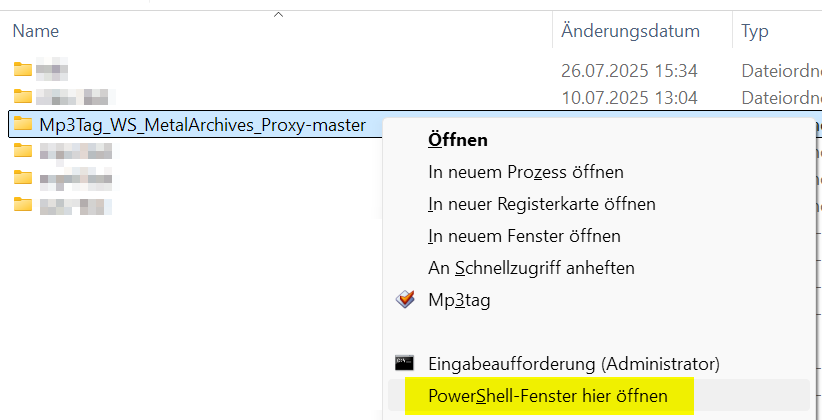
and get the same opened folder

---
### Author:  [@MONIKADAVRE](https://community.mp3tag.de/u/MONIKADAVRE)
#### Post date: [October 28, 2025, 7:33pm UTC](https://community.mp3tag.de/t/ws-metal-archives/5923/195 "2025-10-28T19:33:34Z")
Well, the installation went well, and thank you very much for your help. Unfortunately, I'm not as lucky as you are.

Translation: Server connection error: [www.metal-archives.com](http://www.metal-archives.com)
> 12029: 12029: Unable to establish a connection with the server.
---
### Author:  [@chthonic](https://community.mp3tag.de/u/chthonic)
#### Post date: [October 28, 2025, 7:46pm UTC](https://community.mp3tag.de/t/ws-metal-archives/5923/196 "2025-10-28T19:46:41Z")
@MONIKADAVRE No, this probably happened because the powershell window was closed. Keep it open until you no longer need it. Also, sometimes you may need to do setup.ps1 + run.ps1 again every time you need to use it instead of just running “run.ps1”
Also, make sure the powershell window is using the directory where the scripts are at

NOT like this

If you don’t have it like that, copy the full path of the folder, and type into powershell
`cd “D:\Downloads\Compressed\Mp3Tag_WS_MetalArchives_Proxy-1.0.0”`
in your case, it will be `cd “paste-yourpath-here”`
---
### Author:  [@MONIKADAVRE](https://community.mp3tag.de/u/MONIKADAVRE)
#### Post date: [October 28, 2025, 8:00pm UTC](https://community.mp3tag.de/t/ws-metal-archives/5923/197 "2025-10-28T20:00:07Z")
Oh, thank you so much, it works!!!
---
### Author:  [@anton](https://community.mp3tag.de/u/anton)
#### Post date: [October 28, 2025, 8:05pm UTC](https://community.mp3tag.de/t/ws-metal-archives/5923/198 "2025-10-28T20:05:13Z")
First of all, thank you so much @chthonic and @LyricsLover for the help. I am still at work (actually in lunch time lol), and wasn’t able to be of any help ☹
@MONIKADAVRE glad to hear that Proxy is now running on your end. Please let us know in case of any issues.
That being said, there something that has got me curious:
> [@chthonic](#):
>
> Also, sometimes you may need to do setup.ps1 + run.ps1 again every time you need to use it instead of just running “run.ps1”
Could you please share more details about this? I didn’t faced this issue (or something similar) during development and/or testing, and would love to know more about it.
Thanks in advance.
---
### Author:  [@chthonic](https://community.mp3tag.de/u/chthonic)
#### Post date: [October 28, 2025, 11:08pm UTC](https://community.mp3tag.de/t/ws-metal-archives/5923/199 "2025-10-28T23:08:06Z")
@anton Sure, I get some errors if I just run “run.ps1” instead of using both “setup” and “run” scripts. Sometimes, even with the “Preload failed” error, it works like usual.

Most of the time, i get the “URI must contain a hostname” dialog. If I hit “Retry” it gives me this below, incomplete search. However, if I run both scripts after the other in the same powershell window, it works with no issues. This works the same if im using Windows powershell or Powershell 7. I should add, im on windows 11.

---
### Author:  [@anton](https://community.mp3tag.de/u/anton)
#### Post date: [October 29, 2025, 5:40am UTC](https://community.mp3tag.de/t/ws-metal-archives/5923/200 "2025-10-29T05:40:19Z")
Thank you so much for sharing those details - specially the screenshots!
Although I haven’t faced that issue on my end, I have a potential root cause in mind, although I’ll need to do some additional tests.
As for PowerShell versions that shouldn’t be an issue, as I also have both “classic” PowerShell (v5) and PowerShell 7 (7.5.3 - I need to update it, now that I’m thinking about it) and it worked fine in both instances. Only difference is that I am currently working with a Windows 10 machine, but that shouldn’t be an issue (I hope…)
In any case, good to hear that you found a workaround, but nonetheless I’ll work in a fix for that issue.
Thanks, again, and regards.
---
### Author:  [@Jaeger1349](https://community.mp3tag.de/u/Jaeger1349)
#### Post date: [October 30, 2025, 2:40am UTC](https://community.mp3tag.de/t/ws-metal-archives/5923/201 "2025-10-30T02:40:29Z")
Can you make a dummy-proof guide to use this new script, please? I’m learning about python so I’m kinda confused right now
---
### Author:  [@anton](https://community.mp3tag.de/u/anton)
#### Post date: [October 30, 2025, 6:03am UTC](https://community.mp3tag.de/t/ws-metal-archives/5923/202 "2025-10-30T06:03:24Z")
Hi all,
I’ve published a new version of this project which mainly focuses in the following:
- To fix reported error when executing `run.ps1` script as standalone (i.e., without running the setup first).
- To add a couple of extra scripts (`setup.cmd` and `run.cmd`) to make it easier to both install and execute the Proxy in Windows environments.
The main difference between existing `*.ps1` scripts and the new `*.cmd` scripts is that the latter can be executed by just doing double click without needing to open command/terminal windows and whatnot.
Worth to mention that both pair of scripts have same logic, and do the same things.
Thank you @chthonic and @Jaeger1349 for your suggestions, and reports.
Please let me know in case of any issues.
Regards.
---
### Author:  [@anton](https://community.mp3tag.de/u/anton)
#### Post date: [October 30, 2025, 6:11am UTC](https://community.mp3tag.de/t/ws-metal-archives/5923/203 "2025-10-30T06:11:26Z")
Hi there
Currently you just need to do the following steps to be able to run this proxy:
1. Have Python 3.12.10 available in your system. You can get it from [Python official site]([Python Release Python 3.12.10 | Python.org](https://www.python.org/downloads/release/python-31210/)).
2. Download the latest release from Github repository ([Direct link to releases](https://github.com/antonio-gil/Mp3Tag_WS_MetalArchives_Proxy/releases)).
3. Run `setup.cmd` script to get all required components and configurations.
4. Run `run.cmd` to run the Proxy.
5. Install newest/custom MP3Tag scripts included on this project in your current MP3Tag instance.
And basically that’s all. As described on README file (in repository) not all scripts were included (yet) but at least the main ones are there, plus a new one that provides a new functionality that wasn’t possible to achieve with regular scripts.
Nonetheless, please let me know in case of any issues.
Regards.
[Previous page](https://community.mp3tag.de/t/ws-metal-archives/5923.md?page=9)
[Next page](https://community.mp3tag.de/t/ws-metal-archives/5923.md?page=11)