When I try to drag and drop an image from my download history, it doesn't let me. This is a feature most programs have, but I see it doesn't work in MP3Tag. It would be very useful if this could be done. Thank you very much."
That works fine for me if I drag & drop an image to the Cover Art placeholder in the bottom left corner, along with one or more selected tracks.
What exactly do you mean by "doesn't let me"?
Do you try to d&d an image from your Windows Explorer Downloads directory?
Or directly from inside your browser (from where exactly)?
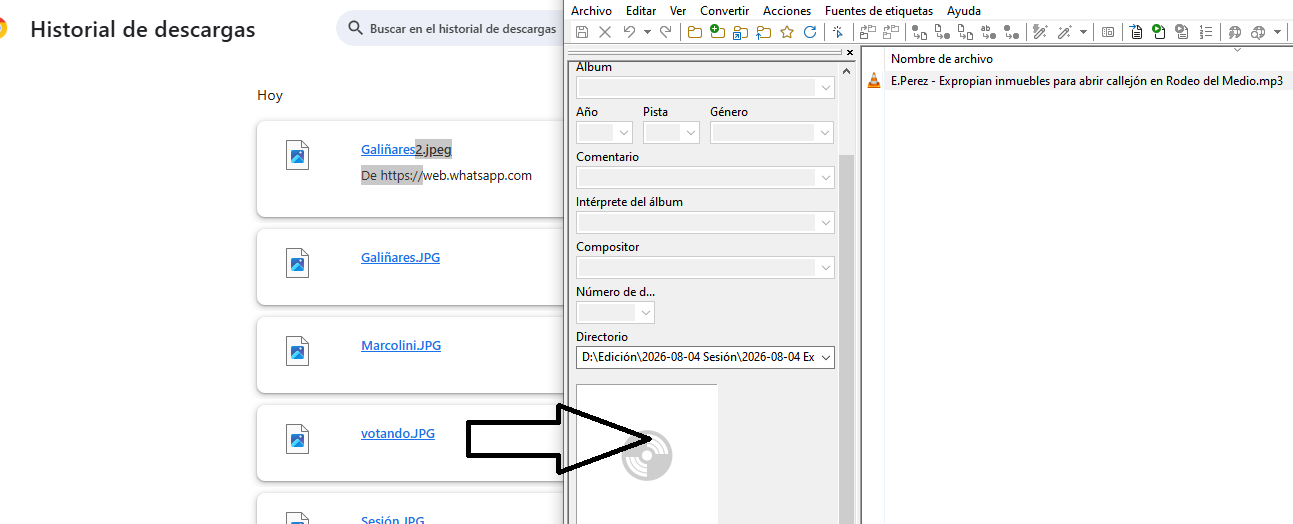
Yes, that doesn't work currently.
Workaround:
Just click on the open folder icon first (on the right side of your downloaded picture) and Drag & Drop the same image from there to Mp3tag.

Lo sé, soy desde hace muchos años usuario de MP3Tag pero doy una sugerencia para versiones futuras del sowftware. Muchas gracias igualmente por responder.
Please answer in English or German.
If needed, you can use Deepl or any other online translation software.
I know; I’ve been an MP3Tag user for many years, but I’m offering a suggestion for future versions of the software. Thanks anyway for the reply.