I have a USB thumb drive with songs but the album artwork does not display on the screen on my new/old car. The music plays just fine. I have been on some car forums but no one has replied with any suggestions.
The artwork appears to be embedded in each mp3 file so it should display. It works fine in my other cars.
It's a bit unclear if, in the particular car in question, you were able to load artwork and no longer can, or if you were not ever able to open artwork.
Regardless, the first step in troubleshooting your issue would be to check the user manual for your car model (if the media player is factory original) or stereo system (if specialized car stereo brand) and check under music file format compatibility. There is no universal standard, so what works in one model can -as you have experienced- not work in others.
And if possible, please share the brand and model of your car/stereo system. Other posters may have a similar setup and may already know of a solution for your issue.
When the thumb drive is used in my other cars the artwork always displays on their screens.
When used in my newer car (2025 Cadillac CT4-V) the artwork does not & never has displayed on the screen. The owner's manual says the USB port supports the MP3, AAC, OGG, 3GP audio formats. There is no mention of artwork.
You could try to add a picture to the folder with the name "folder.jpg" and, if that also is not shown, "cover.jpg". And if all that fails, then there is no way to make the player to show pictures.
Or do you have any files that show one?
It is unlikely that a modern infotainment system like that wouldn't be able to display embedded cover art from MP3s.
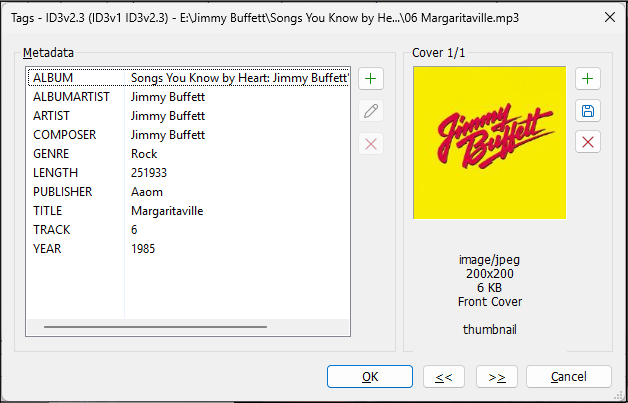
Please show us a screenshot from Mp3tag of the extended tag menu for one of these files (Alt+t).
What are the resolutions of the embedded cover images? Mp3tag displays this information in the tag panel next to the cover art.
... 2024 Caddy XT6. To my surprise there's no album art displayed on the info screen using that same USB drive. Title, artist, album, time and playlist name are shown but no album art. I do own an iPhone12 but have never synced all our music on it but I do have a couple songs in iCloud which do display the album art when in Apple Play mode. It just seems strange this feature doesn't work with USB music.
Here is a link to the official GM CT4 PDF manual, which does not mention "cover art".
Manual page #135:
File System and Naming
File systems supported by the USB may include:
• FAT32
• NTFS
• HFS+
The songs, artists, albums, and genres are taken from the file’s song information and are only displayed if present. The radio displays the file name as the track name if the song information is not available.
So it would be necessary to check if the files really have embedded covers - the easiest way in MP3tag would be to load the files and then apply the
Filter: `%_covers% MISSING
which should lead to an empty file list.
Files that stay in the file list do not have embedded covers.
The 2025 Cadillac CT4-V infotainment system generally does not display embedded MP3 album artwork when playing music directly from a local USB thumb drive, a limitation widely reported by owners across modern GM platforms.
While the system reads and plays the raw audio tracks, metadata graphics embedded via ID3 tags often fail to render unless the media is streamed via smartphone integration.
A couple folders contain several iTune songs & each of those folders has a single "folder.jpg" image of 200x200 pixels. I think these are leftover from when I was initially setting up the folders. But these do not display when playing the respective song, and neither does the embedded image.
I looked at several of the threads in the link you provided & did not find anything but will continue looking.
I've asked about my issue on 2 Cadillac forums & 2 reddit subforums. It's been a couple days & there have many views but no replies.
I did consider that their system just does not display MP3 artwork. As mentioned in another posting, I've asked about my issue on 2 Cadillac forums & 2 reddit subforums. It's been a couple days & there have many views but no replies.
I would think with all the views from other people someone would have chimed in & said something. If this is "widely reported" as per AI you would think someone would have replied. But nothing.
That looks to me like the developers of the car player forgot the picture support.
When embedded pictures and external pictures have no effect, then there are no more tricks up the sleeve.
It sounds like it doesn't support artwork from a USB drive. If you really want to dbl check the AI info I posted above, try streaming from your phone (if you can), and see if it displays. The AI summary said streaming shows artwork, but USB doesn't.