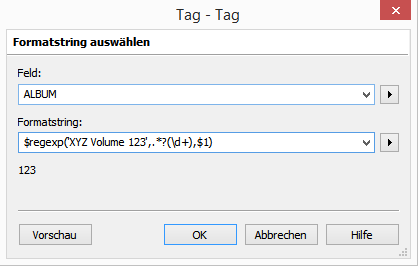
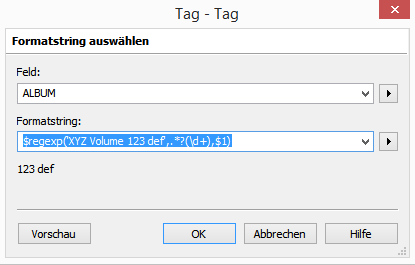
Hello all. Please believe me that this is after a lot of trying.
I have several albums with names with
'Vol.' or 'Vol' or 'Volume' or 'vol.'
followed with or without space or spaces,
followed with numbers of 1-5 digits (this is what I want to extract and turn into discnumber)
sometimes as the last thing, but other times with more alphanumerics after that which are to be ignored.
Examples
XYZ Volume11
XYZ Volume 123
XYZ Vol.123
XYZ Vol. 9
XYZ Vol 88 abc
XYZ volume1abc
I have tried several regexp strategies, some of them worked in Sublime text, but none perfectly in mp3tag action.
Specifically
vol.* (\d+)
or
(\d+)(?!.*\d)
look promising but do not give results when used as
format DISCNUMBER
$regexp(%album%,expression,$1)
I would like to create action
format DISCNUMBER
$regexp(%album%,expression,$1), if its the correct way to go about it.
I am looking for the best possible expression above. Any help will be immensely helpful organize my collection. As you can imagine, I am using this to merge volumes as single album.
Hello. Thanks a lot. This is one problem I am constantly facing. The regex expression seems great. When I test it in sublime text for example.
But but but... when I
create action
Format Value
Field: DISCNUMBER
Format String: $regexp(%album%,\bVol(?:.|ume)\w*(\d+),$1)
I get the entire album name (entire alphanumeric album name) as discnumber rather than just the intended volume number.
Of course I am not technically very sound and don't know what $1 means here, someone had suggested it elsewhere. I want to cry. Please help.
The dollar sign $ variables refer to terms in round parentheses () from left to right, unless manually excluded, which is what I did with that funky ?: in there.
Iʼm not quite sure why or whether $num() is really required here, but you can alter the expression within of course.
In my expression you end up with a string starting with a number.
This could be
123
for "XYZ Volume 123"
but also
88 abc
for "XYZ Vol 88 abc"
And to transform that string into a number - which means to cut everything non-numerical - I simply used the $num() function.
But as there are many ways that lead to Rome, one probably could have done it with a nested $regexp() or something similar.
You are right, I screwed up: I mixed up \w (word character) with either \W (its inverse) or \s (whitespace character). My bad.
(For a moment, I was afraid those predefined character classes were not supported in Mp3tag, but they are.)
I tested the following scripts successfully with all example strings in this thread:
Hello. Thanks. But this does not work for album names such as
abc vol. 15 live on date 13/12/1990
It gives output of disc number as 1513121990 and some how $cutright applie don top does not work either.
Thanks for any further advice.
Hello. This seems to be working wonderfully, though a bit slow (too much computing going on there). But its amazing. I will test further and report back. Thanks everyone.
Hello there, thanks a lot. I have been using the version
$regexp(%album%,^.\bVol(?:.|ume)\s(\d+).*$,$1)
But its failing when (Vol1) is in brackets.
Thanks for the amazing help. Some more improvements in this regard will be highly appreciated, even though 90% of my problem is already solved by you.
Cheers.
Hello, good day.
Yes sure. But being very limited on regex I would need further help on how to remove brackets, colons, commas after the end of numbers. Isn't \s \W be replaced with something that can also take care of these. Basically in
$regexp(%album%,^.\bVol(?:.|ume)?\s(\d+).*$,$1)
when non-digits are encountered after we first encounter them after Volume, we should stop looking.
Please accept my distinguished thanks for all the effort and attention.