I am using Foobar 2000 with OpenLyrics plugin to batch-search for lyrics and save them automatically to the tag, as suggested by Ohrenkino in another topic.
In the meantime I am using Mp3tag to check the lyrics that are important to me
Now I have noticed in Mp3 Tag that almost every AmbumArtist is removed form the tags !
I have checked: it is not that it just doen't show in Mp3-Tag, they are actually removed from the tag. If I search in Windows Explorer there are (almost) no AlbumArtists at all.
How on earth do I get these back ?
The only solution I know is to manually adjust every tag...all 19.000
In Mp3 Tag I know you can select a batch of files of e.g. the same artist and then add the correct value in the missing field. But then I loose all lyrics again !
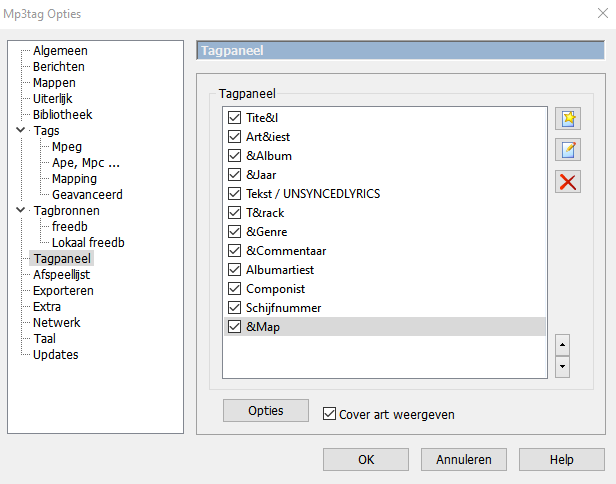
I know that if you select multiple files in the tag-panel you can choose to either keep, remove or change the value of most fields, but this does not work for the field Unsynced lyrics that I have added to the tag-panel myself.
Perhaps I have setup that field incorrect and it has to be changed?
(I Can't remember how or where I have found a way to add that field to the panel, I found that somewhere on this forum)
If you have a solution for me, please be aware that I am not at all good with computers and/or programming, so I will need an extensive answer.
First check the extended tags dialogue Alt-T for a single file if the field is still there and see the dialogue title what kind of tags are in the files.
If you only have V1 tags, then there is no ALBUMARTIST
If you have V2.3 then see if there is a field called ALBUM ARTIST (with a space).
And finally check if there are APE tags in the files.
Best illustrate that with a screenshot of the extended tags dialogue from that file.
See also this secion in the advanced foobar settings
Changing one field should have no impact on another.
Saving lyrics to the correct field certainly should not have the Albumartist removed. Were any other fields changed?
And again restoring the Albumartist from whatever change cause this loss should not impact the lyric field.
If all else fails it is always recommended you keep a secure backup so you can restore your last good point. With a 19k library I'm hoping you have a recent backup to work with?
(I know there are not much lyrics here, just saying it is an instrumental, but I thaught it best to test things where little information can get lost again...)
But I am certain that if I change the AlbumArtist with a multiple selection of files, the lyricsfield will be overwritten. (I have previously done so accidentally with a small selection)
Like I said, in the Tag-panel you can choose per field if you want to keep (houden) or remove (wissen) when changing multiple files, but that is not possible with my Unsyned Lyrics field
it just always removes the data from the unsynced lyrics field when selecting multiple files.
And yes, if all things fail I do have a back-up from 99,99% of the files (I bought some new songs in the past weeks that were not backed-up yet).
But then I will have lost all the found lyrics and (more importantly) all the manual work I have done on it this week
Ok, so I have searched further. I remember again where to change the field Unsynced Lyrics in the Tag panel, so I have changed a setting so that the standard value is to keep (houden) the information that is already there
The settings in Foobar do not explain where the tag field might have gone.
Could you now show what the field definition for ALBUMARTIST looks like in the tag panel.
I look esp. at the Default value which should be <keep>
Turns out some Artists fields are also removed, fortunately none of the tags have both the artist and the artist album removed.
And only a few I cannot possible recover who that is (because the AlbumArtists is Various Artists) --> oh no, just remembered I can look that up in my back-up
Well, I hope I just did something stupid then and the problem will not re-occur...
I will add the missing AlbumArtists in Mp3 Tag manually by changing multiple selections then.
The field setting of the field Unsynced Lyrics was not keep (don't remember what it was, perhaps blank).
The other fields though, and in this case especially the field AlbumArtists, were already all on keep. So that cannot have been the problem
I was thinking though....earlier today Mp3 Tag crashed while I was opening the whole Music map at once. Can that have corrupted files ? I can Imagine the file that it was opening at that very second, but all those files..?
A good test would be now (on files for which you have a backup): does it happen again that the ALBUMARTIST gets removed?
If not ... it will be even harder to reproduce the problem.
But the symptoms that you report indicate otherwise. So, building on Ohrenkino's suggestion, the question going forward is:
With files that have AlbumArtist tags now verified by you as "keep", are their values retained after saving new edits on the other tags, or not? I predict that the values will be retained.
If Mp3tag was prone to removing AlbumArtist entries despite that field being marked "keep", there would be a forest of complaints here. I don't see them....
I have changed various AlbumArtists and various other fields, and now all fields that I want to keep are kept.
So I think we will never find out what happened, if it does not happen again.
I think there were two kinds of "glitches":
one probably occured when Mp3 Tag crashed, causing some of the fields to be removed (about 10%).
It later turned out that not only AlbumArtists, but also some other fields (Artist, Album) were suddenly blank. (I just thought it was only AlbumArtists because that was the bulk which was immediately obvious)
(or this happened when I did something stupid like not selecting the correct fields to keep, although I cannot imagine selecting those files together, it was a very random selection)
the other one is that Mp3 Tag showed almost no AlbumArtists (95%), but most of them were actually still there. Because at first it looked like almost all of them were gone, but later I found that only aprrox. 10% were really missing.
Obviously I did not check every file in Windows Explorer and the ones I did check were really missing, but later it turned out the problem was not as big as it initially looked.
I have now manually filled the missing AlbumArtists, selecting multiple files in Mp3 Tag and adding the AlbumArtist without losing any other data in the process.
I have checked some files both in Mp3 Tag and in Windows Explorer, they all look good.