to delete the first seven and the last four characters:
Formatstring: $regexp(%album%,.......(.+)....,$1)
or, if it is also possible that it ends with FLAC (five letters including the space):
Formatstring: $regexp(%album%,.......(.+) .+,$1) (deletes everything from the last space)
or, if other things than in front ar also possible:
Formatstring: $regexp(%album%,.+? - (.+) .+,$1) (deletes everything until " - ")
But now the more difficult part, would you mind to explain me how it works, why this way if I need to change in the future other things will be easier, for you and for me.
For this, i used $regexp(), one (and maybe the most complicated) of the many scripting functions available for Mp3tag: https://docs.mp3tag.de/scripting
In my examples I used $regexp() the first paramter %album%. This is equivalent to:
Action: Replace with Regular Expression
Field: ALBUM
Next I defined three different regular expressions: .......(.+).... .......(.+) .+ .+? - (.+) .+
and replaced them always with: $1
. = any character
() = defines what is later represented by $1
= repeat a character any number of times
+? = limits the repeat to the shortes possible string
= is a litteraral character, as well as the spaces. I used them because they appear in your album names a seperator between year and album name
$1 = is what has been put in parenthesis before
Although user pone has already demonstrated in this thread one way to solve the task, I step in to demonstrate some alternative ways too.
Generally use the Mp3tag Filter to set the file list view to the related set of files.
Filter:
"$right(%ALBUM%,4)" IS " MP3"
"$right(%ALBUM%,4)" IS " AAC"
"$right(%ALBUM%,5)" IS " FLAC"
ALBUM MATCHES "\d{4}\s-\s(.+?)\s(?:MP3|AAC|FLAC)"
Filter: "$right(%ALBUM%,4)" IS " MP3" OR "$right(%ALBUM%,4)" IS " AAC"
Action: Format value
Field: ALBUM
Formatstring: $cutRight($cutLeft(%ALBUM%,7),4)
From:
1984 - Hello AAC
2000 - Mello MP3
To:
Hello
Mello
Filter: "$right(%ALBUM%,5)" IS " FLAC"
Action: Format value
Field: ALBUM
Formatstring: $cutRight($cutLeft(%ALBUM%,7),5)
From:
2011 - Bello FLAC
To:
Bello
Filter: ALBUM MATCHES "\d{4}\s-\s(.+?)\s(?:MP3|AAC|FLAC)"
Action: Format value
Field: ALBUM
Formatstring: $regexp(%ALBUM%,'\d{4}\s-\s(.+?)\s(?:MP3|AAC|FLAC)','$1')
From:
1984 - Hello AAC
2000 - Mello MP3
2011 - Bello FLAC
To:
Hello
Mello
Bello
I'm newish to this Reg lark,
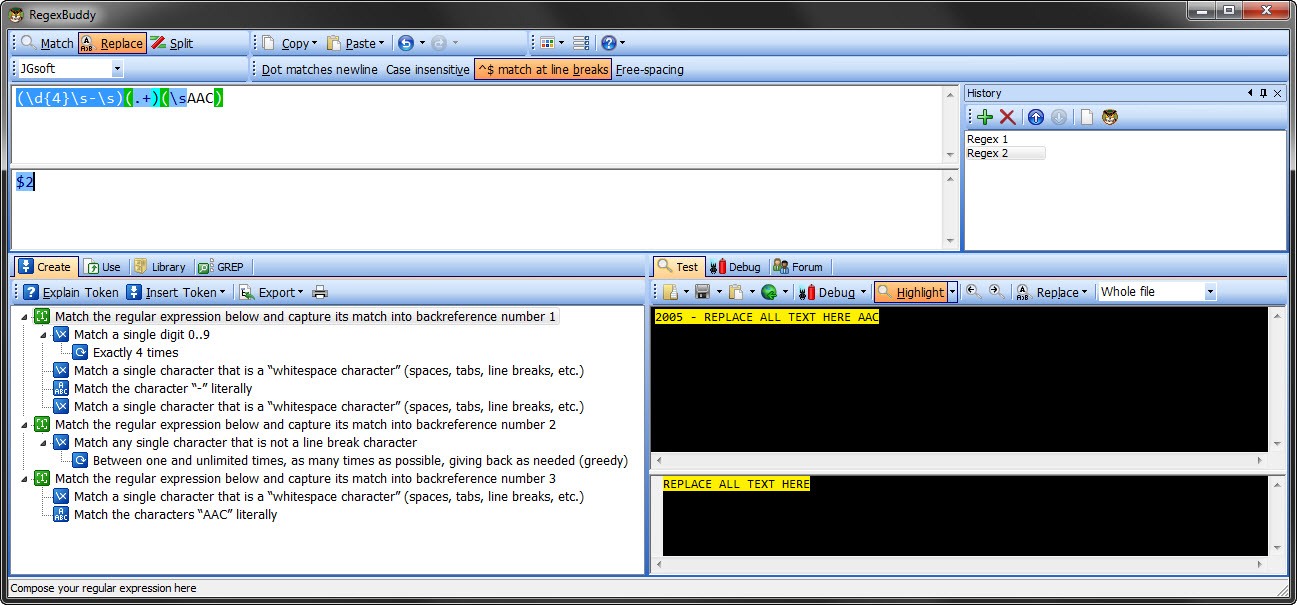
So please point me out where I'm going wrong. I've recently bought a copy of RegexBuddy which I have to say is a great learning tool for Reg'in ... I've dug deep this last few days and tried learning what makes regexp tick. So here is my solution to the problem which is probably more simpler to understand and implement.
\d digit 0-9 {4} match exactly 4 times \s white space - match the character "-" literally \s white space ) ends capture 1 ( starts capture 2 . match ANY single character + match between 1 and as many times as possible )ends capture 2 ( starts capture 3 \s white space AAC match the characters "AAC" literally ) ends capture 3
Replace matches with:$2
(.+) was the 2nd capture therefore whatever is inside the () it output to the Field:ALBUM
The only thing that meeds chaging is the "AAC" to "MP3" "FLAC" etc which for a newbie is ideal
pone, DetlevD: Please feel free to lend your comment to this solution.
BTW this works , and if you are interested in learning and creating regexp then I would suggest getting RegexBuddy http://www.regexbuddy.com/ @ €30.00. But its an amazing little program with a lot of preset regexp.
I've added a screenshot of what the solution looks like in RegexBuddy so you can see its interface and breakdown to the repexp.
 ... I've dug deep this last few days and tried learning what makes regexp tick. So here is my solution to the problem which is probably more simpler to understand and implement.