I have a folder of around 1000 mp3 filess as well as the same number of cover art pictures. I have rename both the mp3 and the jpg to be the same. How can I bulk add each cover art to each mp3 file? This is not adding 1 album art to all 1000 mp3 files.
Load the files.
Select the files.
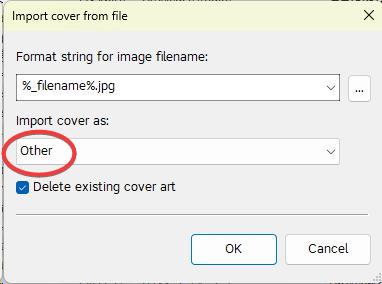
Create an action (quick) of the type "Import cover from file"
enter as Filename format string:
%_filename%.jpg
Click OK.
When the action has run, use a filter to check which files did not get a picture:
%_covers% MISSING
Ideally, the file list is empty after you applied the filter.
Thanks so much. I think I'm on the right track now. What do you mean by below?
"enter as Filename format string:
%_filename%.jpg
Click OK."
as soon as you start to create the suggested action you are asked to enter some parameters. And these are my suggestions.
This is the input box from the Action where you can enter @ohrenkino's suggestion:

I got it. Thank you very much. It works super smooth. No error at all. Initially, it doesn't work as I chosed "Other" in "Import cover as:". After chaning to "Front Cover", I was able to process all the files in a minute or so. Again, highly appreciated for your answer.