Hello all, I'm new here, I need help with Mp3tag for one thing: I cannot replace the \ character in any field with the Replace action at all, Mp3tag ultimately ignores that, thus leaving me unable to change it to, for instance, ";".
See e.g. here:
How can I replace all the \\ characters at once?
Yes. For each separately named field.
What have you tried so far?
I tried replacing them in the GENRE field, but to no avail. Since I have multiple genres split, I would like to change all of them to ;.
So, did you try the action "Merge duplicate fields" for GENRE?
Yeah, however it did not work as I expected
You do realize that statements like "did not work" do not really help to get better fitting suggestions.
Please tell us:
What did you do?
What did you get?
What did you expect?
Best illustrated with screenshots.
OK, I retried again just now (I changed \\ to \) and it did work, however I'm not sure how to replace all \'s to ; at once, since the action above only removes double \'s.
Again:
Or, relating to
What did you try again? Which action/function? Which parameters?
Oh sorry, I tried the "merge duplicate fields" action of course, and it finally gave me the expected results (I've set the field to GENRE and "\" for the separator). Now I need to know the action to replace all \'s with ;'s at once
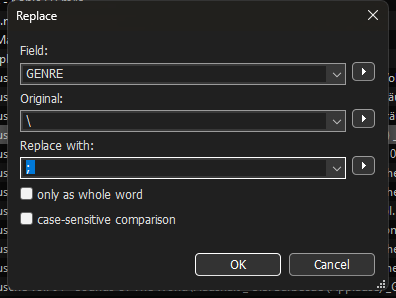
I'm not sure if you really understand the basic problem:
There are 3 possible situations:
a) You see one backslash \ or two backslashes \\
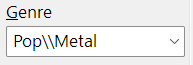
b) You have one field (like GENRE) with multiple entries, like Pop\Metal

c) You have several fields with the same name, with different entries in each field
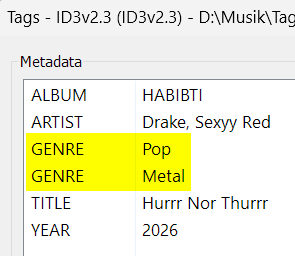
showed in the mp3tag Tag Panel as:
If you show us a screenshot from one of your files after pressing Alt + T we can help you better.