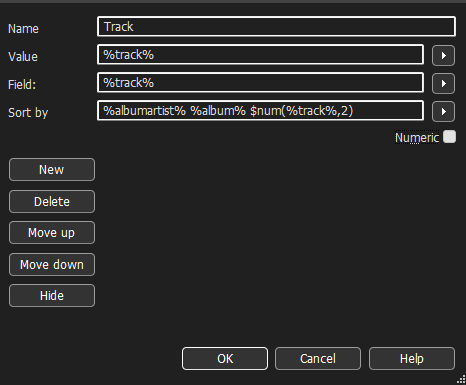
I cannot get the tracks to be in numerical order top to bottom even though all tracks are labeled corrrectly. I click on the space just above the track numbers, and this rearranges the tracks, but almost never in the correct order, e.g. 1–10.
I tried this: $num(%track%,2)%title% - %artist% - %album%
from someone else’s post. The labeling is ok. But, once again, the tracks don’t line up in numerical order.
When I open the folder containing the tracks in Windows Explorer, the tracks appear in numerical order, top to bottom. And, as I said, all tracks are numbered correctly and appear in numerical order in whatever software I use - Plex, Lyrion, etc.
Where do you see the strange order? In MP3tag? The windows explorer?
Could you show us a screenshot of the filelist for the files that pose a problem for you?
The screenshot should show also the column by which you sort.
It could be that also a screenshot of the column definition for the track numbers could help
Alt-1 opens Convert>Tag-Filename. I doubt that it ever has sorted.
The screenshot does not show the column by which the file list is sorted. That is indicated by a little arrow in the column header.
Check View>Sort by>
that the column name for Track is selected.
Yeah - I have done that (view>sort by>track number. But next time I load an album, the tracks aren’t in the correct order so I have to do this for every album. It’s not that big a deal. I was just wondering if I’m doing something wrong or if there’s some way to have the tracks appear in order without doing it manually. And it seems I remember a time when the tracks appeared in numerical order without me doing anything.
MP3tag usually remembers the column by which tracks were sorted.
If you want to get the files sorted by Albumartist-Album-Track, modify the settings for the track column:
Please note that this sorting setting will put all tracks no. 1 first, then all the no. 2s and so on. So it would work only if you load only 1 album at a time.
The more universal approach is as I described.
If you are satisfied with a strict numerical order, you could try: