hi,
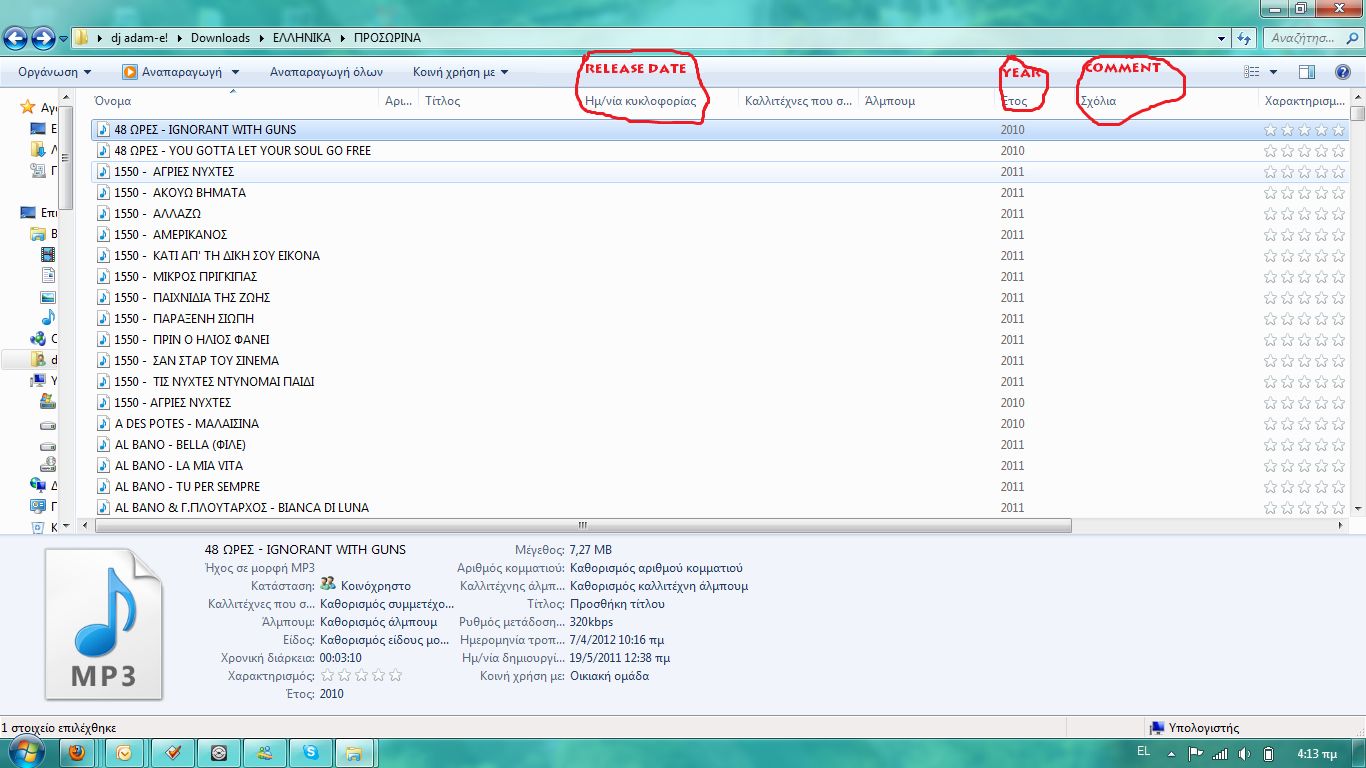
i'm trying to change my mp3 year/comment tags to a new tag but it shows right in the mp3tag program but in the file after does not shows can you help?
example
when i use in the year field ''10-2011'' in the file shows only ''10''
when i use the year field and the comment field ''2011'' ''october''
it shows the year but not the comment...
The YEAR field is only intended for 4-digit numbers. If you want to log anything more sophisticated you would have to use the RELEASEDATE field as this allows day, month, year, hour, minute, second.
You may store more than just the year in the YEAR tag and mp3tag usually does not mind. But the question is what your favourite player makes of it.
What kind of files are we tgalking about? MP3 or FLAC?
RELEASEDATE is not a function but just another tag that you have to fill with data you want to see as expanded date data.
So instead of filling YEAR with extra data you have to (also) fill the field RELEASEDATE. If it is not already there then you have to add it with the extended tags dialogue.
Please note that not all players support all fields so it may be that your player does not display RELEASEDATE (and you are stuck with the limitations of the YEAR field).
I did not say anything to your COMMENT problem as I simply do not understand what you want.
Could you list the contents of fields before editing, the way they should look like after editing, what you tried to enter and what the result in fact looked like?
the files are mp3 (as shown in the photo) i create a new ''releasedate'' fuction and again the file does not showing it (ether comment). i'm using windows 7 and the player is windows media player,the latest version.
please see photos below
Concerning the comment:
by default mp3tag writes "english" comments. Your OS may expect a Russian (?) comment (please excuse me if I got that wrong).
So, in order to make a comment visible in your local language you have to modify the file
mp3tag.lng
which you can find in the mp3tag installation directory.
Open it with the Editor and search for a line that starts with
_M_STR_ID3V2LANG
It probably looks like this:
_M_STR_ID3V2LANG eng
Here replace the "eng" with the abbreviation for the language of Windows.
The releasedate may also fall under the specialities of a local format.
By default it should look like this:
yyyy-mm-yyThh:mm:ss
(please note the T as separator)
As this is new to me (in respect to implications of local standards) I would be glad if you could give a feedback so that I learn something.
my language is greek,
and i don't think the os does not read english such all my mp3s (most of them) are in english, and the comment i'm using is in english language.
anyway i tried to do what you told me but i cant find nowhere the mp3tag.lng
i only found those
Windows 7 apparently interprets the locally set language of the OS and expects comments that have a token for the same language. Other comments are ignored.
Windows does not look at the language itself but looks for an indicator which comment to display.
So as Mp3tag by default writes comments with the token for English (which is the right setting for iTunes) these comments are not displayed by Windows tools that expect another language.
The Editor is the plain-text-editor that comes with Windows.
The file mp3tag.lng can be found in the same folder as mp3tag.exe.
Use the plain text editor that comes with Windows.
Navigate to the installation directory of mp3tag and there into the folder LANG.
Locate the file greek.lng
Open it with the plain text editor (as this is a plain text file).
Use the search function (Ctrl-F) to locate the text
_M_STR_ID3V2LANG
it should read
_M_STR_ID3V2LANG eng
Modify this to
_M_STR_ID3V2LANG grk
(I think)
so that mp3tag labels comments to be in Greek instead of English.
i tried to edit the greek lag and i did what you told me, i change it in gr but when i want it to save it i couldn't save as .lng file only as a .txt file and i couldn't see any deference,what should i do?
Try out, if one of the attached modified Greek.lng files can help
(Modern Greek (1453-), ISO 639 code: ell, gre).
Unpack the zip file and copy one file into the install folder "Mp3tag\lang" and rename it to "Greek.lng" as needed. Modified_Greek.zip (27.3 KB)
very very very thanks guys excellent job i changed the language as you said in ell and then i restart the programm and selected from tool menu the greek language and now it shows!!!!!!
but the release date (time) does not shows if anybody can help.....again....thanks