Issue when converting Tag (eg Track and Title) with \ included in Track - to Filename in version 3.33.1 (Windows). All characters preceding the \ are discarded in Filename (including the Track number). As an example, Track 06 with the Title 7 O'clock News\Silent Night is converted to filename Silent Night instead of 06 - 7 O'clock News - Silent Night when using the format string %track% - %title%.
A backslash is a forbidden character in windows-filenames. So Mp3tag interprets it as a wish to create a folder-structure.
You can define which character should replace such not allowed characters with the scripting function $replace().
I.e. this format string with $replace() would not just drop not allowed characters but replace all with an other character (--).
$replace(%track% - %title%,\,--)
If you want to replace forbidden characters individually you can create pairs within the brackets.
To ensure that your Windows filename is "valid", you can also use the scripting function $validate(x,y).
From the already mentionend documentation:
$validate(x,y)returns the given file name/path x with all invalid characters/?*"<>|:replaced by the string y.
This will automatically replace every invalid character in your TRACK and TITLE with the given new character, like _:
$validate(%track% - %title%,_)
This would also replace* or : and <> and ? and more "invalid" characters that appears in your TITLE.
Ar you sure that it is the \ and not the /?
If you have a \ it could be that you have now created a folder with the name e.g. 06\.
with %track% - %title% would become a new subdirectory named
06 - 7 O'clock News
and in this new subdirectory a file only named
Silent Night.mp3
So if @SteveD0 really has a Backslash \ in the TITLE, he should replace it with a similar Unicode character (valid in a Windows filename) like
U+005C \ REVERSE SOLIDUS
U+29F5 ⧵ REVERSE SOLIDUS OPERATOR
U+29F9 ⧹ BIG REVERSE SOLIDUS
U+2572 ╲ BOX DRAWINGS LIGHT DIAGONAL UPPER LEFT TO LOWER RIGHT
U+FE68 ﹨ SMALL REVERSE SOLIDUS
U+FF3C \ FULLWIDTH REVERSE SOLIDUS
U+244A ⑊ OCR DOUBLE BACKSLASH
U+2216 ∖ SET MINUS
U+1F67D 🙽 VERY HEAVY REVERSE SOLIDUS
This song's name is usually written with the forward slash character
But it does not replace the backslash.
I've always found $validate() too inflexible for my purposes, as it only allows you to define one character/string for all invalid characters. While using it might prevent characters from being dropped unnoticed. But if the format string contains, for example, a question mark (usually at the end), I personally prefer that the question mark is simply removed rather than being replaced by, say, an underscore.
AFAIK $validate() would replace a Backslash.
You are right, the Backslash \ will not be replaced with $validate() even tough it is an invalid character in a Windows filename.
The Backslash is used by Mp3tag to create directories and subdirectories.
But we still don't know if the \ Backslash is really the problem in the OPs question 
The main difference is IMHO:
Using the $validate() function means that you don't need to replace all invalid characters for a Windows filename manually. You don't even need to know them. The most common invalid characters in a filename are:
< (less than)
> (greater than)
: (colon)
" (double quote)
/ (forward slash)
\ (backslash)
| (vertical bar or pipe)
? (question mark)
* (asterisk)
There are some more in the already linked microsoft documentation.
Although $replace() gives you better control, you have to define at least every invalid character for a Windows filename that needs to be replaced. Some of them appear frequently in TITLE or ARTIST fields.
If you stack like e.g. $validate($replace(%artist% - %title%,?,),_) you still only have to cater for the special ones and let $validate() do the rest.
The fact that the filename after conversion consists exclusively of Silent Night strongly suggests that it is a backslash (and that the file is now located in a newly created folder named 06 - 7 O'clock News).
This is all I get:

Update 24.3.2026, 08:30 Uhr
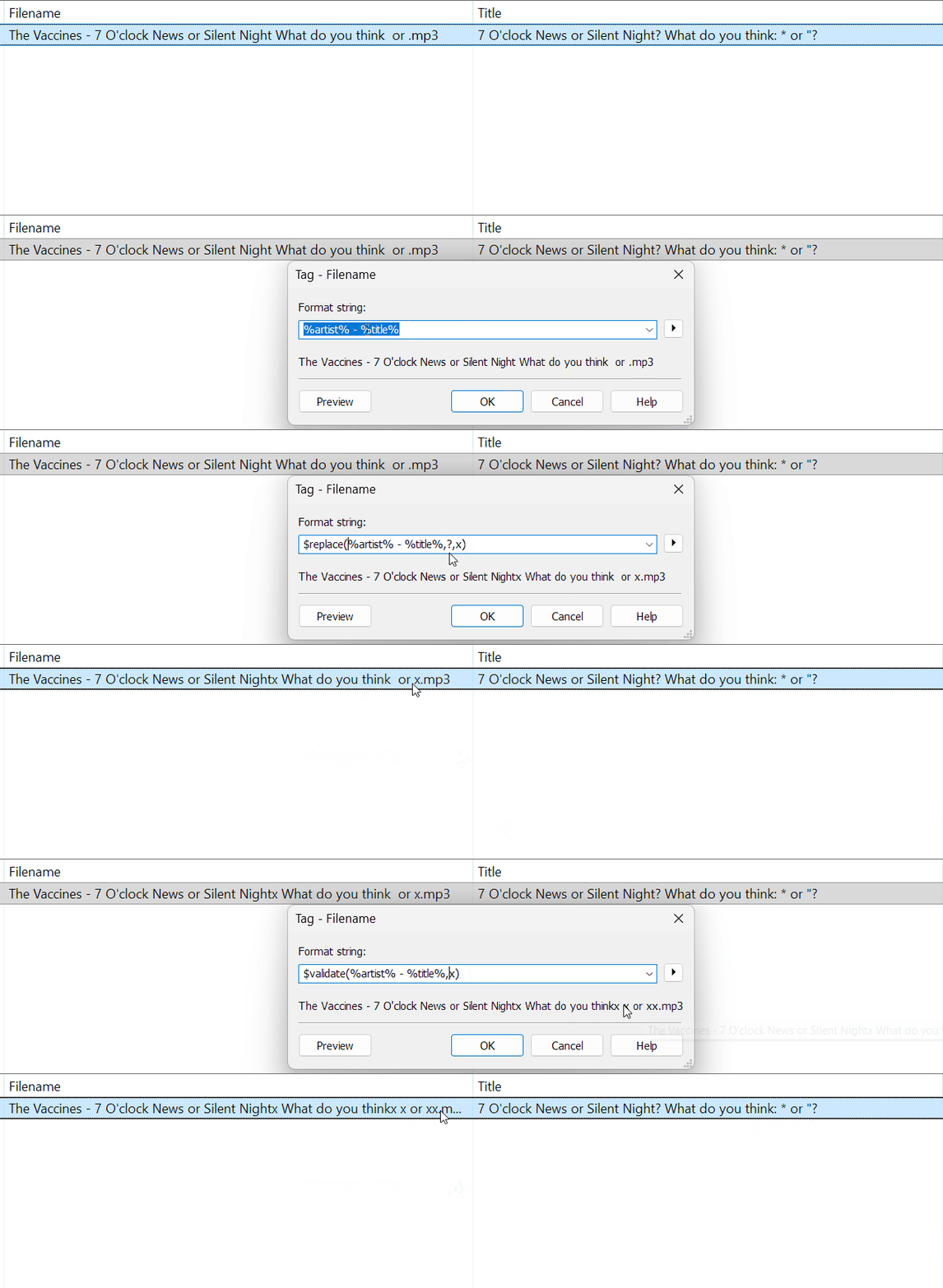
The last substitution in the command
$validate($replace(%artist% - %title%,?,))
was missing. It works fine if I use a comma and remove any invalid character
$validate($replace(%artist% - %title%,?,),)
or if I substitute the invalid characters with an underline (or any other valid character)
$validate($replace(%artist% - %title%,?,),_)

To my surprise the Convert Tag -> Filename already "sanitises" some special characters automatically:
It is definitely the \ character!
And Yes, on further checking it did in fact create a new folder 7 O'clock News with the file 7 O'clock News - Silent Night.flac in it.
Obviously I circumvented the issue my manually replacing characters.
Actually I checked again with the original file and the folder created was: 06 - 7 O'clock News
and the track contained was : Silent Night.flac
Here is an example:

To clarify: The converter removes any file system invalid character.
$validate() works in a similar way but lets you define a substitute.
If that is not specific enough, use $replace() for the individual treatment of characters.
The backslash \ is a valid file system character and therefore does not get replaced neither by $validate() nor by the converter automatism.
You are right!
Even the Converter Tag -> Tag for _FILENAME or _DIRECTORY removes any invalid character automatically.
If you apply the same format string %artist% - %title% to another field - like COMMENT - no characters will be removed automatically.
It is not only the converter. An actions of the type Format Value for _FILENAME behaves the same.