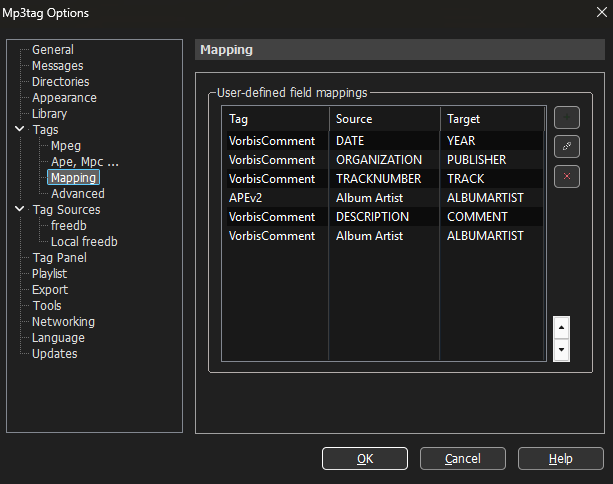
I have a lot of FLAC files that have a DESCRIPTION tag and when loaded into mp3tag I cannot see this value. When I convert the FLAC file to ALAC (using the XLD app) what was the DESCRIPTION tag now becomes the COMMENT tag in the new ALAC file which I can then see in mp3tag. Is the DESCRIPTION tag in the original FLAC file not a valid tag? I am surprised that XLD does add the COMMENT tag correctly and takes the value from DESCRIPTION.
(I opened a ticket on sourceforge to see if they will add the TOTALTRACKS and TOTALDISCS when creating an ALAC file and populate them from the TRACK and DISC substrings from the original FLAC file.)
That is awesome. I wish I could do something like that for TOTALTRACKS and TOTALDISCS but use one of those perl like methods to grab what comes after "/"
So something like map: substr(%track%, '/') to TOTALTRACKS (Not claiming that my "substr" is even correct but you get the idea of what I wish I could do.)
I am not sure what you want to do or achieve ...
MP3tag takes care of the format "1/2" in TRACK and splits it - if standard compliant - to TRACK =1, TOTALTRACKS = 2. No mapping would be required.
(The same applies to DISC and TOTALDISCS.)
So, are you saying that if I convert my FLAC files to ALAC - all I have to do is open the ALAC files in mp3tag and then save the entire fileset in mp3tag? I am trying to figure this out right now....I just converted a set of FLAC files to ALAC and I now load the ALAC files in mp3tag and TOTALTRACKS and TOTALDISCS are not set.
I did see a complex action that someone posted on how to create the TOTALDISCS tag from the "x/y" DISCNUMBER. I don't see how that could be done for TOTALTRACKS though.
As I see it, it is the converter that messes up the metadata.
An easy way to transfer the tags from one file to another would be copy&paste (not field by field but file by file - or even: if the source files and the target files are in the same order, then you could select all source files, use Edit>Copy, select all target files and use Edit>Paste. The first target file would get all the tag data from the first source file, the second from the second and so on).
Just to set something clear: the track format in m4a files is a purely numeric - it does not allow a /.
I am looking at a FLAC file right now, before it is converted to ALAC, and there are no extended tags: TOTALTRACKS and TOTALDISCS - just starting mp3tag and viewing extended tags I do not see them. I also added these two fields to appear on the left column.
I do think the following two actions might work to populate these two fields INTO the FLAC file (I did not write these)
Now after applying these two actions to the FLAC file and then convert to ALAC - the two fields TOTALDISCS and TOTALTRACKS do remain in the new ALAC file.
They do not exist in my FLAC files. But, using the two Actions I posted it creates them from the discs and tracks.
For example, song1 has a track number of 1/12, the action above grabs the 12 and creates the TOTALTRACKS tag for song1. The DISC is listed as 1/1 and using the 2nd action it pulls the second value from DISCS and creates the TOTALDISCS tag for song1. So I just select all of the FLAC files that I am working with and apply these 2 actions. Now when I view Extended Tags on any of these FLAC files - these 2 new tags are now there - they were not when I first started.
DISC creates TOTALDISCS (by extracting the 2nd value)
TRACK creates TOTALTRACKS (by extracting the 2nd value)
You could use "Import tag fields"
Source: %track%
Target pattern: %track%/%totaltracks%
and
Source: %discnumber%
Target pattern: %discnumber%/%totaldiscs%
(not as complicated as the longish $IF() comparisons.
What's the equivalent on the Mac version ? (I don't see "Import tag fields" - I see "Convert tag - tag") but I'm not sure that is the same because that's not allowing you to change multiple patterns...I think.
Ah, I see now: Actions --> Quick Actions --> Format tag field
I have never used a "Quick Action" before - good to know. I wish I could save that as action that I could just do with a one click...or can I? (not have to type in the field names each time I want to do this operation)
No, it is "Import tag fields" . "Format tag field" is a different action.
And yes, you can save an action group (even if it does contain only a single action). Please see the already linked documentation.