Most of my music comes from burning CDs I have or buying from iTunes or Amazon. I use MusicBrainz Picard to tidy things up as needed. I don't have a lot of classical music, but it is growing, and I want to make it easier for me to find things. If someone says "Symphony No. 5" by Beethoven, I can easily find it. Or all of the works by Beethoven that I have.
My first thought was to have the artist field updated, but then I found the composer field might be better suited for this situation. This GitHub seems to standardize the composer and work name. That led me to Mp3Tag.
I have never used Mp3Tag before and am not sure about the process described in the GitHub directions (Convert -> Text File - Tag). If I convert each file to tags, would I then be able to use Mp3Tag to update the composer field properly?
Any ideas or suggestions for the easiest way to move forward would be helpful!
To copy 1 field contents to another, e.g. from ARTIST to COMPOSER, try Convert>Tag-Tag for COMPOSER
Format string: %artist%
This works only if there is already data in ARTIST.
If the data is somewhere else, e.g. the folder name or the filename, then please show us, preferably with a screenshot, a real folder name or filename.
(this is just one example of the many existing albums featuring these Beethoven tracks.)
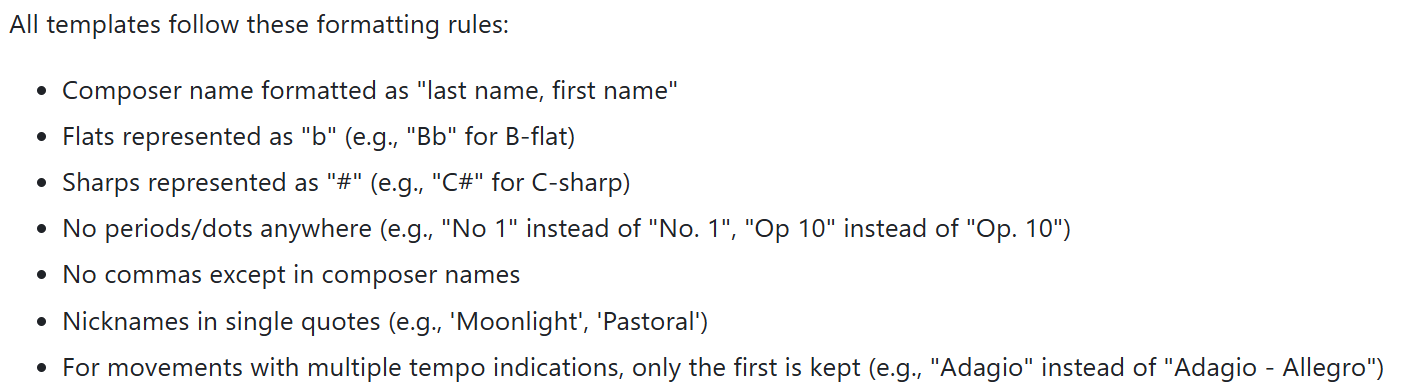
If you are considering using these ready-made "Classical MP3Tag Templates", please be aware that the results may not be what you expected.
This is especially the case if you do not want to adopt the formatting rules:
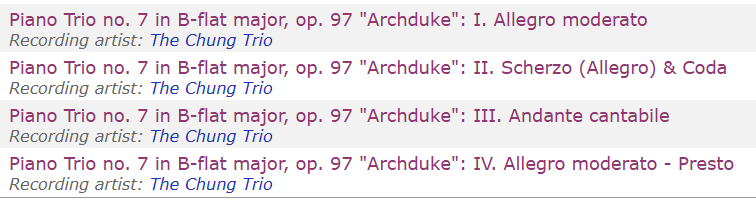
This is an example of some tracks in Mp3Tag. Your response seems to indicate that the data has to be already there? What I was hoping is there was a way to pull in the information in and update the composer or artist name field.
If you look at your example, it shows MusicBrainz does not follow the same formating. The first line says:
"Piano Trio no. 7 in B-flat major"
but using the template that would be:
"Piano Trio no 7 in Bb major"
Also, I don't have a preference about what the formatting rules are, as long as it will be applied consistently, and I will be able to find the tracks by particular composers easily.
So iTunes originally gives you an album that contains "kickass classical" music but does not hint which composer might be the creative head behind it? There is no "by xyz" in the title?
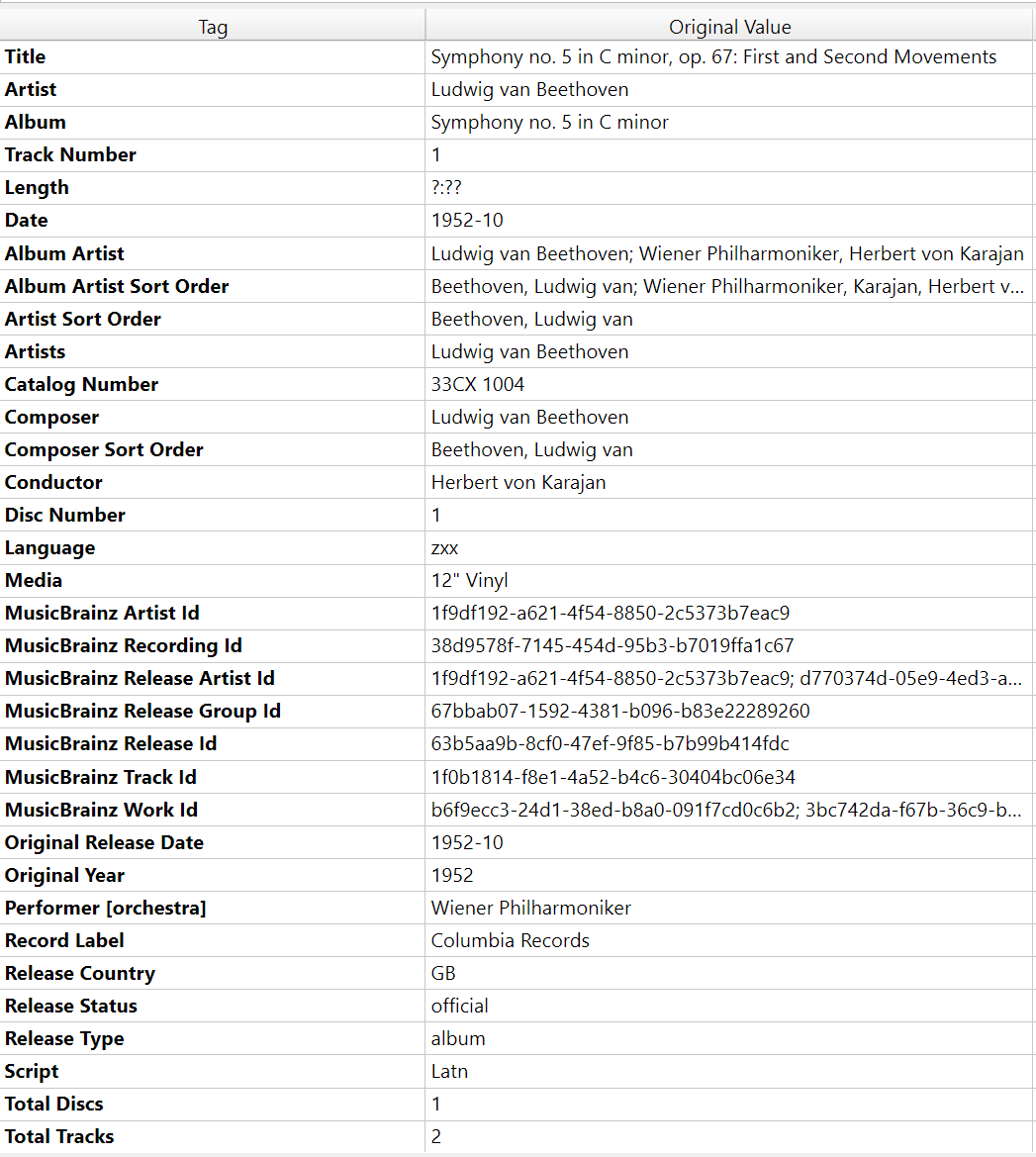
Thank you for that! I didn't know that shortcut. When I do that, I can see the CONDUCTOR field has things like "Ludwing van Beethoven". For this particular album, could I mass copy the CONDUCTOR field to the COMPOSER field? But that would only work for this particular album, while I was hoping for a method that would work on all classical albums.
In theory, you can copy all the content from CONDUCTOR to COMPOSER for your entire collection at once (or for the selected tracks only).
In reality, this only works if you are 100% sure that the data in CONDUCTOR is always correct and that you won't overwrite important existing data in COMPOSER.
Then I would add columns for COMPOSER and CONDUCTOR or even more other fields you see there and of which you are not sure what the content is. You then can mark the fields for which you want to use the same action (like copy CONDUCTOR to COMPOSER).
MB Picard does a great job of filling in all the existing metadata in the appropriate fields for your tracks. If you're struggling to "find things", I recommend looking for a solution (player or media manager) that allows you to search the official fields, such as CONDUCTOR and COMPOSER, more easily.
In classical music, the CONDUCTOR is usually different from the composer:
In this case, the famous conductor Herbert von Karajan conducted the PERFORMER "Wiener Philharmoniker" for this example 5th Symphony from ARTIST and COMPOSER Ludwig van Beethoven:
I would just keep metadata as is from MB or wherever. There are no standards, and how much metadata you want, will vary with how much interest you have in classical music.
For most common people with little interest, the composer and the common work/famous movement name (or quite often where it was used, i.e. movies, games, events) are all.
But there are more facets, like what @LyricsLover explains above. For those who are more engaged, they will not ask for "Beethovens 5th", they will certainly ask for a certain performance with usually a certain conductor, orchestra and/or specific soloists if relevant, or smaller groups like trios, quartets, etc.
It can quickly be overwhelming in the beginning, but common terms and where they typically end up in the metadata are;
composer (the person who wrote the music) into the composer field
conductor and orchestra/ensemble/performer into the artist field, eg. those who actually performs the work created by the composer
the members of the orchestra is not named, but if there are a soloist, they will be included, but also sometimes if there are some exceptional performance by an individual it could be named as well
singers if there is song, spoken verse, voicing etc. are also often included in the artist field
which also means there is a librettist (or lyricist, the person composing the text for the musical piece), but often omitted or included in comments/notes or part of composer
classical music work was typically entertainment intended for an evening and in several parts or movements, there are now metadata fields for work and movement, but often both are included in the title, and each track can be each movements, but often also the entire work, also excerpts are popular in "collections". Larger performances like theater-style works (operas, musicals) also are divided into acts, which often also could be considered works.
but some work are for the use in a religious settings, where each part have some sort of purpose, typically certain prayer/psalms. They often don't have an overall work name, only each parts are named